
闪亮的SelectInputs到Dataframe
闪亮的SelectInputs到Dataframe
提问于 2022-07-04 22:02:55
我正在尝试学习R,并且正在使用闪亮的仪表板GUI遇到问题。我想把这些SelectInputs
tabItem(tabName = "data",
          fluidRow(
            selectInput("Telecommuting", "Telecommute (Yes=1, No=0)", c("1","0")),
            selectInput("logo", "Has Logo(Yes=1, No=0)", c("1","0")),
            selectInput("questions", "Has Questions(Yes=1, No=0)", c("1","0")),
进入我在仪表板脚本顶部调用的dataframe输入。
dfTemp<- read.csv('words.csv', header=T)CSV只是一行csv,所有值都初始化为0。我想通过用户获取SelectInputs,并根据输入将它们放入数据帧中。
  storeCommute<- renderText(input$Telecommuting)
dfTemp$telecommuting<- storeCommute
但是,当我尝试将dfTemp$远程办公设置为storeCommute输入时,我会得到一个错误:
Error in xj[i] : object of type 'closure' is not subsettable我已经搜索了几个小时了,没有关于如何完成这个任务的信息。任何帮助都会很棒的,谢谢!
回答 1
Stack Overflow用户
发布于 2022-07-05 05:03:37
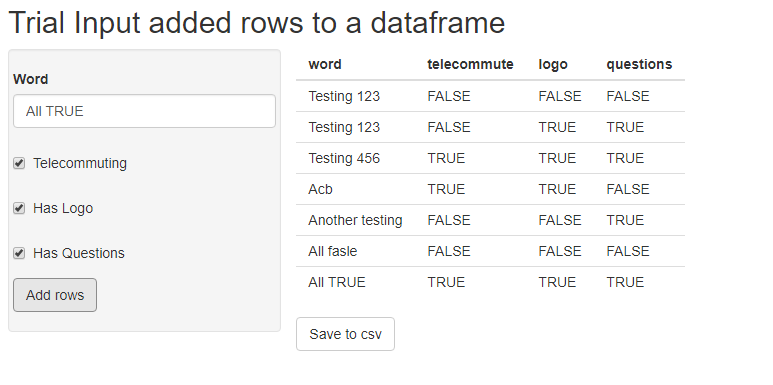
由于selectInput的性质,您所描述的是可行的,但也是相当复杂的。下面是一个我认为非常接近您所写内容的示例,该示例包括不同输入ui的各种用法、反应性值和闪亮中的事件处理。
library(shiny)
library(dplyr)

# ui part
ui <- fluidPage(

  # Application title
  titlePanel("Trial Input added rows to a dataframe"),

  # Sidebar with a slider input for number of bins
  sidebarLayout(
    sidebarPanel(
      fluidRow(
        # a text input for input random word
        textInput(inputId = "word",
                  label = 'Word', width = "300px")
      ),
      fluidRow(
        # a checkbox for Yes/No values - telecommute
        checkboxInput(inputId = "telecommute",
                      label = 'Telecommuting',
                      value = FALSE)
      ),
      fluidRow(
        # a checkbox for Yes/No values - logo
        checkboxInput(inputId = "logo",
                      label = 'Has Logo',
                      value = FALSE)
      ),
      fluidRow(
        # a checkbox for Yes/No values - questions
        checkboxInput(inputId = "questions",
                      label = 'Has Questions',
                      value = FALSE)
      ),
      fluidRow(
        # Action button that added rows to the reactive value df on click
        actionButton(inputId = "add_rows", label = "Add rows")
      )
    ),

    # Show a plot of the generated distribution
    mainPanel(
      fluidRow(
        #  data.frame output - will change follow each "add_rows" click
        tableOutput(outputId = "data_table")
      ),
      fluidRow(
        # Action button that save the current data to words.csv
        actionButton(inputId = "save_csv", label = "Save to csv")
      )
    )
  )
)

# server part
server <- function(input, output) {

  # reactive values that store df_temp for later processing & visualization
  values <- reactiveValues(
    df_temp =
      {
        # for the first time running if no words.csv available
        # an empty tibble is created.
        data <- tibble(word = character(0),
                       telecommute = logical(0),
                       logo = logical(0),
                       questions = logical(0))
        if (file.exists("./words.csv")) {
          # if words.csv exist load the data from csv file
          data <- read.csv("./words.csv", stringsAsFactors = FALSE)
        }
        data
      }
  )

  # server code handling logic added row to values$df_temp
  observeEvent(input$add_rows, {
    values$df_temp <- bind_rows(values$df_temp,
                                tibble(word = input$word,
                                       telecommute = input$telecommute,
                                       logo = input$logo,
                                       questions = input$questions))
  })

  # render the values$df_temp to a table output to UI
  output$data_table <- renderTable(values$df_temp)

  # server code handling logic to save values$df_temp when click "Save to csv"
  observeEvent(input$save_csv, {
    write.csv(values$df_temp, "./words.csv", row.names = FALSE)
  })
}

# Run the application
shinyApp(ui = ui, server = server)
页面原文内容由Stack Overflow提供。腾讯云小微IT领域专用引擎提供翻译支持
原文链接:
https://stackoverflow.com/questions/72862361
复制相关文章
相似问题
腾讯云开发者

Copyright © 2013 - 2026 Tencent Cloud. All Rights Reserved. 腾讯云 版权所有
深圳市腾讯计算机系统有限公司 ICP备案/许可证号:粤B2-20090059  粤公网安备44030502008569号
腾讯云计算(北京)有限责任公司 京ICP证150476号 | 京ICP备11018762号