
使用Find将数据拆分为多个2D数组
使用Find将数据拆分为多个2D数组
提问于 2022-07-04 17:14:22
我有一份报告要从另一份报告中的数据中更新。这两个报告都很大,超过50,000行。我将它们读入数组中,这样进程运行得更快。
我需要根据HR数组中的某些条件将Source数组拆分为单独的数组。当我试图为ID变量赋值时,我得到了一个对象所需的错误。
Option Explicit

Sub SearchArrays()

Dim wb As Workbook, wsSource As Worksheet, wsHR As Worksheet
Dim arrSource() As Variant, arrHR() As Variant, arrNotFound() As Variant, arrRemoved() As Variant, arrUpdated() As Variant
'Dim ID As String
Dim ID As Variant
Dim x As Long, y As Long, nCounter As Long, CounterN As Long, rCounter As Long, CounterR As Long, uCounter As Long, CounterU As Long

Set wb = ThisWorkbook
Set wsSource = wb.Worksheets("Source")
Set wsHR = wb.Worksheets("HR")

wsSource.Activate
arrSource = Range("A2", Range("A2").End(xlDown).End(xlToRight)) 'Read Source data into array
wsHR.Activate
arrHR = Range("A2", Range("A2").End(xlDown).End(xlToRight))     'Read HR data into array

'Use Find to find the values in source array in the hr array
For x = LBound(arrSource, 1) To UBound(arrSource, 1)
    For y = LBound(arrHR, 1) To UBound(arrHR, 1)
        'ID is in column 2 of Source data and column 3 of HR data
        Set ID = arrSource(x, 2).Find(what:=arrHR(y, 3).Value, LookIn:=xlValues, lookat:=xlWhole)
        If ID Is Nothing Then
            'Copy data to Not Found array
            nCounter = nCounter + 1
            ReDim Preserve arrNotFound(1 To 5, 1 To nCounter)   'Redimension the Not Found array with each instance
            For CounterN = 1 To 5    'The arrNotFound equals the current row
                arrNotFound(CounterN, nCounter) = arrSource(x, CounterN)
            Next CounterN
        ElseIf Not ID Is Nothing And ID.Offset(, 3).Value <> arrHR(y, 3).Offset(, 2) Then
            'Copy to removed array
            rCounter = rCounter + 1
            ReDim Preserve arrRemoved(1 To 5, 1 To rCounter)   'Redimension the Removed array with each instance
            For CounterR = 1 To 5    'The arrRemoved equals the current row
                arrRemoved(CounterR, rCounter) = arrSource(x, CounterR)
            Next CounterR
        ElseIf Not ID Is Nothing And ID.Offset(, 3).Value = arrHR(y, 3).Offset(, 2) Then
            'Copy to Updated array
            uCounter = uCounter + 1
            ReDim Preserve arrUpdated(1 To 5, 1 To uCounter)   'Redimension the Updated array with each instance
            For CounterU = 1 To 5    'The arrUpdated equals the current row
                arrUpdated(CounterU, uCounter) = arrSource(x, CounterU)
            Next CounterU
        End If
    Next y
Next x

'Write arrNotFound to a new worksheet
'Write arrRemoved to a new worksheet
'Write arrUpdated to a new worksheet

End Sub
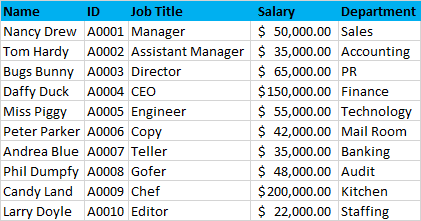
样本数据:
回答 1
Stack Overflow用户
发布于 2022-07-05 09:21:20
将数据拆分为数组
简单地说,是
它将查找数据写入字典,(lDict).
- It将源数据写入基于2D的数组,(
sData).
- It将源数据行(
srData)写入数组中的三个集合,(dcData).
- It将数据写入另一个数组(
dData)中最多三个基于2D的一维数组。这个锯齿数组包含“三个”所需的数组。
- 它将数据写入多达三个新工作表。
代码
Option Explicit

Sub SplitDataIntoArrays()

    ' Define constants.

    ' Lookup
    Const lName As String = "HR"
    Const lCol1 As Long = 3
    Const lCol2 As Long = 6
    ' Source
    Const sName As String = "Source"
    Const sCol1 As Long = 2
    Const sCol2 As Long = 5
    ' Destination
    Dim dNames() As Variant
    dNames = VBA.Array("Updated", "Removed", "Not Found")
    Const dfCellAddress As String = "A1"
    ' Reference the workbook ('wb').
    Dim wb As Workbook: Set wb = ThisWorkbook ' workbook containing this code

    ' Write the values from the lookup worksheet columns
    ' to two 2D one-based one-column arrays ('lData1', 'lData2').

    Dim lws As Worksheet: Set lws = wb.Worksheets(lName)
    Dim lrg As Range: Set lrg = lws.Range("A1").CurrentRegion
    Dim lrCount As Long: lrCount = lrg.Rows.Count

    If lrCount = 1 Then
        MsgBox "No data in the lookup worksheet.", vbCritical
        Exit Sub
    End If

    Dim lData1() As Variant: lData1 = lws.Columns(lCol1).Value
    Dim lData2() As Variant: lData2 = lws.Columns(lCol2).Value

    ' Write the unique values from the lookup arrays
    ' to the lookup dictionary ('lDict') whose keys will hold
    ' the value from the first array while its items will hold
    ' the corresponding values from the second array.

    Dim lDict As Object: Set lDict = CreateObject("Scripting.Dictionary")
    lDict.CompareMode = vbTextCompare

    Dim r As Long
    Dim lString As String

    For r = 2 To lrCount
        lString = CStr(lData1(r, 1))
        If Len(lString) > 0 Then ' exclude blanks
            If Not lDict.Exists(lString) Then
                lDict(lString) = CStr(lData2(r, 1))
            'Else ' already exists; there shouldn't be duplicates!
            End If
        End If
    Next r

    If lDict.Count = 0 Then
        MsgBox "No valid data in the lookup column range.", vbCritical
        Exit Sub
    End If

    ' Free memory since the lookup data is in the lookup dictionary.
    Erase lData1
    Erase lData2

    ' Write the data from the source worksheet
    ' to a 2D one-based array ('sData').

    Dim sws As Worksheet: Set sws = wb.Worksheets(sName)
    Dim srg As Range: Set srg = sws.Range("A1").CurrentRegion
    Dim srCount As Long: srCount = srg.Rows.Count

    If srCount = 1 Then
        MsgBox "No data in the source worksheet.", vbCritical
        Exit Sub
    End If

    Dim scCount As Long: scCount = srg.Columns.Count

    Dim sData() As Variant: sData = srg.Value

    ' Using the information in the lookup dictionary, write the values
    ' from the source array to the (jagged) destination collection array
    ' ('dcData') whose each element will hold a collection
    ' of the appropriate 1D source row arrays ('srData').

    Dim srData() As String: ReDim srData(1 To scCount)

    Dim dcData() As Variant: ReDim dcData(1 To 3)

    Dim dc As Long

    ' Add a new collection to each element of the destination collection array.
    For dc = 1 To 3
        Set dcData(dc) = New Collection
    Next dc

    Dim sString1 As String
    Dim sString2 As String
    Dim sCase As Long
    Dim sc As Long

    ' Add the row arrays to the collections.
    For r = 2 To srCount
        sString1 = CStr(sData(r, sCol1))
        If lDict.Exists(sString1) Then
            sString2 = CStr(sData(r, sCol2))
            If StrComp(sString2, lDict(sString1), vbTextCompare) = 0 Then
                sCase = 1 ' updated
            Else
                sCase = 2 ' removed
            End If
        Else
            sCase = 3 ' not found
        End If
        For sc = 1 To scCount
            srData(sc) = sData(r, sc)
        Next sc
        dcData(sCase).Add srData
    Next r

    ' Write the data from the destination collection array
    ' to the destination (jagged) array ('dData') which will hold up to three
    ' 2D one-based arrays (ready to be easily written to the worksheets).

    Dim dData() As Variant: ReDim dData(1 To 3)
    Dim cData() As Variant ' each 2D one-based array in the destination array

    Dim drCount As Long
    Dim dItem As Variant

    For dc = 1 To 3
        drCount = dcData(dc).Count ' number of source row ranges...
        ' ... or the number of current destination array data rows
        If drCount > 0 Then
            drCount = drCount + 1 ' include headers
            ReDim cData(1 To drCount, 1 To scCount)
            ' Write headers
            For sc = 1 To scCount
                cData(1, sc) = sData(1, sc)
            Next sc
            ' Write data.
            r = 1 ' headers are written
            For Each dItem In dcData(dc)
                r = r + 1
                For sc = 1 To scCount
                    cData(r, sc) = dItem(sc)
                Next sc
            Next dItem
            dData(dc) = cData ' assign current array to the destination array
        End If
    Next dc

    ' Free memory since the data is in the destination array.
    Set lDict = Nothing
    Erase sData
    Erase dcData
    Erase cData

    ' Write the data from the destination array to the destination worksheets.

    Application.ScreenUpdating = False

    Dim dws As Worksheet ' Current Destination Worksheet
    Dim drg As Range ' Current Destination Range

    For dc = 1 To 3
        ' Delete the worksheet if it exists.
        On Error Resume Next
            Set dws = wb.Worksheets(dNames(dc - 1))
        On Error GoTo 0
        If Not dws Is Nothing Then ' the worksheet exists; delete it
            Application.DisplayAlerts = False
            dws.Delete
            Application.DisplayAlerts = True
        'Else ' the worksheet doesn't exist; do nothing
        End If
        If Not IsEmpty(dData(dc)) Then ' appropriate array is not empty; write
            ' Add a new worksheet after all sheets.
            Set dws = wb.Worksheets.Add(After:=wb.Sheets(wb.Sheets.Count))
            ' Rename the newly added worksheet.
            dws.Name = dNames(dc - 1)
            ' Reference the destination range.
            Set drg = dws.Range(dfCellAddress) _
                .Resize(UBound(dData(dc), 1), scCount)
            ' Write the values from the destination array
            ' to the destination range.
            drg.Value = dData(dc)
            ' Apply some formatting.
            drg.Rows(1).Font.Bold = True
            drg.EntireColumn.AutoFit
            ' Reset the variable to be ready for the next check.
            Set dws = Nothing
        'Else ' appropriate array is empty; do nothing
        End If
    Next dc

    ' Save the workbook.
    'wb.Save

    Application.ScreenUpdating = True

    MsgBox "Data split.", vbInformation

End Sub页面原文内容由Stack Overflow提供。腾讯云小微IT领域专用引擎提供翻译支持
原文链接:
https://stackoverflow.com/questions/72860124
复制相关文章
相似问题
腾讯云开发者

Copyright © 2013 - 2026 Tencent Cloud. All Rights Reserved. 腾讯云 版权所有
深圳市腾讯计算机系统有限公司 ICP备案/许可证号:粤B2-20090059  粤公网安备44030502008569号
腾讯云计算(北京)有限责任公司 京ICP证150476号 | 京ICP备11018762号