
触摸的全球手势变得灰暗,并说“被侏儒使用”。
触摸的全球手势变得灰暗,并说“被侏儒使用”。
提问于 2022-07-03 11:24:06
我刚在笔记本上安装了Manjaro21.3.1( gnome 42),3和4个手指手势不起作用。
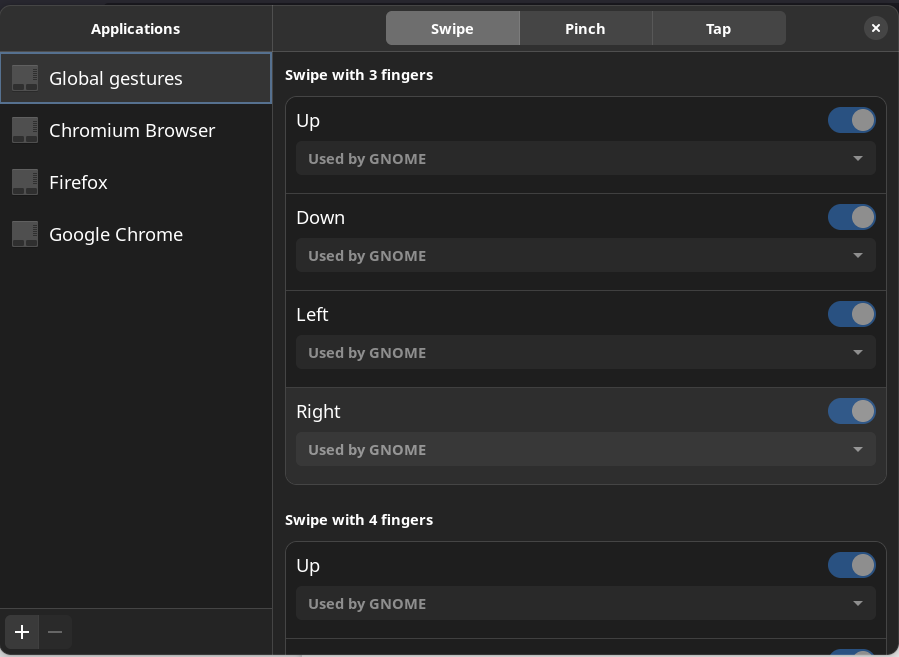
我试着从AUR和Touch( UI应用程序)重新安装Touchegg。
我还尝试了来自Touchegg 存储库的这些命令行:
$ sudo systemctl enable touchegg.service
$ sudo systemctl start touchegg
该服务处于活动状态,并且正在运行:
● touchegg.service - Touchégg Daemon
     Loaded: loaded (/usr/lib/systemd/system/touchegg.service; enabled; vendor preset: disabled)
     Active: active (running) since Sun 2022-07-03 12:42:52 CEST; 6min ago
       Docs: https://github.com/JoseExposito/touchegg/tree/master/installation#readme
   Main PID: 508 (touchegg)
      Tasks: 4 (limit: 9176)
     Memory: 13.8M
        CPU: 2.763s
     CGroup: /system.slice/touchegg.service
             └─508 /usr/bin/touchegg --daemon
我还验证了我的履带板是否能处理手势。
Device:           MSFT0001:02 06CB:7F8F Touchpad
Kernel:           /dev/input/event7
Group:            6
Seat:             seat0, default
Size:             102x67mm
Capabilities: pointer gesture最后,我试图从gnome扩展中安装x11手势,但仍然一无所获。
有没有办法解决这个问题?
(我不喜欢使用Wayland,因为它破坏了一些应用程序,比如团队。)
回答 1
Stack Overflow用户
回答已采纳
发布于 2022-07-04 09:34:31
我设法找到了一个“取消灰色”设置的解决方案。
我去了/home/.config/touchegg.conf并替换了所有的
<action type="GNOME_SHELL"></action>通过
<action type="SHOW_DESKTOP">
        <animate>true</animate>
</action>
然后我在TouchéGUI中手动更改了我想要的内容。
页面原文内容由Stack Overflow提供。腾讯云小微IT领域专用引擎提供翻译支持
原文链接:
https://stackoverflow.com/questions/72846063
复制相关文章
相似问题
腾讯云开发者

Copyright © 2013 - 2026 Tencent Cloud. All Rights Reserved. 腾讯云 版权所有
深圳市腾讯计算机系统有限公司 ICP备案/许可证号:粤B2-20090059  粤公网安备44030502008569号
腾讯云计算(北京)有限责任公司 京ICP证150476号 | 京ICP备11018762号