
为什么角色控制器中的移动功能没有移动我的玩家?
为什么角色控制器中的移动功能没有移动我的玩家?
提问于 2022-07-01 02:47:11
因此,我有一个带有角色控制器的播放器模型,为了管理玩家的移动,我有以下文件:
using UnityEngine;

public class CharacterMovementController : MonoBehaviour {
    Animator characterAnimator;
    CharacterController character;
    [SerializeField] Transform mainCamera;
    [SerializeField] float sprintBoost = 10f;
    [SerializeField] float currentSpeed = 20f;
    [SerializeField] float trueSpeed;
    // Start is called before the first frame update
    void Start() {
        characterAnimator = gameObject.GetComponent<Animator>();
        character = gameObject.GetComponent<CharacterController>();
    }

    void Update() {
        // There was a bunch of animation stuff that I figured wouldn't be important for
        // you to read

        Vector3 move = new Vector3(Input.GetAxis("Horizontal") * trueSpeed, 0, Input.GetAxis("Vertical") * trueSpeed);
        // Movement Logic
        character.Move(move * Time.deltaTime);
    }
}
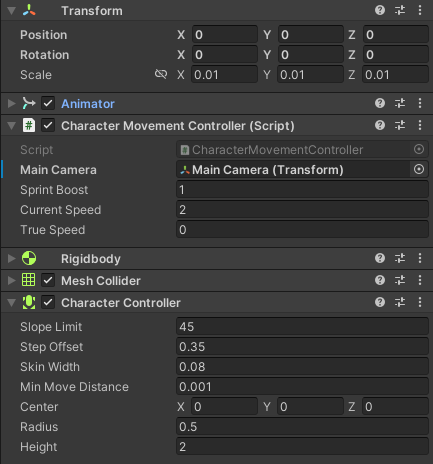
我已经试着把播放器的currentSpeed拖到疯狂的数字上,但仍然没有效果。我检查了字符控制器是否被正确引用,并且移动函数正在Vector3对象中传递。
回答 2
Stack Overflow用户
发布于 2022-07-01 03:33:17
不要将输入值(Input.GetAxis("Horizontal")或Input.GetAxis("Vertical"))与move字段中的速度相乘,而是将其与整个向量相乘:
Vector3 move = new Vector3(Input.GetAxis("Horizontal"), 0, Input.GetAxis("Vertical"));
// Movement Logic
character.Move(move * Time.deltaTime * trueSpeed);有关更多信息,请参阅CharacterController.Move文档
Stack Overflow用户
发布于 2022-07-01 19:51:44
所以很明显,这都是关于台阶偏移,我有一个大的模型,我不得不缩小很多,这意味着偏移量必须较低,最后我使它0.01。
页面原文内容由Stack Overflow提供。腾讯云小微IT领域专用引擎提供翻译支持
原文链接:
https://stackoverflow.com/questions/72823897
复制相关文章
相似问题
腾讯云开发者

Copyright © 2013 - 2026 Tencent Cloud. All Rights Reserved. 腾讯云 版权所有
深圳市腾讯计算机系统有限公司 ICP备案/许可证号:粤B2-20090059  粤公网安备44030502008569号
腾讯云计算(北京)有限责任公司 京ICP证150476号 | 京ICP备11018762号