
填充的颤振文本Widget比预期的要大
填充的颤振文本Widget比预期的要大
提问于 2022-06-30 06:55:48
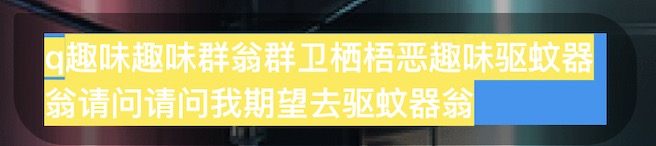
正如上面的图像所示,我在一个容器中创建了一个文本包装,其中填充的property.The文本Widget具有蓝色,并且实际文本大小小于文本Widget大小(由于行截断).Therefore,右填充大于左填充。
如何将准确的填充设置到文本Widget?
这是我的示例代码和示例图像。
但请注意,正确的页边距与您的屏幕大小有关,您可能需要调整字符才能看到问题。

import 'package:flutter/material.dart';

void main() {
  runApp(const MyApp());
}

class MyApp extends StatelessWidget {
  const MyApp({Key? key}) : super(key: key);

  @override
  Widget build(BuildContext context) {
    return MaterialApp(
      home: Scaffold(
        body: Container(
            margin: EdgeInsets.only(left: 8, top: 120, right: 10),
            decoration: BoxDecoration(
              color: Colors.black.withAlpha(100),
              borderRadius: BorderRadius.only(
                  topLeft: Radius.circular(2),
                  topRight: Radius.circular(20),
                  bottomLeft: Radius.circular(20),
                  bottomRight: Radius.circular(20)),
            ),
            // width: textSize.width,
            child: Padding(
              padding: EdgeInsets.symmetric(vertical: 8, horizontal: 12),
              child: DecoratedBox(
                decoration: const BoxDecoration(color: Colors.blue),
                child: Text(
                  'a very long qwqwjj爱思大数据那是阿萨德撒啊实打请问去凄凄切切实爱思打',
                  textWidthBasis: TextWidthBasis.longestLine,
                  style: TextStyle(
                    background: Paint()..color = Colors.yellow,
                  ),
                ),
              ),
            )),
      ),
    );
  }
}回答 5
Stack Overflow用户
发布于 2022-06-30 08:18:51
这可能对你有帮助:https://www.youtube.com/watch?v=oD5RtLhhubg&ab_channel=Flutter
此外,你也可以尝试包装在一个盒子或容器中,给出一定的尺寸(宽度,宽度)。
Stack Overflow用户
发布于 2022-06-30 09:04:24
也许是因为你的短信。您可以用center包装文本小部件,以便将其放置在中间。
Stack Overflow用户
发布于 2022-06-30 11:45:56
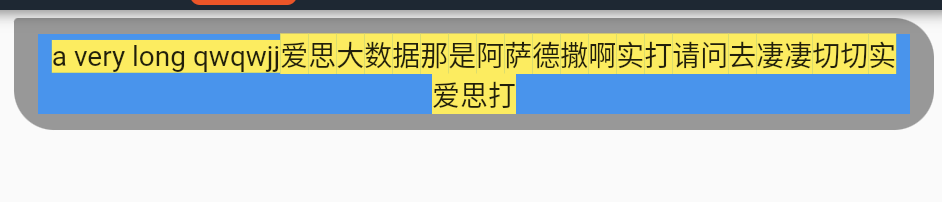
当结尾有可用的空间时,字符将尝试将自己放入其中,如果不合适,则转到下一行,空格将保持为空,以使文本两边的空间平分,添加textAlign属性并将其设置为TextAlign.center,
Text(
    'a very long qwqwjj爱思大数据那是阿萨德撒啊实打请问去凄凄切切实爱思打',
    style: TextStyle(
       background: Paint()..color = Colors.yellow,
    ),
    textAlign: TextAlign.center,
),
页面原文内容由Stack Overflow提供。腾讯云小微IT领域专用引擎提供翻译支持
原文链接:
https://stackoverflow.com/questions/72811454
复制相关文章
相似问题
腾讯云开发者

Copyright © 2013 - 2026 Tencent Cloud. All Rights Reserved. 腾讯云 版权所有
深圳市腾讯计算机系统有限公司 ICP备案/许可证号:粤B2-20090059  粤公网安备44030502008569号
腾讯云计算(北京)有限责任公司 京ICP证150476号 | 京ICP备11018762号