
当站点启用/localhost而不是覆盖默认/etc/nginx/nginx.conf时发生404错误
当站点启用/localhost而不是覆盖默认/etc/nginx/nginx.conf时发生404错误
提问于 2022-06-28 22:53:31
我有一个码头容器,它充当本地kubernetes服务的反向代理--我知道,我应该使用真正的入口控制器,但目前我正在与使用这种配置的其他人一起工作,并试图排除它。
当我没有启用/etc/nginx/site的文件和/etc/nginx/nginx.conf时,配置如下:
worker_processes 1;

events {
    worker_connections 1024;
}

http {
    sendfile on;
    tcp_nopush on;
    tcp_nodelay on;
    keepalive_timeout 10;
    types_hash_max_size 2048;

    add_header Referrer-Policy no-referrer-when-downgrade;
    add_header X-Content-Type-Options nosniff;
    add_header X-Download-Options noopen;
    add_header X-Permitted-Cross-Domain-Policies none;
    add_header X-XSS-Protection "1; mode=block";
    server_tokens off;
    server_names_hash_bucket_size 128;

    include /etc/nginx/mime.types;
    default_type application/octet-stream;

    log_format artformat '$remote_addr,$remote_user,$time_local,"$request",$status,$body_bytes_sent,"$http_referer","$http_user_agent",$request_time';

    access_log /var/log/nginx/access.log artformat;
    error_log /var/log/nginx/error.log debug;

    gzip on;
    gzip_disable "msie6";
    gzip_vary on;
    gzip_proxied any;
    gzip_comp_level 6;
    gzip_buffers 16 8k;
    gzip_http_version 1.1;
    gzip_types application/javascript text/plain text/css application/json application/x-javascript text/xml application/xml application/xml+rss text/javascript;
    include /etc/nginx/sites-enabled/*;


    server {
        listen 80 default_server;
        server_name localhost;

        root /usr/share/nginx/html;
        charset utf-8;
        index index.html;
        try_files $uri $uri/ =404;

        # Resolve app first.
        location /app/ {
            resolver 10.96.0.10 valid=30s;
            set $skill_matrix_app skill-matrix-app.default.svc.cluster.local;
            set $skill_matrix_app_port 8080;
            proxy_pass http://$skill_matrix_app:$skill_matrix_app_port;
            add_header Cache-Control "max-age=0 ,no-cache, no-store, must-revalidate";
        }
        # Resolve the angular static files second.
        location ~* /app/.*\.(js|css|gz|png|svg|jpg|gif|woff|woff2|ttf|otf|eot|json|map|txt)$ {
            resolver 10.96.0.10 valid=30s;
            set $skill_matrix_app skill-matrix-app.default.svc.cluster.local;
            set $skill_matrix_app_port 8080;
            proxy_pass http://$skill_matrix_app:$skill_matrix_app_port;
            add_header Cache-Control "max-age=0 ,no-cache, no-store, must-revalidate";
        }
        # API resolution after the app resolution
        location /api/ {
            resolver 10.96.0.10 valid=30s;
            set $skill_matrix_api skill-matrix-api.default.svc.cluster.local;
            set $skill_matrix_api_port 8000;
            proxy_pass http://$skill_matrix_api:$skill_matrix_api_port;
            add_header Cache-Control "max-age=0 ,no-cache, no-store, must-revalidate";
        }
        # Admin comes after the app and it's static files.
        location /admin/ {
            resolver 10.96.0.10 valid=30s;
            set $skill_matrix_api skill-matrix-api.default.svc.cluster.local;
            set $skill_matrix_api_port 8000;
            proxy_pass http://$skill_matrix_api:$skill_matrix_api_port;
            add_header Cache-Control "max-age=0 ,no-cache, no-store, must-revalidate";
        }
        # Add static resolution for django files
        location ~* /static/.*\.(js|css|gz|png|svg|jpg|gif|woff|woff2|ttf|otf|eot|json|map|txt)$ {
            resolver 10.96.0.10 valid=30s;
            set $skill_matrix_api skill-matrix-api.default.svc.cluster.local;
            set $skill_matrix_api_port 8000;
            proxy_pass http://$skill_matrix_api:$skill_matrix_api_port;
        }
    }
}
一切都很好--我可以得到这个应用程序:
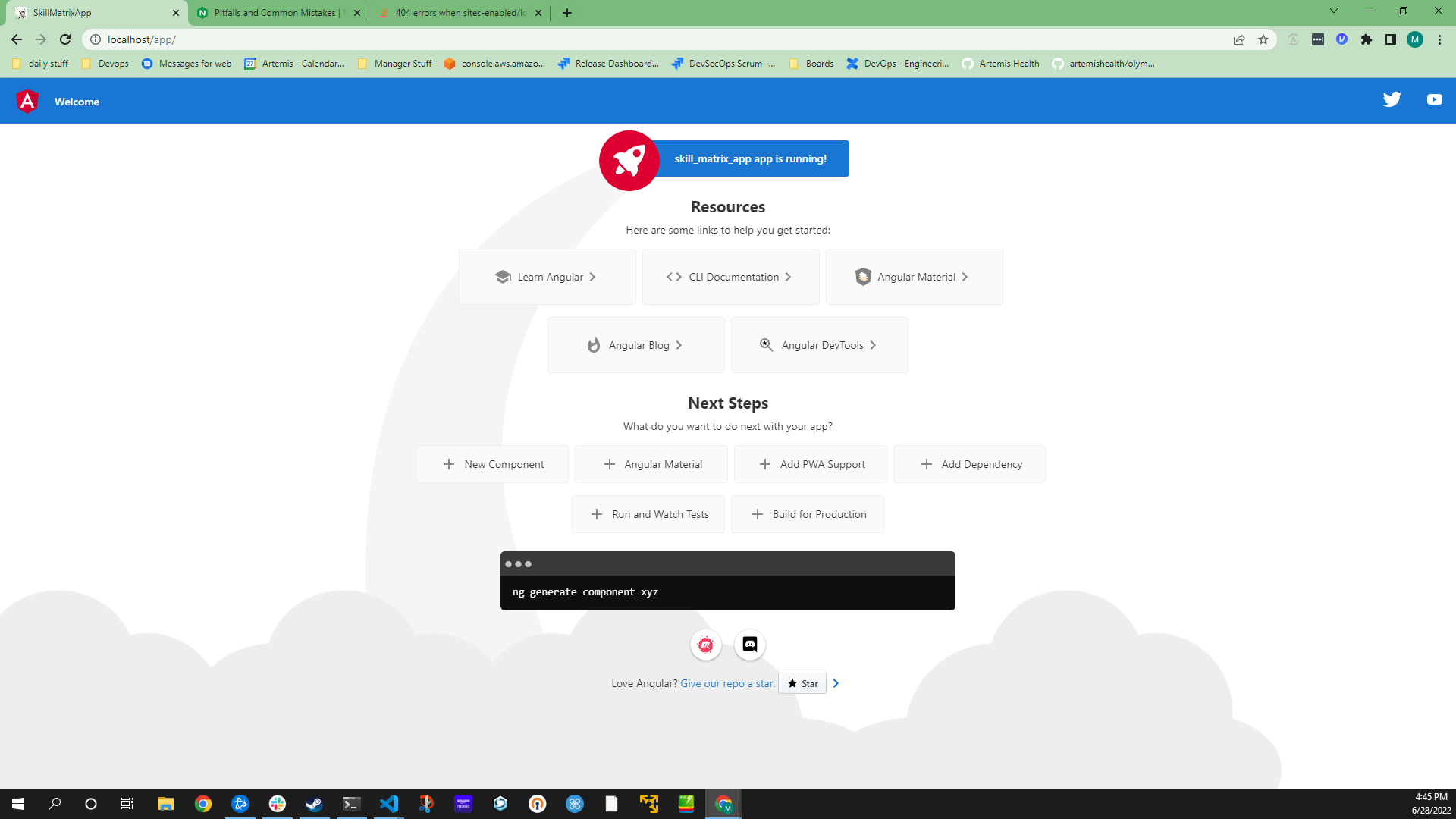
当我将服务器配置移动到/etc/nginx/sites启用/localhost时,如下所示:
server {
    listen 80 default_server;
    server_name localhost;

    root /usr/share/nginx/html;
    charset utf-8;
    index index.html;
    try_files $uri $uri/ =404;

    # Resolve app first.
    location /app/ {
        resolver 10.96.0.10 valid=30s;
        set $skill_matrix_app skill-matrix-app.default.svc.cluster.local;
        set $skill_matrix_app_port 8080;
        proxy_pass http://$skill_matrix_app:$skill_matrix_app_port;
        add_header Cache-Control "max-age=0 ,no-cache, no-store, must-revalidate";
    }
    # Resolve the angular static files second.
    location ~* /app/.*\.(js|css|gz|png|svg|jpg|gif|woff|woff2|ttf|otf|eot|json|map|txt)$ {
        resolver 10.96.0.10 valid=30s;
        set $skill_matrix_app skill-matrix-app.default.svc.cluster.local;
        set $skill_matrix_app_port 8080;
        proxy_pass http://$skill_matrix_app:$skill_matrix_app_port;
        add_header Cache-Control "max-age=0 ,no-cache, no-store, must-revalidate";
    }
    # API resolution after the app resolution
    location /api/ {
        resolver 10.96.0.10 valid=30s;
        set $skill_matrix_api skill-matrix-api.default.svc.cluster.local;
        set $skill_matrix_api_port 8000;
        proxy_pass http://$skill_matrix_api:$skill_matrix_api_port;
        add_header Cache-Control "max-age=0 ,no-cache, no-store, must-revalidate";
    }
    # Admin comes after the app and it's static files.
    location /admin/ {
        resolver 10.96.0.10 valid=30s;
        set $skill_matrix_api skill-matrix-api.default.svc.cluster.local;
        set $skill_matrix_api_port 8000;
        proxy_pass http://$skill_matrix_api:$skill_matrix_api_port;
        add_header Cache-Control "max-age=0 ,no-cache, no-store, must-revalidate";
    }
    # Add static resolution for django files
    location ~* /static/.*\.(js|css|gz|png|svg|jpg|gif|woff|woff2|ttf|otf|eot|json|map|txt)$ {
        resolver 10.96.0.10 valid=30s;
        set $skill_matrix_api skill-matrix-api.default.svc.cluster.local;
        set $skill_matrix_api_port 8000;
        proxy_pass http://$skill_matrix_api:$skill_matrix_api_port;
    }
}
并从/etc/nginx/nginx.conf文件中删除该服务器配置:
worker_processes 1;

events {
    worker_connections 1024;
}

http {
    sendfile on;
    tcp_nopush on;
    tcp_nodelay on;
    keepalive_timeout 10;
    types_hash_max_size 2048;

    add_header Referrer-Policy no-referrer-when-downgrade;
    add_header X-Content-Type-Options nosniff;
    add_header X-Download-Options noopen;
    add_header X-Permitted-Cross-Domain-Policies none;
    add_header X-XSS-Protection "1; mode=block";
    server_tokens off;
    server_names_hash_bucket_size 128;

    include /etc/nginx/mime.types;
    default_type application/octet-stream;

    log_format artformat '$remote_addr,$remote_user,$time_local,"$request",$status,$body_bytes_sent,"$http_referer","$http_user_agent",$request_time';

    access_log /var/log/nginx/access.log artformat;
    error_log /var/log/nginx/error.log debug;

    gzip on;
    gzip_disable "msie6";
    gzip_vary on;
    gzip_proxied any;
    gzip_comp_level 6;
    gzip_buffers 16 8k;
    gzip_http_version 1.1;
    gzip_types application/javascript text/plain text/css application/json application/x-javascript text/xml application/xml application/xml+rss text/javascript;
    include /etc/nginx/sites-enabled/*;

}
我开始得到404未找到,看起来它试图在html根目录中找到这些文件,而不是代理它们:
2022/06/28 22:47:46 [error] 32#32: *1 "/usr/share/nginx/html/app/index.html" is not found (2: No such file or directory), client: 127.0.0.1, server: localhost, request: "GET /app/ HTTP/1.1", host: "localhost"
127.0.0.1 - - [28/Jun/2022:22:47:46 +0000] "GET /app/ HTTP/1.1" 404 555 "-" "Mozilla/5.0 (Windows NT 10.0; Win64; x64) AppleWebKit/537.36 (KHTML, like Gecko) Chrome/103.0.0.0 Safari/537.36" "-"
为什么它试图查找app/index.html而不是代理到服务?
回答 1
Stack Overflow用户
发布于 2022-06-29 00:07:43
通过在dockerfile中添加一个删除行来删除基于default.conf的https://www.nginx.com/blog/deploying-nginx-nginx-plus-docker/来解决这个问题
FROM nginx:1.21

RUN rm /etc/nginx/nginx.conf /etc/nginx/conf.d/default.conf
RUN mkdir /etc/nginx/sites-enabled/
COPY error/ /var/www/html
COPY index.html /var/www/html
COPY favicon.ico /var/www/html
COPY localhost.crt /opt/nginx/ssl_keys/ssl.crt
COPY localhost.key /opt/nginx/ssl_keys/ssl.key
COPY sites-enabled/ /etc/nginx/sites-enabled/
COPY nginx.conf /etc/nginx
一旦我这样做了,default.conf就不再覆盖并试图让所有东西都能查看本地主机。
页面原文内容由Stack Overflow提供。腾讯云小微IT领域专用引擎提供翻译支持
原文链接:
https://stackoverflow.com/questions/72793995
复制相关文章
相似问题
腾讯云开发者

Copyright © 2013 - 2026 Tencent Cloud. All Rights Reserved. 腾讯云 版权所有
深圳市腾讯计算机系统有限公司 ICP备案/许可证号:粤B2-20090059  粤公网安备44030502008569号
腾讯云计算(北京)有限责任公司 京ICP证150476号 | 京ICP备11018762号