
无法获得mainBundle资源(返回null)
我试图访问一个我添加到应用程序中的资源文件,使用的是相对平移。我读到过我应该用这样的东西:
NSBundle *mainBundle = [NSBundle mainBundle];
NSString *filePath = [[mainBundle resourcePath] stringByAppendingPathComponent:@"myFile.txt"];
fh = [NSFileHandle fileHandleForReadingAtPath:resourcePath];但这不管用。使用NSLog,我可以确认mainBundle不是null,resourcePath返回如下内容:/Users/tom/Library/Developer/CoreSimulator/Devices/XXXXXXXX-XXXX-XXXX-XXXX-XXXXXXXXXXX/data/Containers/Bundle/Application/XXXXXXXX-XXXX-XXXX-XXXX-XXXXXXXXXXX/MyApp_Demo.app/myFile.txt
我尝试过许多事情,比如添加资源所在的目录的名称,即Ressources/myFile,但是没有产生任何结果。
我完全是一个目标C初学者,但我必须修补遗留代码,我必须处理这一点,所以任何帮助都是非常感谢的。
附带注意:这是Xcode中的项目结构:
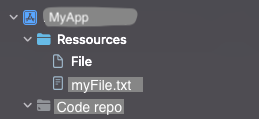
同时,在Finder中,Ressources目录不在MyApp目录中,而是在项目目录中的同一级别上。我想知道这是否可能是问题所在。
边注2:
NSString *filePath2 = [[NSBundle mainBundle] pathForResource:@"myFile" ofType:@"txt"];
在控制台登录后返回(null)。
回答 1
Stack Overflow用户
发布于 2022-06-30 15:08:13
最好在此调试过程中使用模拟器。
验证
您应该检查文件或Resources文件夹是否实际被复制到正确的位置。如果您添加了Resources文件夹,请使用下面的代码检查它
NSString *resourcesFolderPath = [[NSBundle mainBundle] pathForResource:@"Resources" ofType:nil];
NSString *fullFilePath = [NSString pathWithComponents:@[demoToursPath,"filename.txt"]];

NSFileManager *manager=[NSFileManager defaultManager];

NSLog(@"Filepath: %@", fullFilePath);
NSLog(@"File Exist: %@", [manager fileExistsAtPath:fullFilePath]);
一旦确认了这一点,您就可以更新代码以匹配访问文件所需的位置和路径。
附加调试
您还可以打印应用程序的Document Directory,打开查找器窗口并导航到那里,查看是否在正确的位置添加了Resources文件夹(如果添加了)。
NSString *documentDir = [NSSearchPathForDirectoriesInDomains(NSDocumentDirectory, NSUserDomainMask, YES)objectAtIndex:0]

NSLog(@"Document Directory: %@", documentDir);
如果你用更多的信息更新这个问题,我就能帮你更好。
https://stackoverflow.com/questions/72784544
复制相似问题
腾讯云开发者

Copyright © 2013 - 2026 Tencent Cloud. All Rights Reserved. 腾讯云 版权所有
深圳市腾讯计算机系统有限公司 ICP备案/许可证号:粤B2-20090059  粤公网安备44030502008569号
腾讯云计算(北京)有限责任公司 京ICP证150476号 | 京ICP备11018762号