
如何匹配谷歌驱动器和谷歌表格中的字母数字顺序?
如何匹配谷歌驱动器和谷歌表格中的字母数字顺序?
提问于 2022-06-28 09:26:31
在我的谷歌驱动器上,我有一个包含2006年文件的文件夹。这些文件按名称排序。(来自A -> Z)下面是我文件夹中文件的确切顺序:https://gist.github.com/cuzureau/a36deb8e02ab0f2e0523cd58f2cf0950
现在,我还有一个Google表,它的文件名与列中的文件名相同。每个单元格只有一个文件名。它们是字母顺序(来自A -> Z),这是列内文件的确切顺序:https://gist.github.com/cuzureau/6fe722b821ce3aa60b697819b64d6b05
文件名没有按相同的顺序排序。我怎么能这么做?
也许我应该使用Google中的一个公式来重新排序列中的文件名?
回答 1
Stack Overflow用户
发布于 2022-06-29 09:50:21
以下是使用Google脚本的两种可能的解决方案(这两种解决方案都经过了前100个文件的测试):
直接使用DriveApp获取名称
- 输入您的工作表并单击
Extensions > Apps Script
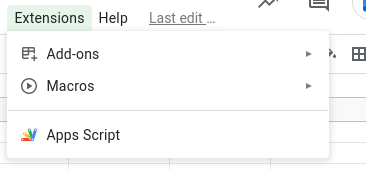
- 复制文件所在的文件夹id
- 抄袭这个剧本。
const sheet = SpreadsheetApp.getActiveSheet()
function myFunction() {
  const folderId = "<FOLDER_ID>"
  // Get all files in the folder
  const files = DriveApp.getFolderById(folderId).getFiles()
  const toShortFiles = []
  while (files.hasNext()) {
    // save all the names
    const file = files.next()
    toShortFiles.push(file.getName())
  }
  // short A-Z
  const shorted = toShortFiles.sort((a, b) => a.localeCompare(b)).map(n => [n])
  sheet.getRange(1, 1, shorted.length, 1).setValues(shorted)
}
直接创建新工作表
如果在同一行中有更多的数据,这是另一种选择。
function shortRows() {
  /* Create a new sheet */
  const shortedSheet = SpreadsheetApp.getActiveSpreadsheet().insertSheet('shortedSheet')
  const range = sheet.getRange(1, 1, sheet.getLastRow(), sheet.getLastColumn())
  const values = range.getValues()
  /* Short by name */
  const result = values.sort((a, b) => {
    return a[0].toString().localeCompare(b[0].toString())
  })
  /* Paste the data in the new sheet */
  shortedSheet.getRange(1, 1, result.length, result[0].length).setValues(result)
}如果您不想创建一个新的工作表,您可以使用我邀请您测试的方法moveTo和moveRows。
文档:
页面原文内容由Stack Overflow提供。腾讯云小微IT领域专用引擎提供翻译支持
原文链接:
https://stackoverflow.com/questions/72783919
复制相关文章
相似问题
腾讯云开发者

Copyright © 2013 - 2026 Tencent Cloud. All Rights Reserved. 腾讯云 版权所有
深圳市腾讯计算机系统有限公司 ICP备案/许可证号:粤B2-20090059  粤公网安备44030502008569号
腾讯云计算(北京)有限责任公司 京ICP证150476号 | 京ICP备11018762号