
生成一个链接,从python中的minio下载文件。
生成一个链接,从python中的minio下载文件。
提问于 2022-06-27 14:44:27
我想使用python在minio中存储和下载文件。
下面是代码
from minio import Minio
import os

def getMinioClient(access, secret):

  return Minio(
      endpoint="localhost:9000",
      access_key=access,
      secret_key=secret,
      secure=False,
    )

if __name__ == "__main__":
  client = getMinioClient("admin", "Secret_key123")

  try:

    file_name = "myfile.csv"
    bucket = "file_bucket"

    with open(file_name, "rb") as f:
      stat_data = os.stat(file_name)

      # fput_object to upload file
      a = client.fput_object(
            bucket,
            file_name,
            f,
            stat_data.st_size
          )
    print("uploaded")

    # using fget_object to download file
    client.fget_object(bucket, file_name, f"{file_name}_downloaded")

  except Exception as e:
print(e)只有我知道的下载文件的选项是使用fget_object
如何获得链接,然后粘贴在url栏中即可下载所需的文件。
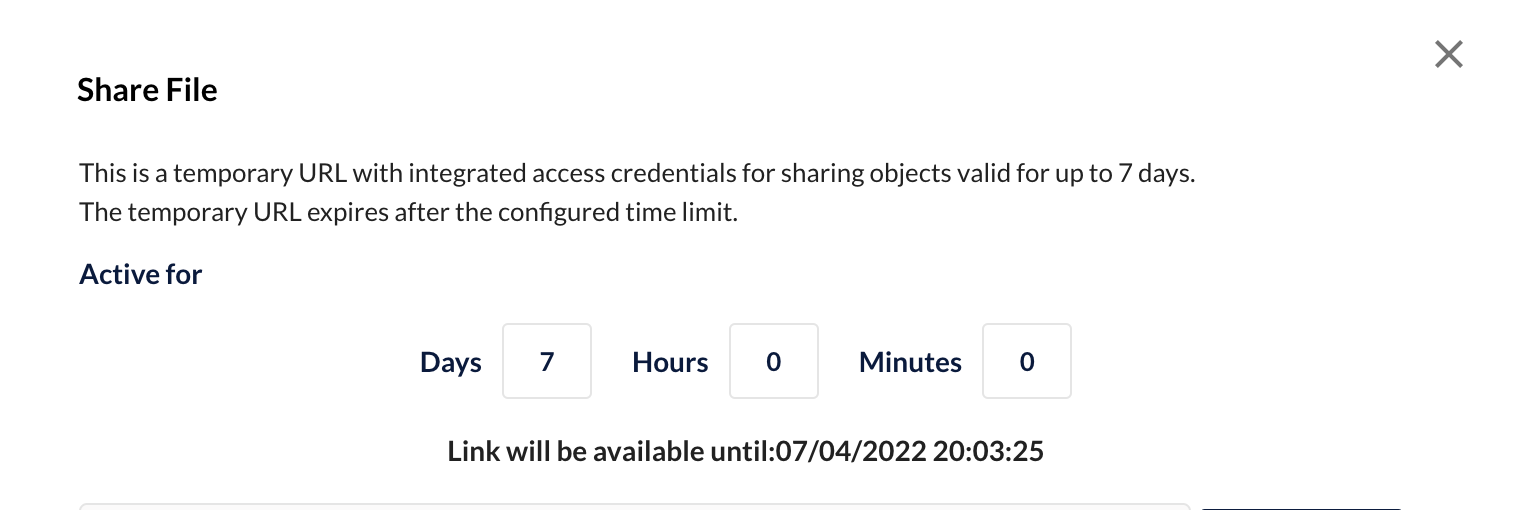
就像我们从minio UI中获得的链接一样,当我们单击特定文件的共享时,如下所示

单击共享链接后,生成一个链接,该链接可用于下载该文件,甚至无需登录。
如何通过连接到minio从python代码中生成下载链接。
提前感谢!
回答 1
Stack Overflow用户
发布于 2022-08-28 20:27:07
首先,必须将公共策略设置为桶,可以使用以下示例
policy = {
                "Version": "2012-10-17",
                "Statement": [
                    {
                        "Effect": "Allow",
                        "Principal": {"AWS": "*"},
                        "Action": [
                            "s3:GetBucketLocation",
                            "s3:ListBucket",
                            "s3:ListBucketMultipartUploads",
                        ],
                        "Resource": f"arn:aws:s3:::{self.bucket_name}",
                    },
                    {
                        "Effect": "Allow",
                        "Principal": {"AWS": "*"},
                        "Action": [
                            "s3:GetObject",
                            "s3:PutObject",
                            "s3:DeleteObject",
                            "s3:ListMultipartUploadParts",
                            "s3:AbortMultipartUpload",
                        ],
                        "Resource": f"arn:aws:s3:::{self.bucket_name}/*",
                    },
                ],
            }
            client.set_bucket_policy(self.bucket_name, json.dumps(policy))
然后,您可以使用from桶名和文件名来生成文件路径。
client.fput_object(
            bucket_name,
            file_name,
            file.fileno(),
            content_type=file.content_type,
        )

return f"{self.endpoint}/{bucket_name}/{file_name}"页面原文内容由Stack Overflow提供。腾讯云小微IT领域专用引擎提供翻译支持
原文链接:
https://stackoverflow.com/questions/72774015
复制相关文章
相似问题
腾讯云开发者

Copyright © 2013 - 2026 Tencent Cloud. All Rights Reserved. 腾讯云 版权所有
深圳市腾讯计算机系统有限公司 ICP备案/许可证号:粤B2-20090059  粤公网安备44030502008569号
腾讯云计算(北京)有限责任公司 京ICP证150476号 | 京ICP备11018762号