
为什么控制台日志中没有文件内容而请求对象中没有文件内容?
为什么控制台日志中没有文件内容而请求对象中没有文件内容?
提问于 2022-06-25 19:16:24
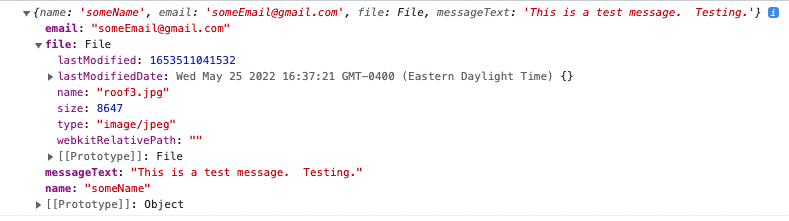
我不明白为什么文件内容在console.log(data);中成功显示,但是当我dd($file);时,它是一个空数组([])。
我尝试过将$request->file('file');转换为$request->get('file');,但结果是相同的(这是许多不同尝试中的一个)。
我真的试过在阳光下做任何事情来纠正这一点,但都没有用。我如何制作它,以便$file能够在console.log(data)中显示我在$file中看到的内容
注意: name、email和messageText在请求对象中显示得很好,但由于某种原因,file没有遵守。我并不是为了减少查看代码的数量而为这些代码添加了JSX。
控制器代码:
$name                        = $request->get('name');
$email                       = $request->get('email');
$file                        = $request->file('file');
$messageText                 = $request->get('messageText');

dd($request->all()); // name, email and messageText show up fine.
dd($file); // returns [] even though console.log() shows its populated
前端代码:
const [fileName, setFileName]                                                 = useState("");
const [fileChosen, setFileChosen]                                             = useState(false);
const [fileContent, setFileContent]                                           = useState(null);

// Create a reference to the hidden file input element
const hiddenFileInput = React.useRef(null);

const handleClick = () => {
    // Programmatically click the hidden file input element
    // when the Button component is clicked
    hiddenFileInput.current.click();
};

// Call a function (passed as a prop from the parent component to handle the user-selected file
const handleChange = (event) => {
    setFileChosen(true);
    setFileContent(event.target.files[0]);
    setFileName(event.target.files[0].name);
};

const handleSubmit = (e) => {
    e.preventDefault();

    let data = {
        'name' : name,
        'email' : email,
        'file'  : fileContent,
        'messageText' : messageText
    };

    console.log(data);

    const headers = {
        "Accept": 'application/json'
    };

    axios.post('http://127.0.0.1:8000/api/support', data, {headers})
        .then(resp => {
            console.log(resp);
        }).catch(error => {
        let errorMessage = error.response.data.message;
        let errorStatus  = error.response.status;

        setErrorMessage(errorMessage);
        setErrorStatus(errorStatus);
    });
};

return(
<form onSubmit={handleSubmit} method="POST" encType="multipart/form-data/">
  <div className="contact-form-group">
    <label htmlFor="file"/>
    <input type="file" id="file" name="file" hidden onChange={handleChange} ref={hiddenFileInput}/>
    <button type="button" id="custom-button" onClick={handleClick}>Choose File</button>
    <span id="custom-text">{!fileChosen ? "No file chosen, yet" : fileName}</span>
  </div>
 </form>
);console.log(data)输出:
回答 1
Stack Overflow用户
发布于 2022-06-25 19:57:03
请检查一下,标签有错字吗?
enctype="multipart/form-data/" => enctype="multipart/form-data"希望你能帮上忙!
页面原文内容由Stack Overflow提供。腾讯云小微IT领域专用引擎提供翻译支持
原文链接:
https://stackoverflow.com/questions/72756716
复制相关文章
相似问题
腾讯云开发者

Copyright © 2013 - 2026 Tencent Cloud. All Rights Reserved. 腾讯云 版权所有
深圳市腾讯计算机系统有限公司 ICP备案/许可证号:粤B2-20090059  粤公网安备44030502008569号
腾讯云计算(北京)有限责任公司 京ICP证150476号 | 京ICP备11018762号