
如何在表rows+顺风之间增加空间?
如何在表rows+顺风之间增加空间?
提问于 2022-06-25 16:39:36
伙计们,我对顺风很陌生,我试着在表行之间增加空间。
      <table className="table-auto w-full shadow-md mt-5 rounded">
        <thead className="bg-base-200 text-left text-gray-700  tracking-wider">
          <tr>
            <th className="p-4 ">Chapter Number</th>
            <th className="p-4 ">Chapter Name</th>
            <th className="p-4 ">Added at</th>
            <th className="p-4 ">Status</th>
          </tr>
        </thead>
        <tbody>
          {chapters.map((chapter) => (
              <tr className="bg-card mt-6 rounded" key={chapter.chapterNumber}>
                <td className="p-4">{chapter.chapterNumber}</td>
                <td className="p-4">{chapter.chapterName}</td>
                <td className="p-4">{chapter.addedAt}</td>
                <td className="p-4">{!chapter.published && 'Not published'}</td>
              </tr>
          ))}
        </tbody>
</table>这不会在表行之间添加空间。因此,我尝试过在每一行上使用mt-6。它没有效果。
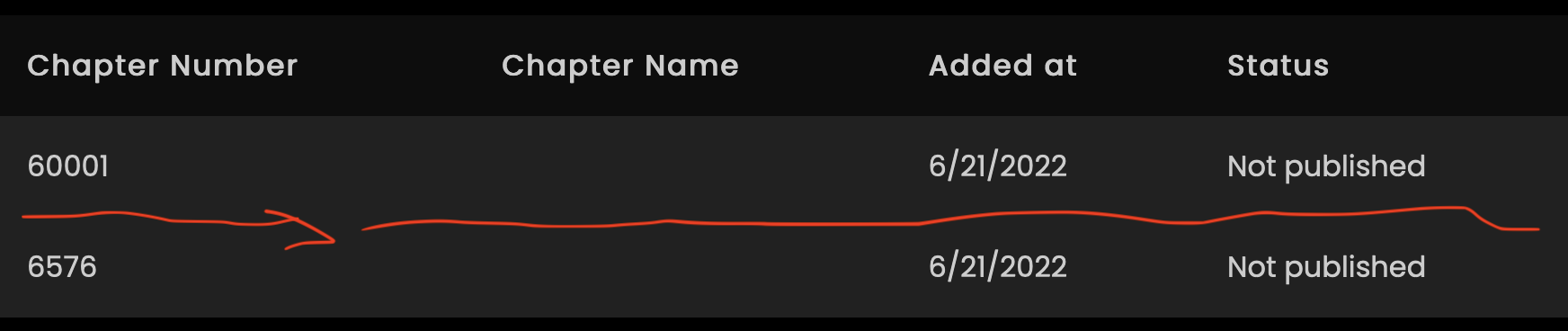
我看到了一个类似的问题,在这里使用了回答,并添加了边框间距和分界。
所以,现在我的表行有了这些类。
<table className="table-auto w-full shadow-md mt-5 border-spacing-2 border-separate rounded">但这会导致在所有元素周围增加空间。
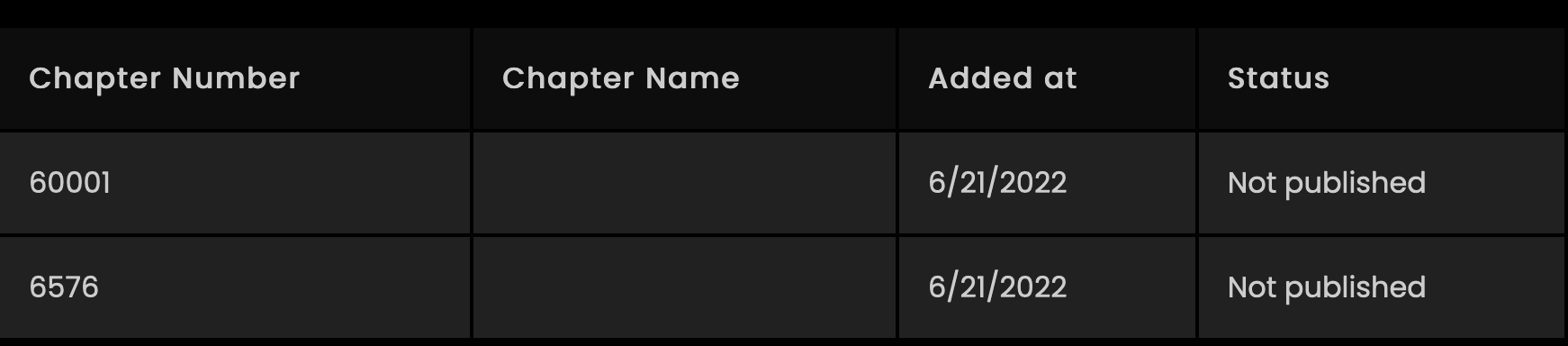
我不明白为什么表行的行为是这样的,也不使用margin和mt-6。
但是,如果我用div替换行,它将应用边距顶部。例:
      <div className="">
        <th className="p-4 ">Chapter Number</th>
        <th className="p-4 ">Chapter Name</th>
        <th className="p-4 ">Added at</th>
        <th className="p-4 ">Status</th>
      </div>
      <div className="mt-6 bg-card">
        <th className="p-4 ">1</th>
        <th className="p-4 ">Chapter Name</th>
        <th className="p-4 ">04/2/2022</th>
        <th className="p-4 ">Not published</th>
      </div>
      <div className="mt-6 bg-card">
        <th className="p-4 ">1</th>
        <th className="p-4 ">Chapter Name</th>
        <th className="p-4 ">04/2/2022</th>
        <th className="p-4 ">Not published</th>
      </div>
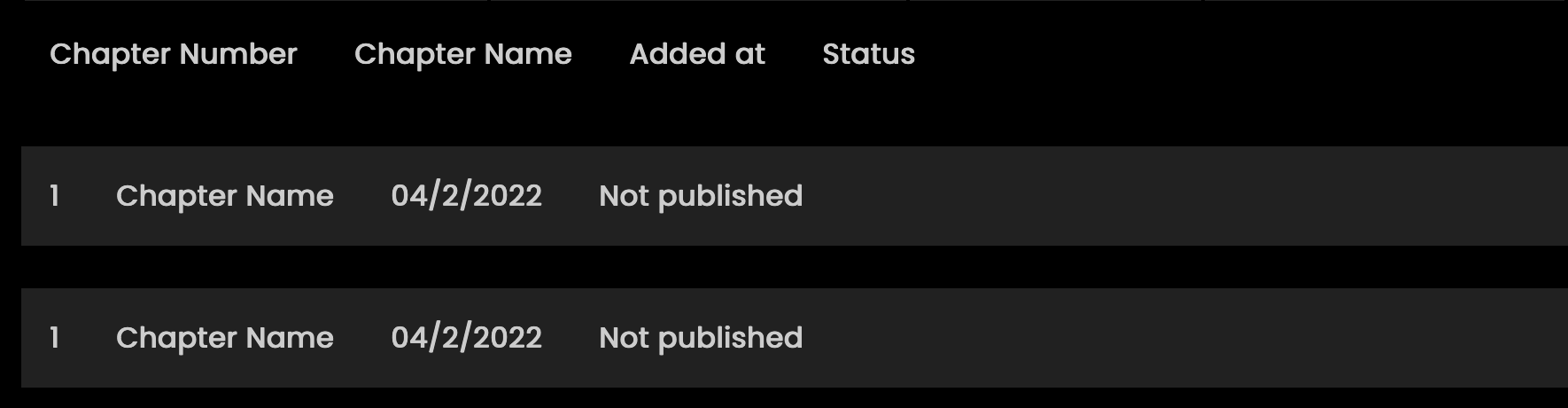
回答 2
Stack Overflow用户
回答已采纳
发布于 2022-06-25 19:29:19
首先,您需要在表标记上使用Tailwind border-separate属性拆分边框,然后添加border-spacing-y-3,其中:y是轴,数字是行之间的高度。
用于控制表边框间距的实用程序。顺风文献
<script src="https://cdn.tailwindcss.com"></script>
<table class="table-auto w-full shadow-md mt-5 rounded bg-black border-separate border-spacing-y-3">
  <thead class="text-left text-gray-500 tracking-wider">
    <tr>
      <th class="p-4">Chapter Number</th>
      <th class="p-4">Chapter Name</th>
      <th class="p-4">Added at</th>
      <th class="p-4">Status</th>
    </tr>
  </thead>
  <tbody class="">
    <tr class="bg-card rounded text-gray-200 bg-neutral-900">
      <td class="p-4">60001</td>
      <td class="p-4"></td>
      <td class="p-4">6/21/2022</td>
      <td class="p-4">Not published</td>
    </tr>
    <tr class="bg-card rounded text-gray-200 bg-neutral-900">
      <td class="p-4">60001</td>
      <td class="p-4"></td>
      <td class="p-4">6/21/2022</td>
      <td class="p-4">Not published</td>
    </tr>
  </tbody>
</table>
Stack Overflow用户
发布于 2022-06-26 05:52:21
使用border-seperate和border-spacing-y-4只添加垂直magin。
<script src="https://cdn.tailwindcss.com"></script>
<div class="bg-black">
<table class="table-auto w-full shadow-md   rounded border-separate border-spacing-y-4">
        <thead class="text-white text-left bg-gray-900  tracking-wider">
          <tr>
            <th class="p-4 ">Chapter Number</th>
            <th class="p-4 ">Chapter Name</th>
            <th class="p-4 ">Added at</th>
            <th class="p-4 ">Status</th>
          </tr>
        </thead>
        <tbody class="">

              <tr class="bg-stone-800 mt-6 text-white rounded" key={chapter.chapterNumber}>
                <td class="p-4">{chapter.chapterNumber}</td>
                <td class="p-4">{chapter.chapterName}</td>
                <td class="p-4">{chapter.addedAt}</td>
                <td class="p-4">{!chapter.published && 'Not published'}</td>
              </tr>

              <tr class="bg-stone-800 mt-6 text-white rounded" key={chapter.chapterNumber}>
                <td class="p-4">{chapter.chapterNumber}</td>
                <td class="p-4">{chapter.chapterName}</td>
                <td class="p-4">{chapter.addedAt}</td>
                <td class="p-4">{!chapter.published && 'Not published'}</td>
              </tr>

              <tr class="bg-stone-800 mt-6 text-white rounded" key={chapter.chapterNumber}>
                <td class="p-4">{chapter.chapterNumber}</td>
                <td class="p-4">{chapter.chapterName}</td>
                <td class="p-4">{chapter.addedAt}</td>
                <td class="p-4">{!chapter.published && 'Not published'}</td>
              </tr>
              <tr class="bg-stone-800 mt-6 text-white rounded" key={chapter.chapterNumber}>
                <td class="p-4">{chapter.chapterNumber}</td>
                <td class="p-4">{chapter.chapterName}</td>
                <td class="p-4">{chapter.addedAt}</td>
                <td class="p-4">{!chapter.published && 'Not published'}</td>
              </tr>


        </tbody>
      </table>
</div>
页面原文内容由Stack Overflow提供。腾讯云小微IT领域专用引擎提供翻译支持
原文链接:
https://stackoverflow.com/questions/72755613
复制相关文章
相似问题
腾讯云开发者

Copyright © 2013 - 2026 Tencent Cloud. All Rights Reserved. 腾讯云 版权所有
深圳市腾讯计算机系统有限公司 ICP备案/许可证号:粤B2-20090059  粤公网安备44030502008569号
腾讯云计算(北京)有限责任公司 京ICP证150476号 | 京ICP备11018762号