
在Kubernetes中使用Yaml创建Gcp服务协议的秘密
在Kubernetes中使用Yaml创建Gcp服务协议的秘密
提问于 2022-06-25 03:10:54
我正试图从下载文件中为GCP的IAM服务帐户创建一个Kubernetes秘密,该文件具有以下结构
secret.yaml
apiVersion: v1
kind: Secret
metadata:
  name: gcp-secret
  namespace: tekton-pipelines
type: kubernetes.io/opaque
stringData:
  gcs-config: |
     {
      "type": "service_account",
      "project_id": "fetebird-350310",
      "private_key_id": "5566b5e81ce3cb9530659be6c70e07a36dcbd581",
      "private_key": "-----BEGIN PRIVATE KEY-----\nMIIEvww2VjXHj9/7gQ8ZWs/OaQKBgQDDHqb2rG4b5wGMDeeW\nuNTofm7xfC9yAHBm4Rug6hXpYSy36LUrpe0agZqzcLpH2G4xTarQyx76sPXVCpGc\nyFAQ6Jvj1kqM2pHJlGg+L1kX1mZ96jOyyZ2mxPV3r837q90w4CqT2rLKTF9VgWre\nSD6P7h2JbJ46Xzu4Mp72wSxSCg==\n-----END PRIVATE KEY-----\n",
      "client_email": "ssss@ssss-350310.iam.gserviceaccount.com",
      "client_id": "sssssssss",
      "auth_uri": "https://accounts.google.com/o/oauth2/auth",
      "token_uri": "https://oauth2.googleapis.com/token",
      "auth_provider_x509_cert_url": "https://www.googleapis.com/oauth2/v1/certs",
      "client_x509_cert_url": "https://www.googleapis.com/robot/v1/metadata/x509/fetebird%40fetebird-350310.iam.gserviceaccount.com"
    }
运行下面的命令,它确实会创建一个秘密,但是身份验证无法通过服务帐户工作
kubectl apply --filename secret.yamlservice-account.yaml
apiVersion: v1
kind: ServiceAccount
metadata:
  name: git-service-account
secrets:
  - name: git-ssh-auth
  - name: gcp-secret
管道运行的
apiVersion: tekton.dev/v1beta1
kind: PipelineRun
metadata:
  name: run-pipeline
  namespace: tekton-pipelines
spec:
  serviceAccountNames:
    - taskName: clone-repository
      serviceAccountName: git-service-account
    - taskName: build
      serviceAccountName: gcp-service-account
  pipelineRef:
    name: fetebird-discount
  workspaces:
    - name: shared-workspace
      persistentVolumeClaim:
        claimName: fetebird-discount-pvc
  params:
    - name: repo-url
      value: git@bitbucket.org:anandjaisy/discount.git
我从secret.yaml创建秘密的方式是正确的吗?
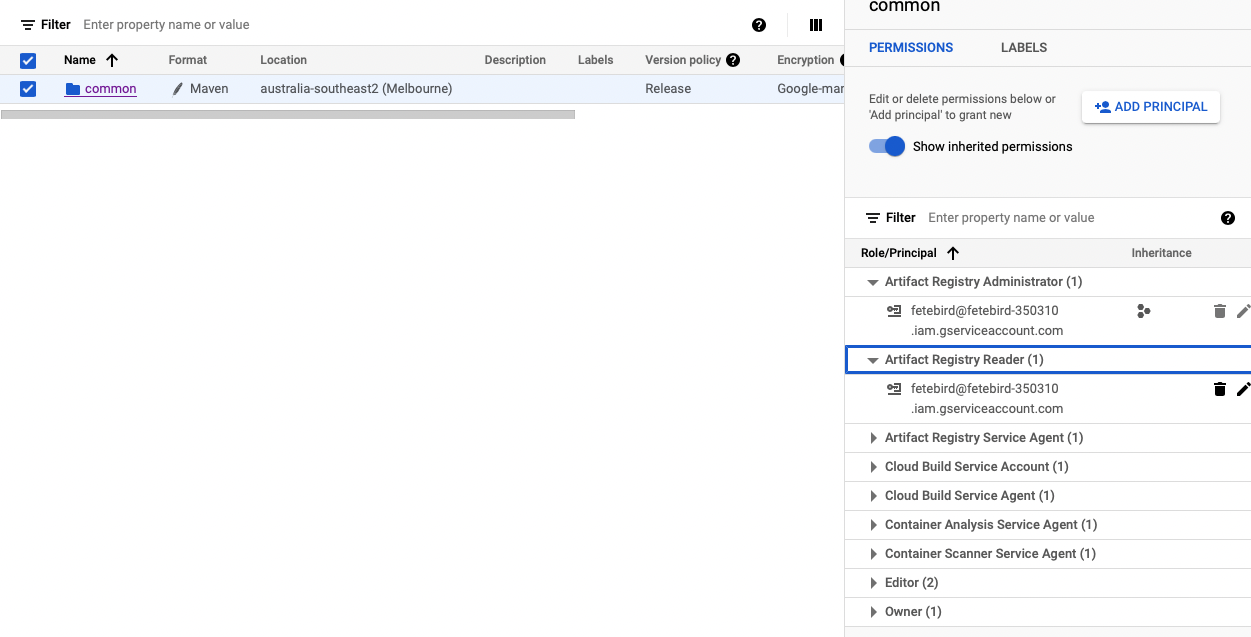
该服务帐户具有以下权限
在tekton管道上获取错误
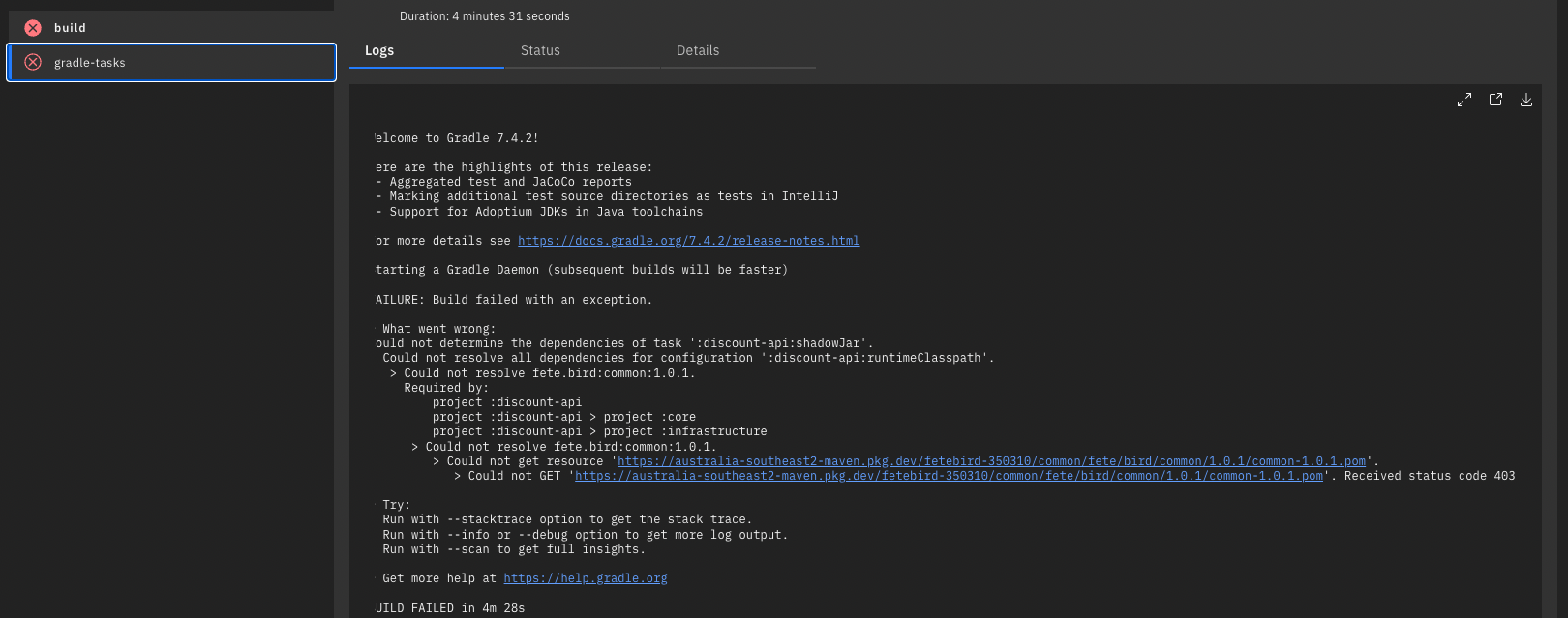
如果我提供对工件注册表的公共访问,它就能工作。不知怎么的,这个许可对我不起作用,不知道如何解决这个问题。
回答 2
Stack Overflow用户
发布于 2022-06-27 12:03:12
你可以试试这个:
apiVersion: v1
kind: ServiceAccount
metadata:
  name: git-service-account
secrets:
  - name: git-ssh-auth
  - name: pubsub-key
  - name: gcp-secret
您没有将秘密添加到服务帐户中的机密列表中。
Stack Overflow用户
发布于 2022-06-28 07:40:19
你能试试以下几种吗?并请尝试合并所有的秘密在单一服务帐户。
apiVersion: tekton.dev/v1beta1
kind: PipelineRun
metadata:
  name: run-pipeline
  namespace: tekton-pipelines
spec:
  serviceAccountName: git-service-account
  pipelineRef:
    name: fetebird-discount
  workspaces:
    - name: shared-workspace
      persistentVolumeClaim:
        claimName: fetebird-discount-pvc
  params:
    - name: repo-url
      value: git@bitbucket.org:anandjaisy/discount.git
我可以在这里尝试另一个建议。你有没有像这里建议的那样包括注释?
https://tekton.dev/docs/pipelines/auth/#configuring-ssh-auth-authentication-for-git
apiVersion: v1
kind: Secret
metadata:
  name: ssh-key
  annotations:
    tekton.dev/git-0: github.com # Described below
type: kubernetes.io/ssh-auth
stringData:
  ssh-privatekey: <private-key>
  # This is non-standard, but its use is encouraged to make this more secure.
  # If it is not provided then the git server's public key will be requested
  # when the repo is first fetched.
known_hosts: <known-hosts>页面原文内容由Stack Overflow提供。腾讯云小微IT领域专用引擎提供翻译支持
原文链接:
https://stackoverflow.com/questions/72751000
复制相关文章
相似问题
腾讯云开发者

Copyright © 2013 - 2026 Tencent Cloud. All Rights Reserved. 腾讯云 版权所有
深圳市腾讯计算机系统有限公司 ICP备案/许可证号:粤B2-20090059  粤公网安备44030502008569号
腾讯云计算(北京)有限责任公司 京ICP证150476号 | 京ICP备11018762号