
芯片过滤数据
芯片过滤数据
提问于 2022-06-24 20:27:42
我想根据在芯片中选择的工作来过滤人的数据,假设选择了Maid芯片,我应该显示大约5-6个女佣和一个“全看”按钮,同样,如果选择了工程师芯片,那么应该只显示5-6个工程师。
这些过滤过的数据也应该是水平滚动的。
我正在学习颤振,所以我们可以使用任何虚拟数据来实现这一点,我也希望它像一张卡片,以便我可以显示人的图片,一些相关的信息和他们的评级。
而且我想让所有的人都保持芯片大小不变,基本上,如果可能的话,应该取最长字的芯片大小。
我的代码直到现在
import 'package:flutter/material.dart';
import 'package:mad_ezee_app/constants.dart';
import 'package:flutter/src/rendering/box.dart';

class HomeScreen extends StatefulWidget {
  const HomeScreen({Key? key}) : super(key: key);

  @override
  State<HomeScreen> createState() => _HomeScreenState();
}

class _HomeScreenState extends State<HomeScreen> {
  int _selectedIndex = 0;
  PageController pageController = PageController();
  List array =["Maid","Driver","Engineer","Gardener","Pilot"];
  void onTapped(int index){
    setState(() {
      _selectedIndex = index;
    });
    pageController.jumpToPage(index);
  }
  void tappedCategory(int index){
    setState(() {
      _selectedIndex = index;
    });
    print(index);
  }

  @override
  Widget build(BuildContext context) {
    return Scaffold(
        body: Column(
          mainAxisSize: MainAxisSize.min,
            children:[
              Container(
                  child: Container(
                      margin: EdgeInsets.only(top:45,bottom: 15),
                      padding: EdgeInsets.only(left: 20,right: 20),
                      child:Row(
                          mainAxisAlignment: MainAxisAlignment.spaceBetween,
                          children: [
                            Column(
                                children:[
                                  Text("Bengaluru"),
                                  Text("R.T Nagar")
                                ]
                            ),
                            Container(
                              width: 45,
                              height:45,
                              padding: EdgeInsets.only(left: 0,right: 0),
                              child: Icon(Icons.search,color: Colors.white,),
                              decoration: BoxDecoration(
                                  borderRadius: BorderRadius.circular(15),
                                  color:TimePassColor.APP_COLOR
                              ),
                            ),
                            Container(
                              width: 45,
                              height:45,
                              child: Icon(Icons.notifications,color: Colors.white,),
                              decoration: BoxDecoration(
                                  borderRadius: BorderRadius.circular(15),
                                  color:TimePassColor.APP_COLOR
                              ),
                            ),
                          ]
                      )
                  )
              ),
              SingleChildScrollView(
                scrollDirection: Axis.horizontal,
                child: Row(
                  children: List<Widget>.generate(
                      array.length, // place the length of the array here
                          (int index) {
                        return Container(
                          margin: EdgeInsets.all(2.0),
                          child: GestureDetector(
                            onTap: (){
                              print(index);
                            },
                            child: Chip(
                                label: Text(array[index])
                            ),
                          ),
                        );
                      }
                  ).toList(),
                ),
              ),
              Expanded(
                child:ListView(
            // This next line does the trick.
                  scrollDirection: Axis.horizontal,
                  children: <Widget>[
                    Container(
                      width: 160.0,
                      color: Colors.red,
                    ),
                    Container(
                      width: 160.0,
                      color: Colors.blue,
                    ),
                    Container(
                      width: 160.0,
                      color: Colors.green,
                    ),
                    Container(
                      width: 160.0,
                      color: Colors.yellow,
                    ),
                    Container(
                      width: 160.0,
                      color: Colors.orange,
                    ),
                  ],
                ),
              ),
              Expanded(
                child: PageView(
                  controller: pageController,
                  children: [
                    Container(color: Colors.white,),
                    Container(color: Colors.white,),
                    Container(color: Colors.white,),
                    Container(color: Colors.white,),
                    Container(color: Colors.white,),
                    Container(color: Colors.white,),
                    Container(color: Colors.white,),
                    Container(color: Colors.white,),
                  ],
                ),
              ),
            ]
        ),
        bottomNavigationBar: BottomNavigationBar(items: const <BottomNavigationBarItem> [
          BottomNavigationBarItem(icon: Icon(Icons.home),label:'Home'),
          BottomNavigationBarItem(icon: Icon(Icons.cleaning_services),label:'House Keeping'),
          BottomNavigationBarItem(icon: Icon(Icons.search),label:'Search'),
          BottomNavigationBarItem(icon: Icon(Icons.account_balance_wallet),label:'Wallet'),
          BottomNavigationBarItem(icon: Icon(Icons.bookmarks),label:'Bookmarked'),
          BottomNavigationBarItem(icon: Icon(Icons.local_convenience_store),label:'Store'),
          BottomNavigationBarItem(icon: Icon(Icons.notifications),label:'Notifications'),
          BottomNavigationBarItem(icon: Icon(Icons.assessment),label:'Notifications'),
          BottomNavigationBarItem(icon: Icon(Icons.person),label:'Profile'),
        ],currentIndex: _selectedIndex,
          selectedItemColor: Colors.blue,
          unselectedItemColor: Colors.grey,
          onTap: onTapped,
        )
    );
  }
}
示例数据可能如下:-
data =[
{
"name":"Sachin Rajput",
"profilePic":"https://lh3.googleusercontent.com/a-/AAuE7mCfQn-gP_FJZUUU4GC4aSU1km9t_e5PL6zsV-NwdA=k-s48",
"category":["cleaning","Mopping","Engineer"]
"rating":5
},
:
]注:-一个人可以有多个职业*当前输出
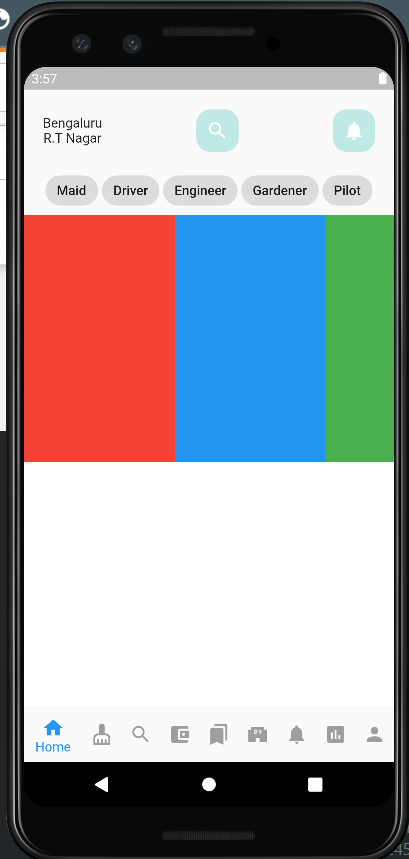
回答 1
Stack Overflow用户
回答已采纳
发布于 2022-06-26 09:48:39
我想这对你有用。
class HomeScreen extends StatefulWidget {
  const HomeScreen({Key? key}) : super(key: key);

  @override
  State<HomeScreen> createState() => _HomeScreenState();
}

class _HomeScreenState extends State<HomeScreen> {
  int _selectedIndex = 0;
  int _selectedCategoryIndex = -1;
  String _selectedUserType = "Maid";
  PageController pageController = PageController();
  List array = ["Maid", "Driver", "Engineer", "Gardener", "Pilot"];
  List data = [
    {
      "name": "Sachin Rajput",
      "profilePic":
          "https://lh3.googleusercontent.com/a-/AAuE7mCfQn-gP_FJZUUU4GC4aSU1km9t_e5PL6zsV-NwdA=k-s48",
      "category": ["Maid", "Engineer"],
      "rating": 5,
      "bg": Colors.red
    },
    {
      "name": "Sachin Tendulkar",
      "profilePic":
          "https://lh3.googleusercontent.com/a-/AAuE7mCfQn-gP_FJZUUU4GC4aSU1km9t_e5PL6zsV-NwdA=k-s48",
      "category": ["Gardener", "Pilot", "Engineer"],
      "rating": 5,
      "bg": Colors.amberAccent
    }
  ];
  List filteredData = [];

  void onTapped(int index) {
    setState(() {
      _selectedIndex = index;
    });
    pageController.jumpToPage(index);
  }

  void tappedCategory(int index) {
    _selectedCategoryIndex = index;
    _selectedUserType = array[index];
    _filterData();
  }

  @override
  void initState() {
    super.initState();
    _filterData();
  }

  _filterData() {
    filteredData = _selectedCategoryIndex >= 0 ? data.where((element) => element["category"].contains(_selectedUserType)).toList() : data;
    setState(() {});
  }

  @override
  Widget build(BuildContext context) {
    return Scaffold(
        body: Column(mainAxisSize: MainAxisSize.min, children: [
          Container(
              margin: const EdgeInsets.only(top: 45, bottom: 15),
              padding: const EdgeInsets.only(left: 20, right: 20),
              child: Row(
                  mainAxisAlignment: MainAxisAlignment.spaceBetween,
                  children: [
                    Column(children: const [
                      Text("Bengaluru"),
                      Text("R.T Nagar")
                    ]),
                    Container(
                      width: 45,
                      height: 45,
                      padding: const EdgeInsets.only(left: 0, right: 0),
                      decoration: BoxDecoration(
                          borderRadius: BorderRadius.circular(15),
                          color: Colors.red),
                      child: const Icon(
                        Icons.search,
                        color: Colors.white,
                      ),
                    ),
                    Container(
                      width: 45,
                      height: 45,
                      decoration: BoxDecoration(
                          borderRadius: BorderRadius.circular(15),
                          color: Colors.red),
                      child: const Icon(
                        Icons.notifications,
                        color: Colors.white,
                      ),
                    ),
                  ])),
          SingleChildScrollView(
            scrollDirection: Axis.horizontal,
            child: Row(
              children: List<Widget>.generate(
                  array.length, // place the length of the array here
                  (int index) {
                return Container(
                  margin: const EdgeInsets.all(2.0),
                  child: GestureDetector(
                    onTap: () {
                      tappedCategory(index);
                    },
                    child: Chip(label: Text(array[index])),
                  ),
                );
              }).toList(),
            ),
          ),
          Expanded(
            child: ListView.builder(
              scrollDirection: Axis.horizontal,
              itemCount: filteredData.length,
              itemBuilder: (context, index) {
                var item = filteredData[index];
                return Container(
                  width: 160.0,
                  color: item['bg'],
                  child: Center(
                    child: Text(item["name"].toString()),
                  ),
                );
              },
              // This next line does the trick.
            ),
          ),
        ]),
        bottomNavigationBar: BottomNavigationBar(
          items: const <BottomNavigationBarItem>[
            BottomNavigationBarItem(icon: Icon(Icons.home), label: 'Home'),
            BottomNavigationBarItem(
                icon: Icon(Icons.cleaning_services), label: 'House Keeping'),
            BottomNavigationBarItem(icon: Icon(Icons.search), label: 'Search'),
            BottomNavigationBarItem(
                icon: Icon(Icons.account_balance_wallet), label: 'Wallet'),
            BottomNavigationBarItem(
                icon: Icon(Icons.bookmarks), label: 'Bookmarked'),
            BottomNavigationBarItem(
                icon: Icon(Icons.local_convenience_store), label: 'Store'),
            BottomNavigationBarItem(
                icon: Icon(Icons.notifications), label: 'Notifications'),
            BottomNavigationBarItem(
                icon: Icon(Icons.assessment), label: 'Notifications'),
            BottomNavigationBarItem(icon: Icon(Icons.person), label: 'Profile'),
          ],
          currentIndex: _selectedIndex,
          selectedItemColor: Colors.blue,
          unselectedItemColor: Colors.grey,
          onTap: onTapped,
        ));
  }
}
一项建议是减少底部导航栏中的项目数量。4到5是最优的,6是最坏的情况.但你有9个项目,这将是很难访问较小的设备,特别是肥胖的手指问题将很容易挫败最终用户。
页面原文内容由Stack Overflow提供。腾讯云小微IT领域专用引擎提供翻译支持
原文链接:
https://stackoverflow.com/questions/72749105
复制相关文章
相似问题
腾讯云开发者

Copyright © 2013 - 2026 Tencent Cloud. All Rights Reserved. 腾讯云 版权所有
深圳市腾讯计算机系统有限公司 ICP备案/许可证号:粤B2-20090059  粤公网安备44030502008569号
腾讯云计算(北京)有限责任公司 京ICP证150476号 | 京ICP备11018762号