
将min 100设置为已经存在于min 100体内的DIV
将min 100设置为已经存在于min 100体内的DIV
提问于 2022-06-23 13:22:11
我正在尝试将DIV的最小高度设置为容器的100%或100 the。
但是:
将min-height:100%设置为DIV无效,并且
将类min-vh-100添加到DIV中会给出比父DIV更高的高度。
<body class="min-vh-100 d-flex flex-column bg-primary">
<header class="p-3 bg-success">
Header<br/>
Content
</header>
<div class="container flex-grow-1 p-0 bg-secondary">
<div class="d-flex flex-column"><!-- What do I have to do here to set this DIV's height to 100% of parent DIV ? -->
<div class="flex-grow-1 p-3 bg-danger">
Main Content that's need to fill up vertical space
</div>
<div class="p-3 bg-warning">
Bottom Content for Main
</div>
</div>
</div>
<footer class="p-3 bg-info">
Footer<br/>
Content<br/>
© 2022 Bootstrap
</footer>
</body>这就是我想要的:
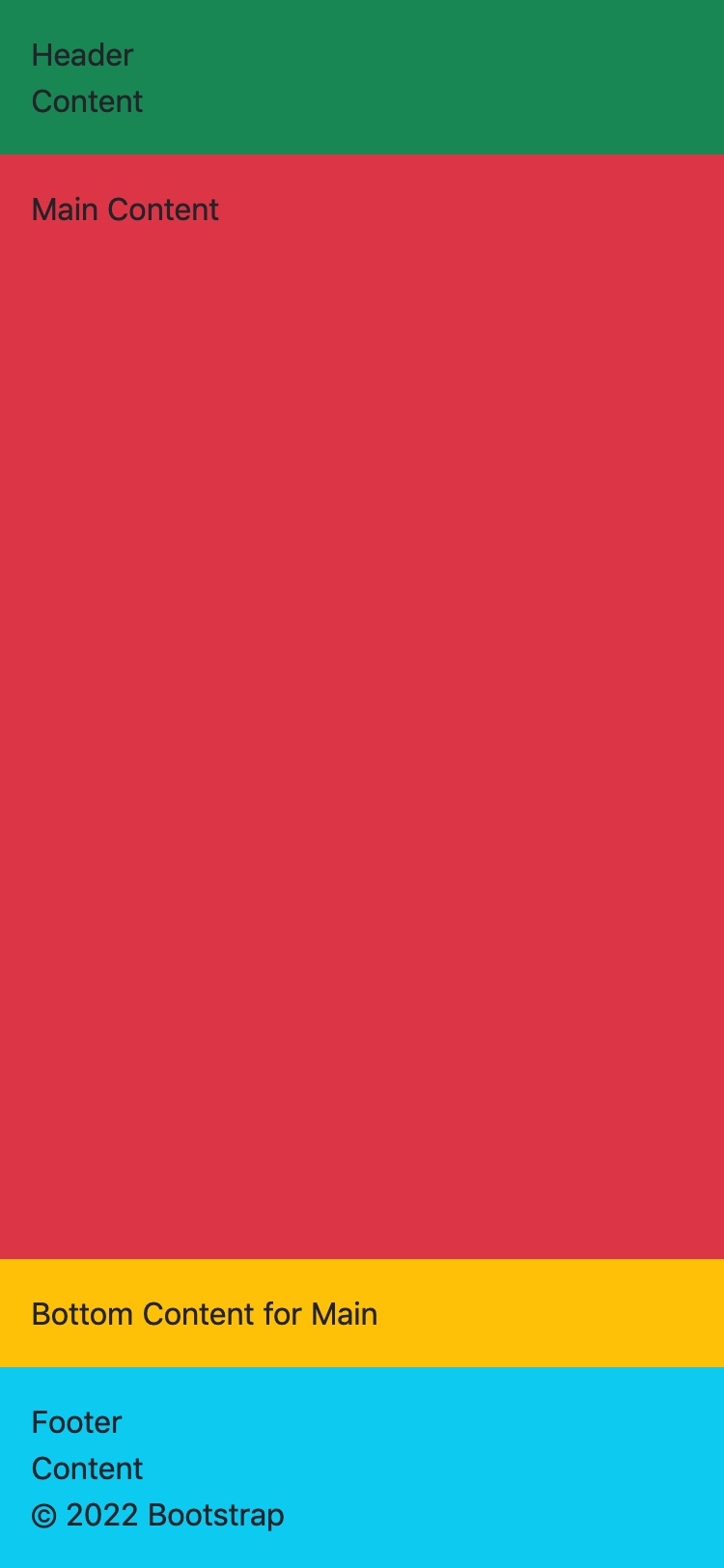
<!doctype html>
<html lang="en">
<head>
<meta charset="utf-8" />
<meta name="viewport" content="width=device-width, initial-scale=1" />
<title>Footer at Bottom when content is not page-full</title>
<link href="https://cdn.jsdelivr.net/npm/bootstrap@5.1.3/dist/css/bootstrap.min.css" rel="stylesheet" integrity="sha384-1BmE4kWBq78iYhFldvKuhfTAU6auU8tT94WrHftjDbrCEXSU1oBoqyl2QvZ6jIW3" crossorigin="anonymous">
</head>
<body class="min-vh-100 d-flex flex-column bg-primary">
<header class="p-3 bg-success">
Header<br/>
Content
</header>
<div class="container flex-grow-1 p-0 bg-secondary">
<div class="d-flex flex-column">
<div class="flex-grow-1 p-3 bg-danger">
Main Content
</div>
<div class="p-3 bg-warning">
Bottom Content for Main
</div>
</div>
</div>
<footer class="p-3 bg-info">
Footer<br/>
Content<br/>
© 2022 Bootstrap
</footer>
</body>
</html>
回答 1
Stack Overflow用户
发布于 2022-06-24 05:33:11
如果不使用JavaScript,我似乎无法解决这个问题。
<!doctype html>
<html lang="en">
<head>
<meta charset="utf-8" />
<meta name="viewport" content="width=device-width, initial-scale=1" />
<title>flex child as a flex container with 100% height of parent flex container</title>
<link href="https://cdn.jsdelivr.net/npm/bootstrap@5.1.3/dist/css/bootstrap.min.css" rel="stylesheet" integrity="sha384-1BmE4kWBq78iYhFldvKuhfTAU6auU8tT94WrHftjDbrCEXSU1oBoqyl2QvZ6jIW3" crossorigin="anonymous">
<script>
document.addEventListener("DOMContentLoaded", () =>
{
let body = document.body;
let html = document.documentElement;
let body_height = Math.max(body.scrollHeight, body.offsetHeight, html.clientHeight, html.scrollHeight, html.offsetHeight);
let header_height = document.getElementsByTagName('header')[0].offsetHeight;
let footer_height = document.getElementsByTagName('footer')[0].offsetHeight;
document.getElementsByTagName('main')[0].style.height = (body_height - (header_height + footer_height)) + "px";
});
</script>
</head>
<body class="min-vh-100 d-flex flex-column bg-primary">
<header class="p-3 bg-success">
Header<br/>
Content
</header>
<main class="container p-0 d-flex flex-column">
<div class="flex-grow-1 p-3 bg-danger">
Main Content
</div>
<div class="p-3 bg-warning">
Bottom Content for Main
</div>
</main>
<footer class="p-3 bg-info">
Footer<br/>
Content<br/>
© 2022 Bootstrap
</footer>
</body>
</html>
页面原文内容由Stack Overflow提供。腾讯云小微IT领域专用引擎提供翻译支持
原文链接:
https://stackoverflow.com/questions/72730935
复制相关文章
相似问题
腾讯云开发者

Copyright © 2013 - 2026 Tencent Cloud. All Rights Reserved. 腾讯云 版权所有
深圳市腾讯计算机系统有限公司 ICP备案/许可证号:粤B2-20090059  粤公网安备44030502008569号
腾讯云计算(北京)有限责任公司 京ICP证150476号 | 京ICP备11018762号