
如何在命运轮上画形象?
如何在命运轮上画形象?
提问于 2022-06-22 03:45:05
我使用了来自how to draw a wheel of fortune?的幸运密码
我在每个扇区上将函数drawSector(扇区,i)修改为drawImage,如下所示:
function drawSector(sector, i) {
        const ang = arc * i;
        ctx.save();
        // COLOR
        ctx.beginPath();
        ctx.fillStyle = sector.color;
        ctx.moveTo(rad, rad);
        ctx.arc(rad, rad, rad, ang, ang + arc);
        ctx.lineTo(rad, rad);
        ctx.fill();
        // TEXT
        ctx.translate(rad, rad);
        ctx.rotate(ang + arc / 2);
        if(!sector.label.includes('<img')){
            ctx.textAlign = "right";
            ctx.fillStyle = "#fff";
            ctx.fillText(sector.label, rad-10, txtPositionY);
        }
        else{
            // IMG
            const div = document.createElement('div')
                          div.innerHTML = sector.label
                  const img = div.querySelector('img');
                  const ratio = img.width/img.height;

                  let imgMinH = (2*PI*55)/sectors.length; // // r=110/2
                  let imgMaxW = (rad-15) - 55;
                  let imgW    = imgMinH*ratio;
                  let imgH    = imgMinH;
                  let imgX = (rad-15)-imgW;
                  let imgY = (-imgH)/2;
                  let LX   =    (2*PI*imgX)/sectors.length;

                  if(imgW<imgMaxW){
                      while( (imgX>55) && (imgH<LX) && (imgW<imgMaxW) ){
                        imgW += 1;
                        imgH = imgW/ratio;
                        imgX = (rad-15)-imgW;
                        imgY = (-imgH)/2;
                        LX   =  (2*PI*imgX)/sectors.length;
                      }
                  }
                  else{
                    while( (imgX<55) || (imgH>LX) || (imgW>imgMaxW) ){
                        imgW -= 1;
                        imgH = imgW/ratio;
                        imgX = (rad-15)-imgW;
                        imgY = (-imgH)/2;
                        LX   =  (2*PI*imgX)/sectors.length;
                      }
                  }

                  console.log("ratio:"+ratio+'\n orgH:'+imgMinH+'\n imgW:'+imgW+'\nimgH:'+imgH+'\nLX:'+LX+'\nimgX:'+imgX+'\nimgY:'+imgY+'\nimgMaxW:'+imgMaxW);
            ctx.drawImage(img, imgX, imgY, imgW, imgH);
        }
        ctx.restore();
      };
但是我不能精确地计算图像的宽度、高度和位置。请看下面的图片:
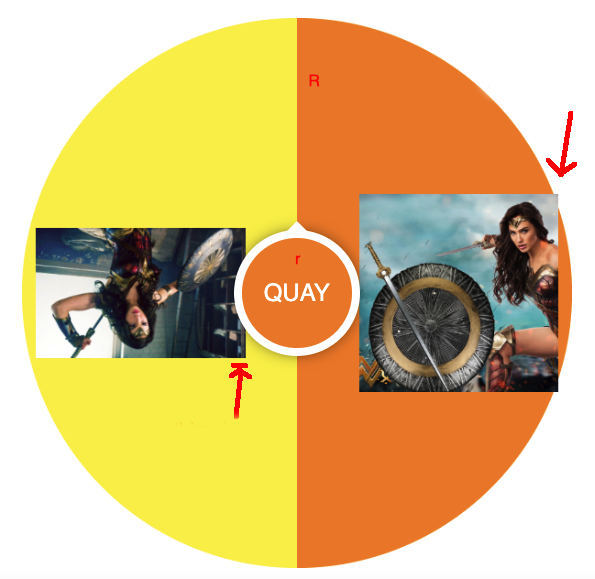
如何精确计算像下面这样的图像宽度、高度、到drawImage的位置?
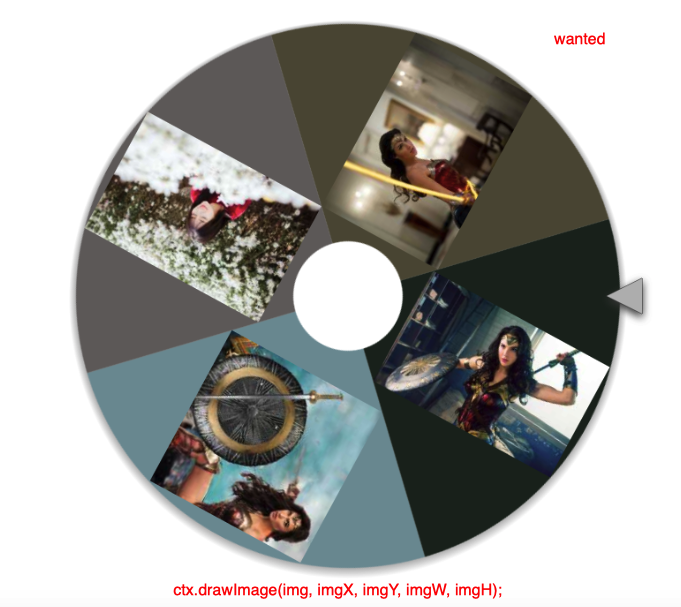
谢谢!
回答 1
Stack Overflow用户
发布于 2022-06-22 08:22:32
const button = document.querySelector('.ring__button');
const ring = document.querySelector('.ring__wrapper');

button.addEventListener('click', () => {
    ring.classList.add('ring__wrapper--rotate')
}):root {
--size: 300px;
}
.ring {
width: var(--size);
height: var(--size);
position: relative;
z-index: 1;
}
.ring__wrapper {
display: flex;
flex-wrap: wrap;
border-radius: 100%;
overflow: hidden;
transform-origin: 50% 50%;
position: relative;
width: inherit;
height: inherit;
}
.ring__wrapper--rotate {
animation: rotate 3s;
transform: rotate(990deg)
}
.ring__button {
position: absolute;
z-index: 1;
border: none;
width: calc(var(--size) / 3);
height: calc(var(--size) / 3);
border-radius: 100%;
background: red;
display: flex;
align-items: center;
justify-content: center;
color: #ffffff;
font-weight: bold;
left: 50%;
top: 50%;
transform: translate(-50%, -50%);
}
.ring__button:after {
position: absolute;
z-index: 3;
display: block;
content: '';
left: 50%;
bottom: 100%;
border-bottom: 20px solid red;
border-left: 10px solid transparent;
border-right: 10px solid transparent;
transform: translate(-50%, 5%);
}
.ring__part {
width: calc(var(--size) / 2);
height: var(--size);
overflow: hidden;
}
.ring__part img {
width: inherit;
height: inherit;
object-fit: contain;
}
.ring__part--1 {background: aquamarine;}
.ring__part--1 img {transform: rotate(180deg);}
.ring__part--2 {background: antiquewhite;}
@keyframes rotate {
from {transform: rotate(0)}
to {transform: rotate(990deg)}
}<div class="ring">
<button class="ring__button">QUAY</button>
<div class="ring__wrapper">
<div class="ring__part ring__part--1"><img src="https://images.unsplash.com/photo-1655810120657-9ce44d2f9e6c?ixlib=rb-1.2.1&ixid=MnwxMjA3fDB8MHxlZGl0b3JpYWwtZmVlZHwxOXx8fGVufDB8fHx8&auto=format&fit=crop&w=800&q=60" alt=""></div>
<div class="ring__part ring__part--2"><img src="https://images.unsplash.com/photo-1655810120657-9ce44d2f9e6c?ixlib=rb-1.2.1&ixid=MnwxMjA3fDB8MHxlZGl0b3JpYWwtZmVlZHwxOXx8fGVufDB8fHx8&auto=format&fit=crop&w=800&q=60" alt=""></div>
</div>
</div>
画布很酷,但是css呢?
const button = document.querySelector('.ring__button');
const ring = document.querySelector('.ring__wrapper');

button.addEventListener('click', () => {
    ring.classList.add('ring__wrapper--rotate')
}):root {
--size: 300px;
}
.ring {
width: var(--size);
height: var(--size);
position: relative;
z-index: 1;
}
.ring__wrapper {
display: flex;
flex-wrap: wrap;
border-radius: 100%;
overflow: hidden;
transform-origin: 50% 50%;
position: relative;
width: inherit;
height: inherit;
}
.ring__wrapper--rotate {
animation: rotate 3s;
transform: rotate(855deg)
}
.ring__button {
position: absolute;
z-index: 1;
border: none;
width: calc(var(--size) / 3);
height: calc(var(--size) / 3);
border-radius: 100%;
background: red;
display: flex;
align-items: center;
justify-content: center;
color: #ffffff;
font-weight: bold;
left: 50%;
top: 50%;
transform: translate(-50%, -50%);
}
.ring__button:after {
position: absolute;
z-index: 3;
display: block;
content: '';
left: 50%;
bottom: 100%;
border-bottom: 20px solid red;
border-left: 10px solid transparent;
border-right: 10px solid transparent;
transform: translate(-50%, 5%);
}
.ring__part {
width: calc(var(--size) / 2);
height: calc(var(--size) / 2);
overflow: hidden;
}
.ring__part img {
width: inherit;
height: inherit;
object-fit: contain;
}
.ring__part--1 {background: aquamarine;}
.ring__part--1 img {transform: rotate(225deg);}
.ring__part--2 {background: antiquewhite;}
.ring__part--2 img {transform: rotate(-45deg);}
.ring__part--3 {background: brown;}
.ring__part--3 img {transform: rotate(135deg);}
.ring__part--4 {background: burlywood;}
.ring__part--4 img {transform: rotate(45deg);}
@keyframes rotate {
from {transform: rotate(0)}
to {transform: rotate(855deg)}
}<div class="ring">
<button class="ring__button">QUAY</button>
<div class="ring__wrapper">
<div class="ring__part ring__part--1"><img src="https://images.unsplash.com/photo-1655810120657-9ce44d2f9e6c?ixlib=rb-1.2.1&ixid=MnwxMjA3fDB8MHxlZGl0b3JpYWwtZmVlZHwxOXx8fGVufDB8fHx8&auto=format&fit=crop&w=800&q=60" alt=""></div>
<div class="ring__part ring__part--2"><img src="https://images.unsplash.com/photo-1655810120657-9ce44d2f9e6c?ixlib=rb-1.2.1&ixid=MnwxMjA3fDB8MHxlZGl0b3JpYWwtZmVlZHwxOXx8fGVufDB8fHx8&auto=format&fit=crop&w=800&q=60" alt=""></div>
<div class="ring__part ring__part--3"><img src="https://images.unsplash.com/photo-1655810120657-9ce44d2f9e6c?ixlib=rb-1.2.1&ixid=MnwxMjA3fDB8MHxlZGl0b3JpYWwtZmVlZHwxOXx8fGVufDB8fHx8&auto=format&fit=crop&w=800&q=60" alt=""></div>
<div class="ring__part ring__part--4"><img src="https://images.unsplash.com/photo-1655810120657-9ce44d2f9e6c?ixlib=rb-1.2.1&ixid=MnwxMjA3fDB8MHxlZGl0b3JpYWwtZmVlZHwxOXx8fGVufDB8fHx8&auto=format&fit=crop&w=800&q=60" alt=""></div>
</div>
</div>
页面原文内容由Stack Overflow提供。腾讯云小微IT领域专用引擎提供翻译支持
原文链接:
https://stackoverflow.com/questions/72709433
复制相关文章
相似问题
腾讯云开发者

Copyright © 2013 - 2026 Tencent Cloud. All Rights Reserved. 腾讯云 版权所有
深圳市腾讯计算机系统有限公司 ICP备案/许可证号:粤B2-20090059  粤公网安备44030502008569号
腾讯云计算(北京)有限责任公司 京ICP证150476号 | 京ICP备11018762号