
如何设置背景颜色的更多按钮与其他选项卡[Xamarin窗体]?
如何设置背景颜色的更多按钮与其他选项卡[Xamarin窗体]?
提问于 2022-06-21 14:16:02
我正在用Xamarin.Forms.Shell开发一个用于布局和导航的应用程序。当我在TabBar中使用五个选项卡中的多个选项卡时,自然会出现更多的按钮,即每个平台(Android和iOS)都是原生的。但是,对于Shell.Background和Shell.TabBarBackground,使用xaml中的自定义颜色也是一样的,但对于选项卡进入更多按钮的背景则不起作用。
我在Xaml应用程序外壳中的代码:
 <Shell.Resources>
    <ResourceDictionary>
        <Style x:Key="BaseStyle"  TargetType="Element">
            <Setter Property="Shell.BackgroundColor"
                    Value="{x:Static core:Colors.Background}" />
            <Setter Property="Shell.ForegroundColor"
                    Value="White" />
            <Setter Property="Shell.TabBarBackgroundColor"
                    Value="{x:Static core:Colors.Background}" />
            <Setter Property="Shell.TabBarTitleColor"
                    Value="{x:Static core:Colors.Selection}" />
            <Setter Property="Shell.TabBarUnselectedColor"
                    Value="White" />
        </Style>
    </ResourceDictionary>
</Shell.Resources>

<ShellItem Route="Home">
    <ShellContent ContentTemplate="{DataTemplate core:HomePage}"/>
</ShellItem>

<TabBar Route="Tabs" Style="{x:StaticResource BaseStyle}">
    <Tab Route="TabSearch"
         Icon="ic_list_white"
         Title="Search">
        <ShellContent ContentTemplate="{DataTemplate core:SearchPage}"/>
    </Tab>
    <Tab
        Icon="ic_filter_list_white"
        Title="Filter">
        <ShellContent ContentTemplate="{DataTemplate core:FilterPage}"/>
    </Tab>

    <Tab Icon="ic_star_white"
        Title="Favourites">
        <ShellContent ContentTemplate="{DataTemplate core:FavouritesPage}"/>
    </Tab>

    <Tab Icon="ic_remove_red_eye_white"
        Title="Seen">
        <ShellContent ContentTemplate="{DataTemplate core:SeenPage}"/>
    </Tab>

    <Tab Icon="ic_shopping_cart_white" Title="{x:Static resources:Strings.MAINPAGE_MENU_PURCHASE_PACKAGES}">
        <ShellContent ContentTemplate="{DataTemplate core:PackagePurchasePage}"/>
    </Tab>

    <Tab Icon="ic_sync_white" Title="{x:Static resources:Strings.MAINPAGE_MENU_RESTORE_PURCHASES}"  >
        <ShellContent ContentTemplate="{DataTemplate core:RestorePurchasePage}"/>
    </Tab>

    <Tab Icon="ic_settings_white" Title="{x:Static resources:Strings.MAINPAGE_MENU_SETTINGS}"  >
        <ShellContent ContentTemplate="{DataTemplate core:SettingsPage}"/>
    </Tab>

    <Tab Icon="ic_help_white" Title="{x:Static resources:Strings.MAINPAGE_MENU_ABOUT}" >
        <ShellContent ContentTemplate="{DataTemplate views:AboutShell }"/>
    </Tab>
</TabBar>
这是我的具有应用风格的选项卡:

当我点击更多的按钮时:
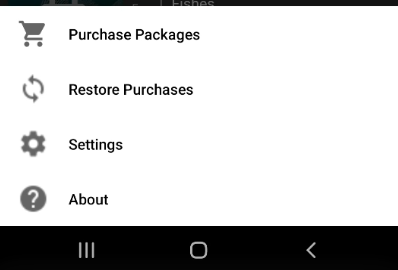
我需要应用相同的风格,在我的TabBar出现在这个屏幕上的更多的按钮。
回答 1
Stack Overflow用户
发布于 2022-06-22 02:34:18
您可以为TabBarUnselectedColor属性设置颜色。
 <Shell.Resources>
    <ResourceDictionary>
        <Style x:Key="BaseStyle"  TargetType="Element">
            <Setter Property="Shell.BackgroundColor"
                Value="Black" />
            <Setter Property="Shell.ForegroundColor"
                Value="White" />
            <Setter Property="Shell.TabBarBackgroundColor"
                Value="Green" />
            <Setter Property="Shell.TabBarTitleColor"
                Value="Red" />
            <Setter Property="Shell.TabBarUnselectedColor"
                Value="Red" />
        </Style>
    </ResourceDictionary>
</Shell.Resources>

页面原文内容由Stack Overflow提供。腾讯云小微IT领域专用引擎提供翻译支持
原文链接:
https://stackoverflow.com/questions/72702410
复制相关文章
相似问题
腾讯云开发者

Copyright © 2013 - 2026 Tencent Cloud. All Rights Reserved. 腾讯云 版权所有
深圳市腾讯计算机系统有限公司 ICP备案/许可证号:粤B2-20090059  粤公网安备44030502008569号
腾讯云计算(北京)有限责任公司 京ICP证150476号 | 京ICP备11018762号