
如何覆盖DataGridCell样式
如何覆盖DataGridCell样式
提问于 2022-06-21 11:09:27
我有一个数据,想要样式它的细胞。我有4个列,2个是文本列,2个是用于编辑和删除按钮的自定义列,如下所示。我的目的是改变它们的风格。当鼠标在文本列上时,单元格背景将不同于编辑和删除列。我为DataGrid提供了一个通用样式,并在其中包含了DataGridCell的新样式。如何为编辑和删除按钮定义新样式并在xaml文件中设置此新样式?
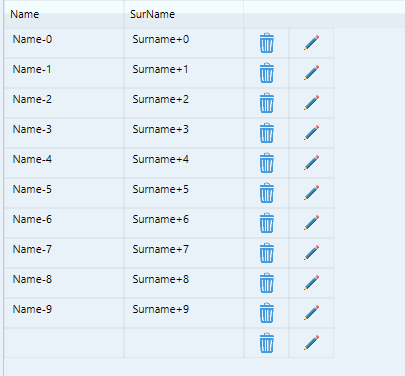
风格
<Style TargetType="{x:Type DataGrid}">
    <Style.Resources>
      <Style TargetType="{x:Type DataGridCell}">
          <Setter.Value>
            <ControlTemplate TargetType="{x:Type DataGridCell}">
              <ControlTemplate.Triggers>
                <Trigger Property="IsMouseOver" Value="True">
                  <Setter Property="Background" Value="{StaticResource ControlBackgroundLine}" />
                </Trigger>
                <Trigger Property="IsSelected" Value="True">
                  <Setter Property="Background" Value="{StaticResource BackgroundSelected}" />
                </Trigger>
              </ControlTemplate.Triggers>
            </ControlTemplate>
          </Setter.Value>
        </Setter>
      </Style>
    </Style.Resources>
  </Style>
XAML
<DataGrid Grid.Row="3" ItemsSource="{Binding deckList}" AutoGenerateColumns="False"
            SelectionMode="Single" SelectionUnit="FullRow" Margin="10,10,0,0" >
            <DataGrid.Columns>
                <DataGridTextColumn Header="Name" Binding="{Binding Path=Name}" ></DataGridTextColumn>
                <DataGridTextColumn Header="SurName" Binding="{Binding Path=SurName}"></DataGridTextColumn>
                <DataGridTemplateColumn>
                    <DataGridTemplateColumn.CellTemplate>
                        <DataTemplate>
                            <Button Width="32">
                                <Image Source="/KillCard;component/Resources/Images/delete.png" Width="16"></Image>
                            </Button>
                        </DataTemplate>
                    </DataGridTemplateColumn.CellTemplate>
                </DataGridTemplateColumn>
                <DataGridTemplateColumn>
                    <DataGridTemplateColumn.CellTemplate>
                        <DataTemplate>
                            <Button Width="32">
                                <Image Source="/KillCard;component/Resources/Images/edit.png" Width="16"></Image>
                            </Button>
                        </DataTemplate>
                    </DataGridTemplateColumn.CellTemplate>
                </DataGridTemplateColumn>
            </DataGrid.Columns>
</DataGrid>回答 1
Stack Overflow用户
发布于 2022-06-21 12:01:03
可以将DataGrid.CellStyle属性设置为全局配置单元格(在当前DataGrid的范围内):
<DataGrid>
  <DataGrid.CellStyle>
    <Style TargetType="{x:Type DataGridCell}">
      <Style.Triggers>
        <Trigger Property="IsMouseOver" Value="True">
          <Setter Property="Background" Value="{StaticResource ControlBackgroundLine}" />
        </Trigger>
      </Style.Triggers>
    </Style>
  </DataGrid.CellStyle>
</DataGrid>或者,若要配置单个单元格,请设置DataGridColumn.CellStyle属性:
<DataGrid>
  <DataGrid.Columns>
    <DataGridTextColumn>
      <DataGridTextColumn.CellStyle>
        <Style TargetType="{x:Type DataGridCell}">
          <Style.Triggers>
            <Trigger Property="IsMouseOver" Value="True">
              <Setter Property="Background" Value="{StaticResource ControlBackgroundLine}" />
            </Trigger>
          </Style.Triggers>
        </Style>
      </DataGridTextColumn.CellStyle>
    </DataGridTextColumn>
  </DataGrid.Columns>
</DataGrid>页面原文内容由Stack Overflow提供。腾讯云小微IT领域专用引擎提供翻译支持
原文链接:
https://stackoverflow.com/questions/72699720
复制相关文章
相似问题
腾讯云开发者

Copyright © 2013 - 2026 Tencent Cloud. All Rights Reserved. 腾讯云 版权所有
深圳市腾讯计算机系统有限公司 ICP备案/许可证号:粤B2-20090059  粤公网安备44030502008569号
腾讯云计算(北京)有限责任公司 京ICP证150476号 | 京ICP备11018762号