
如何使柔性盒开始工作?它什么也没做
我不能让柔性箱工作。我尝试过各种CSS属性,但它不想工作。display-flex似乎根本不对页面做任何事情。我尝试了各种标记,比如flex-direction:column和text-align: center,但是都没有用。为什么挠曲盒什么都不做?
预期结果:
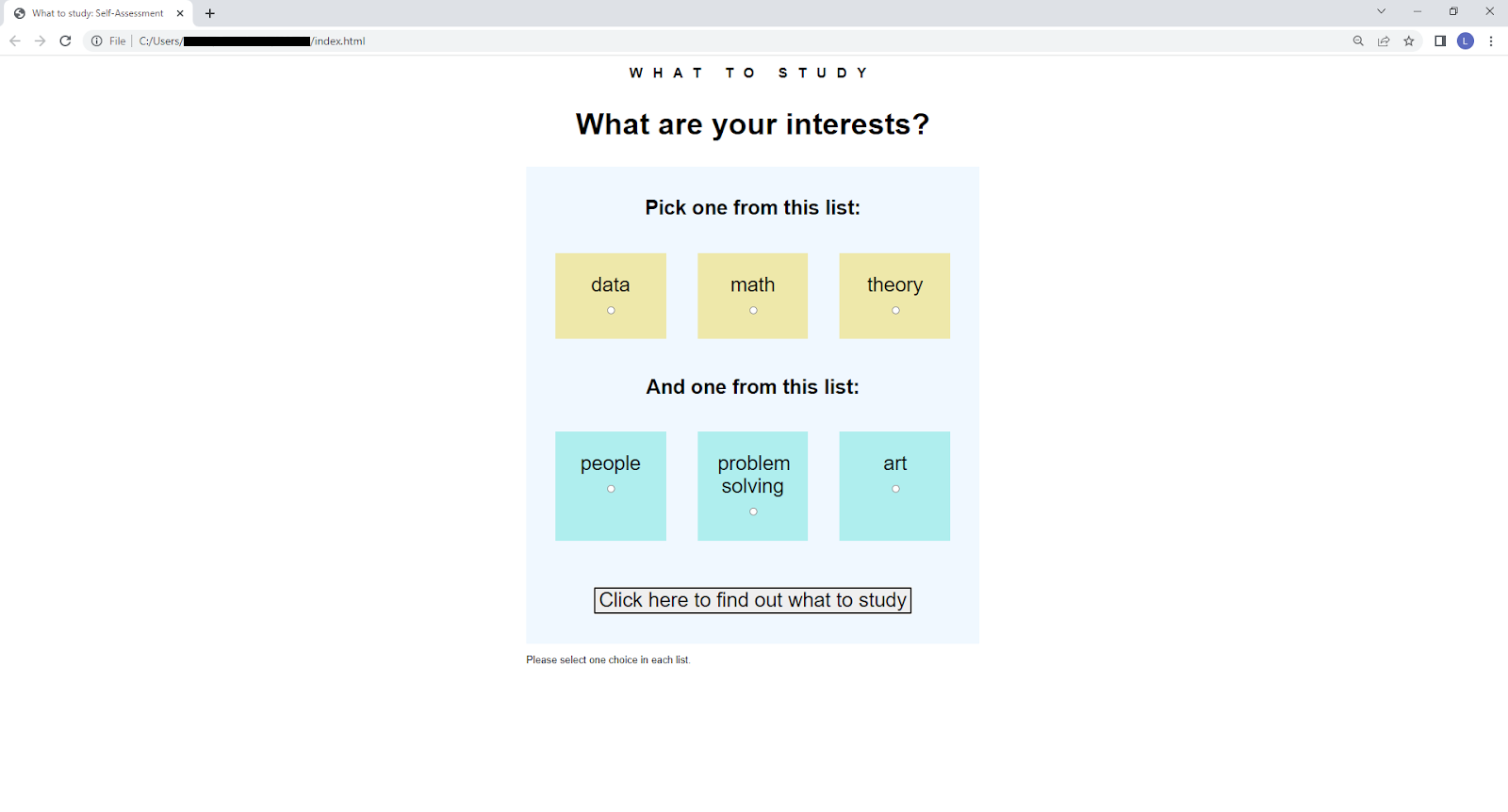
我目前的结果是:https://replit.com/@elliotsFinal/what-to-study#index.html
我的HTML代码:
<!DOCTYPE html>
<html>

<head>
  <meta charset="utf-8">
  <meta name="viewport" content="width=device-width">
  <title>replit</title>
  <link href="style.css" rel="stylesheet" type="text/css" />
</head>

<body>

  <div class=flex-container>

<h3>WHAT TO STUDY</h3>

  <h1>What are your interests?</h2>


<fieldset>
    <legend>Pick one from this list</legend>

    <div>
      <input type="radio" id="data" name="list-1" value="data"
             checked>
      <label for="data">data</label>
    </div>

    <div>
      <input type="radio" id="math" name="list-1" value="math">
      <label for="math">mathy</label>
    </div>

    <div>
      <input type="radio" id="theory" name="list-1" value="theory">
      <label for="theory">theory</label>
    </div>
</fieldset>

<fieldset>
    <legend>And one from this list</legend>

    <div>
      <input type="radio" id="people" name="list-2" value="people"
             checked>
      <label for="people">people</label>
    </div>

    <div>
      <input type="radio" id="problem solving" name="list-2" value="problem solving">
      <label for="problem solving">problem-solving</label>
    </div>

    <div>
      <input type="radio" id="art" name="list-2" value="art">
      <label for="art">art</label>
    </div>
</fieldset>


  <script src="script.js"></script>
  </div>
</body>
<footer>
<P>Please select one choice in each list</P>

</footer>

</div>
</html>
我的CSS:
html, body {
  height: 100%;
  width: 100%;
}

.flex-container {
font-family: Arial, Helvetica, sans-serif;
display: flex
flex-direction: column
background-color: DodgerBlue

}


.flex-container > div {
  background-color: #f1f1f1;
  width: 100px;
  margin: 10px;
  text-align: center;
  line-height: 75px;
  font-size: 30px;
}

.list-1 {

}


.list-2 {

}回答 3
Stack Overflow用户
发布于 2022-06-21 00:58:14
您的代码中有相当多的错误和遗漏需要纠正:
CSS
flexbox只有一个层次(FBL父级对flexbox子),字段集需要成为inside.
.flex-containersemi-colons
.flex-container > div的.flex-container父级中的一个柔性盒父行,缺少的semi-colons
.flex-container > div=>应该是.flex-container > fieldset > div
.list-1,.list-2=>应该是[name="list-1"]和[name="list-2"],因为您不使用HTML标记中的类。
缺少的</body>
- orphaned
</div>
- error
<div class=flex-container>应该是<div class="flex-container">
- h1与h2 =>
<h1>What are your interests?</h2>
- given示例图像=>
<h3>和<h1>应该出现在<div class=".flex-container">之前,而不是<div class=".flex-container">的一部分。
语义(a11y =辅助能力)
<h3>和<h1>=>应该是具有不同字体设置的<div>,
在下面的片段中,您会发现经过修正的代码和一些注释。我没有提供任何类似于“响应性设计”的东西,也没有试图创建最终的设计,让您来实现。
html, body {
    height: 100%;
    width: 100%;
}

h1,h3 { text-align: center }
h3    { letter-spacing: 0.3rem } /* 'stretch' the text */

.flex-container {
    font-family: Arial, Helvetica, sans-serif;
    display: flex;          /* had missing semi-colon */
    flex-direction: column; /* dito */
    background-color: DodgerBlue;

    width : max-content; /* restrict W/H to its content => the fieldset */
    height: max-content;

    margin: 5rem auto; /* some top/bottom space, 'auto' centers horizontally */
}

.flex-container > fieldset {
    display: flex;
}

.flex-container > fieldset > div {
    background-color: #f1f1f1;
    width: 100px;
    margin: 10px;
    text-align: center;
    line-height: 75px;
    font-size: 30px;
}

[name="list-1"] { /* rule for radio group named 'list-1' */ }
[name="list-2"] { /* rule for radio group named 'list-2' */ }<h3>WHAT TO STUDY</h3>
<h1>What are your interests?</h1>
<div class="flex-container">
<fieldset>
<legend>Pick one from this list</legend>
<div>
<input type="radio" id="data" name="list-1" value="data" checked> <label for="data">data</label>
</div>
<div>
<input type="radio" id="math" name="list-1" value="math"> <label for="math">mathy</label>
</div>
<div>
<input type="radio" id="theory" name="list-1" value="theory"> <label for="theory">theory</label>
</div>
</fieldset>
<fieldset>
<legend>And one from this list</legend>
<div>
<input type="radio" id="people" name="list-2" value="people" checked> <label for="people">people</label>
</div>
<div>
<input type="radio" id="problem solving" name="list-2" value="problem solving"> <label for="problem solving">problem-solving</label>
</div>
<div>
<input type="radio" id="art" name="list-2" value="art"> <label for="art">art</label>
</div>
</fieldset>
</div>
</body>
<footer>
<p>Please select one choice in each list</p>
</footer>
Stack Overflow用户
发布于 2022-06-20 22:54:00
这里有很多问题。
<div class=flex-container>应该是<div class="flex-container">。
.flex-container > div的意思是“目标DIVs是. and容器的直接子元素”,但是容器的直接子元素是标题和字段集。
与您的问题无关,但是<h1>What are your interests?</h2>是无效的标记--确保您的开始标记和结束标记匹配。
Stack Overflow用户
发布于 2022-06-20 23:10:12
我希望这能帮上忙:https://replit.com/@MatijaJanji/what-to-study#style.css
除了geat的问题外,您使用flex属性的目标是错误的元素。在上面的例子中,我的目标是以字段集作为父级的所有div。我不确定这是不是你想要的。
https://stackoverflow.com/questions/72693684
复制相似问题
腾讯云开发者

Copyright © 2013 - 2026 Tencent Cloud. All Rights Reserved. 腾讯云 版权所有
深圳市腾讯计算机系统有限公司 ICP备案/许可证号:粤B2-20090059  粤公网安备44030502008569号
腾讯云计算(北京)有限责任公司 京ICP证150476号 | 京ICP备11018762号