
如何禁用此图标
如何禁用此图标
提问于 2022-06-20 08:43:02
import * as React from 'react';
import { IContextualMenuProps, IIconProps, Stack, IStackStyles } from '@fluentui/react';
import { CommandBarButton } from '@fluentui/react/lib/Button';

export interface IButtonExampleProps {
  // These are set based on the toggles shown above the examples (not needed in real code)
  disabled?: boolean;
  checked?: boolean;
}

const menuProps: IContextualMenuProps = {
  items: [
    {
      key: 'emailMessage',
      text: 'Email message',
      iconProps: { iconName: 'Mail' },
    },
    {
      key: 'calendarEvent',
      text: 'Calendar event',
      iconProps: { iconName: 'Calendar' },
    },
  ],
};
const addIcon: IIconProps = { iconName: 'Add' };
const mailIcon: IIconProps = { iconName: 'Mail' };
const stackStyles: Partial<IStackStyles> = { root: { height: 44 } };

export const ButtonCommandBarExample: React.FunctionComponent<IButtonExampleProps> = props => {
  const { disabled, checked } = props;

  // Here we use a Stack to simulate a command bar.
  // The real CommandBar control also uses CommandBarButtons internally.
  return (
    <Stack horizontal styles={stackStyles}>
      <CommandBarButton
        iconProps={addIcon}
        text="New item"
        // Set split=true to render a SplitButton instead of a regular button with a menu
        // split={true}
        menuProps={menuProps}
        disabled={disabled}
        checked={checked}
      />
      <CommandBarButton iconProps={mailIcon} text="Send mail" disabled={disabled} checked={checked} />
    </Stack>
  )
};

如何在fluent-ui按钮组件中禁用此图标
我需要添加哪些道具或方法来禁用它。有谁能帮上忙,因为我无法进入到流利的用户界面反应https://developer.microsoft.com/en-us/fluentui#/controls/web/button
回答 1
Stack Overflow用户
发布于 2022-06-20 09:42:00
您可以指定menuIconProps (read 这里),如果指定为空字符串,它将不会显示图标。
添加此属性menuIconProps={{iconName: ""}}
<CommandBarButton
        iconProps={addIcon}
        text="New item"
        // Set split=true to render a SplitButton instead of a regular button with a menu
        // split={true}
        menuIconProps={{iconName: ""}}
        menuProps={menuProps}
        disabled={disabled}
        checked={checked}
      />
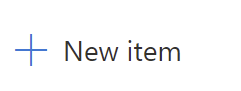
上述更改后,按钮将如下图所示:
页面原文内容由Stack Overflow提供。腾讯云小微IT领域专用引擎提供翻译支持
原文链接:
https://stackoverflow.com/questions/72684372
复制相关文章
相似问题
腾讯云开发者

Copyright © 2013 - 2026 Tencent Cloud. All Rights Reserved. 腾讯云 版权所有
深圳市腾讯计算机系统有限公司 ICP备案/许可证号:粤B2-20090059  粤公网安备44030502008569号
腾讯云计算(北京)有限责任公司 京ICP证150476号 | 京ICP备11018762号