
安装部署组代理失败的powershell
安装部署组代理失败的powershell
提问于 2022-06-20 00:18:30
我尝试运行我的Win7 VM上的“deployment”部分中提供的脚本(我所做的只是“复制\粘贴\运行”)。
$ErrorActionPreference="Stop";
If(-NOT ([Security.Principal.WindowsPrincipal][Security.Principal.WindowsIdentity]::GetCurrent() ).IsInRole( [Security.Principal.WindowsBuiltInRole] “Administrator”)){ throw "Run command in an administrator PowerShell prompt"};
If($PSVersionTable.PSVersion -lt (New-Object System.Version("3.0"))){ throw "The minimum version of Windows PowerShell that is required by the script (3.0) does not match the currently running version of Windows PowerShell." };
If(-NOT (Test-Path $env:SystemDrive\'azagent')){mkdir $env:SystemDrive\'azagent'};
cd $env:SystemDrive\'azagent';
for($i=1; $i -lt 100; $i++){$destFolder="A"+$i.ToString();
if(-NOT (Test-Path ($destFolder))){mkdir $destFolder;cd $destFolder;break;}};
$agentZip="$PWD\agent.zip";
$DefaultProxy=[System.Net.WebRequest]::DefaultWebProxy;$securityProtocol=@();$securityProtocol+=[Net.ServicePointManager]::SecurityProtocol;
$securityProtocol+=[Net.SecurityProtocolType]::Tls12;[Net.ServicePointManager]::SecurityProtocol=$securityProtocol;
$WebClient=New-Object Net.WebClient;
$Uri='https://vstsagentpackage.azureedge.net/agent/2.204.0/vsts-agent-win-x64-2.204.0.zip';
if($DefaultProxy -and (-not $DefaultProxy.IsBypassed($Uri))){$WebClient.Proxy= New-Object Net.WebProxy($DefaultProxy.GetProxy($Uri).OriginalString, $True);};
 $WebClient.DownloadFile($Uri, $agentZip);
Add-Type -AssemblyName System.IO.Compression.FileSystem;
[System.IO.Compression.ZipFile]::ExtractToDirectory( $agentZip, "$PWD");
.\config.cmd --deploymentgroup --deploymentgroupname "MY_GROUP_NAME" --agent $env:COMPUTERNAME --runasservice --work '_work' --url 'https://dev.azure.com/MY_ORG_NAME/' --projectname 'MY_PROJ_NAME';
 Remove-Item $agentZip;
错误发生:
em $agentZip;
At line:1 char:179
+ ... Current() ).IsInRole( [Security.Principal.WindowsBuiltInRole] “Adminis ...
+                                                                  ~
Missing ')' in method call.
At line:1 char:180
+ ... nRole( [Security.Principal.WindowsBuiltInRole] “Administrator?){ throw ...
+                                                    ~~~~~~~~~~~~~~
Unexpected token '“Administrator?' in expression or statement.
At line:1 char:180
+ ... nRole( [Security.Principal.WindowsBuiltInRole] “Administrator?){ throw ...
+                                                    ~~~~~~~~~~~~~~
Missing closing ')' after expression in 'If' statement.
At line:1 char:194
+ ... Role( [Security.Principal.WindowsBuiltInRole] “Administrator?){ throw  ...
+                                                                 ~
Unexpected token ')' in expression or statement.
    + CategoryInfo          : ParserError: (:) [], ParentContainsErrorRecordException
    + FullyQualifiedErrorId : MissingEndParenthesisInMethodCall
下面是powershell版本的信息:
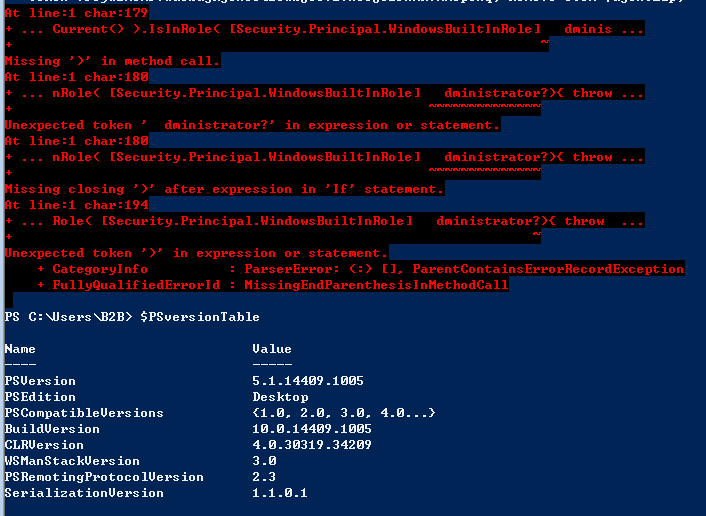
如有任何建议,将不胜感激。
回答 1
Stack Overflow用户
发布于 2022-08-25 03:02:31
正如问题注释中提到的,问题源于提供的注册脚本中的错误引号。

它似乎只影响到更现代的Windows/PowerShell版本,所以微软还没有优先解决这个问题。。目前,解决办法是找到并替换。
如果将脚本粘贴到文本编辑器中,则搜索“Administrator”并用"Administrator"替换。
如果直接将脚本粘贴到(现代的) PowerShell提示符中,错误字符将被删除,您需要手动添加它们:

页面原文内容由Stack Overflow提供。腾讯云小微IT领域专用引擎提供翻译支持
原文链接:
https://stackoverflow.com/questions/72681138
复制相关文章
相似问题
腾讯云开发者

Copyright © 2013 - 2026 Tencent Cloud. All Rights Reserved. 腾讯云 版权所有
深圳市腾讯计算机系统有限公司 ICP备案/许可证号:粤B2-20090059  粤公网安备44030502008569号
腾讯云计算(北京)有限责任公司 京ICP证150476号 | 京ICP备11018762号