
python-mss加速抓取到60 mss
python-mss加速抓取到60 mss
提问于 2022-06-19 06:36:12
我有一个简单的多处理脚本,它:
使用
- 定义
grabber进程,使用mss模块获取屏幕快照 - 使用
pygame模块来显示当前屏幕截图(当前帧)
<代码>F29定义displayer进程
尽管我正在为流水线应用多处理,但我仍然只能得到30个FPS,但奇怪的是,我很少得到60个FPS。是因为我的笔记本电脑规格还是什么?我的笔记本电脑规格是8 GB RAM with AMD Ryzen 5 4500U.,显示器尺寸是(1366 * 768)
这是我的代码:
SCR_SIZE = (640, 480)

def grabber(queue, isRunning):
  from mss import mss
  from time import time
  global SCR_SIZE
  with mss() as sct:
    while isRunning.value:
      t0 = time()
      # queue.put(cvtColor(resize(asarray(sct.grab(sct.monitors[1])), SCR_SIZE), COLOR_BGRA2BGR))
      queue.put(sct.grab(sct.monitors[1]))
      print(time() - t0)
  print('P1 Finished!')

def displayer(queue, isRunning):
  from numpy import asarray
  from cv2 import resize, cvtColor, COLOR_BGRA2BGR
  import pygame
  import pygame.display
  import pygame.image
  import pygame.time
  import pygame.font
  import pygame.event
  from pygame.locals import DOUBLEBUF
  global SCR_SIZE
  pygame.init()
  SCR = pygame.display.set_mode(SCR_SIZE, DOUBLEBUF)
  SCR.set_alpha(None)
  clock = pygame.time.Clock()
  FONT_COMIC = pygame.font.SysFont('Cambria Math', 20)
  while isRunning.value:
    for EVENT in pygame.event.get():
      if EVENT.type == pygame.QUIT:
        print('Quit')
        isRunning.value = 0
    currentFrame = cvtColor(resize(asarray(queue.get()), SCR_SIZE), COLOR_BGRA2BGR)
    if currentFrame is not None:
      SCR.blit(pygame.image.frombuffer(currentFrame, SCR_SIZE, 'BGR'), (0,0))
    else:
      break
    clock.tick(60)
    SCR.blit(FONT_COMIC.render('FPS:'+str(clock.get_fps())[:5], False, (0,255,0)),(10,10))
    SCR.blit(FONT_COMIC.render('QUEUE:'+str(queue.qsize())[:5], False, (0,255,0)),(10,20))
    pygame.display.update()
  print('P2 Finished!')


if __name__ == "__main__":
  from multiprocessing import Process, Queue, Value
  from time import sleep
  queue = Queue()
  isGameRunning = Value('i', 1)
  p1 = Process(target=grabber, args=(queue,isGameRunning, ))
  p2 = Process(target=displayer, args=(queue,isGameRunning, ))
  p1.start()
  p2.start()
  while isGameRunning.value:
    sleep(5)
  p1.terminate()
  p2.terminate()
这是控制台输出
0.04599404335021973
0.028006553649902344
0.03400731086730957
0.03400993347167969
0.032022953033447266
0.033005475997924805
0.03300619125366211
0.03402543067932129
0.03399157524108887
0.03502368927001953
0.0309908390045166
0.032007694244384766
0.02500629425048828
0.0290069580078125
0.03200531005859375
0.03400683403015137
pygame 2.0.1 (SDL 2.0.14, Python 3.9.5)
Hello from the pygame community. https://www.pygame.org/contribute.html
0.033006906509399414
0.03300976753234863
0.029005050659179688
0.03700971603393555
0.030007123947143555
0.03400850296020508
0.05001020431518555
0.028904199600219727
0.03100895881652832
0.03200721740722656
0.03300642967224121
0.03300762176513672
0.03302264213562012
0.033007144927978516
0.03400921821594238
0.03200793266296387
0.03400754928588867
0.031007051467895508
0.022005081176757812
0.03300762176513672
0.032007694244384766
0.03300929069519043
0.03300738334655762
0.043009042739868164
0.028005599975585938
0.03400611877441406
0.03500843048095703
0.0400087833404541
0.03300905227661133
0.031008243560791016
0.03300738334655762
0.032007455825805664
0.03200960159301758
0.03501081466674805
0.029006004333496094
0.03200674057006836
0.03200793266296387
0.03500723838806152
0.031007766723632812
0.033010244369506836
0.032006263732910156
0.03300762176513672
0.03400826454162598
0.031005859375
0.03600883483886719
0.033008575439453125
0.0490117073059082
0.03500771522521973
0.049012184143066406
0.037007808685302734
0.027006864547729492
0.04201197624206543
0.04100990295410156
0.038008928298950195
0.039008378982543945
0.03801131248474121
0.03300738334655762
0.03400778770446777
0.0400080680847168
0.032006025314331055
0.03400874137878418
0.0360109806060791
0.03200650215148926
0.025002241134643555
0.03700685501098633
0.04300880432128906
0.0380094051361084
0.0360112190246582
0.03300881385803223
0.02500605583190918
0.03200531005859375
0.0380096435546875
0.04001021385192871
0.04001045227050781
0.02600717544555664
0.026006460189819336
0.0380101203918457
0.023005247116088867
0.030007362365722656
0.02600717544555664
0.027008533477783203
0.029008150100708008
0.02601027488708496
0.02800750732421875
0.028006792068481445
0.0269925594329834
0.028009414672851562
0.027006864547729492
0.02800726890563965
0.028005599975585938
0.028008222579956055
0.02700638771057129
0.02800750732421875
0.027006149291992188
0.0270082950592041
0.029009580612182617
0.027008771896362305
0.028006792068481445
0.02800774574279785
0.049011945724487305
0.027006864547729492
0.020006895065307617
0.02300715446472168
0.028006792068481445
0.028008222579956055
0.02700638771057129
0.02700662612915039
0.03000664710998535
0.03100872039794922
0.03200507164001465
0.036008358001708984
0.038010597229003906
0.027007102966308594
0.023005008697509766
0.0340113639831543
0.023008346557617188
0.02800607681274414
0.027008056640625
0.027008771896362305
0.027006864547729492
0.028007984161376953
0.02700519561767578
0.027004241943359375
0.027006864547729492
0.02800750732421875
0.02800583839416504
0.027007341384887695
0.02800583839416504
0.02900862693786621
0.02601003646850586
0.03600716590881348
0.031005859375
0.03300642967224121
0.04101252555847168
0.0290071964263916
0.024007797241210938
0.03100132942199707
0.022005319595336914
0.024549484252929688
0.02600884437561035
0.02700638771057129
0.029021024703979492
0.02703118324279785
0.02802300453186035
0.027024507522583008
0.028046846389770508
0.028011083602905273
0.029011964797973633
0.02800774574279785
0.02800893783569336
0.02802586555480957
0.02800917625427246
0.0250399112701416
0.02556896209716797
0.027019500732421875
0.02600550651550293
0.026027679443359375
0.02702021598815918
0.028985261917114258
0.02600860595703125
0.028020620346069336
0.028008460998535156
0.028006553649902344
0.02802276611328125
0.02799224853515625
0.026992082595825195
0.02502274513244629
0.025006532669067383
0.02600693702697754
0.027026891708374023
0.027007102966308594
0.026021718978881836
0.027024030685424805
0.027007341384887695
0.025989294052124023
0.028009653091430664
0.027990341186523438
0.028003454208374023
0.026990175247192383
0.02799081802368164
0.026991844177246094
0.027007341384887695
0.028992414474487305
0.025006532669067383
0.02700972557067871
0.04300951957702637
0.026005268096923828
0.029010534286499023
0.02800607681274414
0.026005983352661133
0.028006553649902344
0.027023792266845703
0.027024030685424805
0.026023149490356445
0.0270230770111084
0.031009674072265625
0.02799248695373535
0.0269927978515625
0.027005910873413086
0.028020620346069336
0.027993202209472656
0.027297496795654297
0.028006315231323242
0.027024507522583008
0.0270235538482666
0.02602362632751465
0.0270235538482666
0.02800917625427246
0.027018308639526367
0.028023958206176758
0.027004718780517578
0.02902507781982422
0.029009580612182617
0.027008056640625
0.027992725372314453
0.02799057960510254
0.026519775390625
0.02800774574279785
0.02802586555480957
0.02400660514831543
0.02600693702697754
0.026007890701293945
0.02700662612915039
0.028023958206176758
0.027006149291992188
0.027007102966308594
0.026988506317138672
0.027007579803466797
0.02799057960510254
0.027005672454833984
0.028009414672851562
0.027008056640625
0.0270235538482666
0.028009414672851562
0.02700972557067871
0.028011322021484375
0.02500605583190918
0.02600860595703125
0.027007341384887695
0.027006149291992188
0.027006864547729492
0.027004718780517578
0.026005029678344727
0.028005599975585938
0.028991222381591797
0.02700972557067871
0.026992321014404297
0.027990102767944336
0.02700638771057129
0.028324127197265625
0.02798748016357422
0.025006532669067383
0.027005434036254883
0.027005910873413086
0.02600693702697754
0.025532007217407227
0.0270233154296875
0.027006149291992188
0.028005123138427734
0.02702474594116211
0.02802562713623047
0.028010129928588867
0.02801990509033203
0.027988433837890625
0.028007984161376953
0.02701115608215332
0.027019977569580078
0.027994871139526367
0.0270082950592041
0.02800917625427246
0.03199338912963867
0.029006481170654297
0.020004749298095703
0.029005765914916992
0.02800774574279785
0.02800607681274414
0.02600693702697754
0.02700638771057129
0.028023242950439453
0.026040077209472656
0.0250241756439209
0.025023221969604492
0.028006553649902344
0.027988433837890625
0.028023242950439453
0.028002500534057617
0.028006553649902344
0.028020143508911133
0.02799224853515625
0.02703118324279785
0.027036666870117188
0.02902054786682129
0.026038408279418945
0.02801060676574707
0.026019811630249023
0.027007102966308594
0.0290067195892334
0.026072025299072266
Quit
P2 Finished!
0.038007497787475586
P1 Finished!正如你所看到的,如果你平均两点之间的延迟,它会给你关于0.0333,它是1/0.0333 = 30 FPS
回答 1
Stack Overflow用户
发布于 2022-06-19 09:09:30
解决了,只需继续使用多进程处理,单独的两个进程抓取,一个用于上半屏幕,另一个用于下半屏幕。
此外,更新上半屏幕和向下半屏幕,如果他们是存在的,只是不需要更新整个屏幕。
SCR_SIZE = (640, 480)
HALFED_HEIGHT_SCR = SCR_SIZE[1] // 2
HALFED_SCR = (SCR_SIZE[0], HALFED_HEIGHT_SCR)
MON_SIZE= (1366, 768)
HALFED_SIZE_MON = (1366, 384)
TOP_GRAB = {'left':0, 'top': 0, 'width': HALFED_SIZE_MON[0], 'height':HALFED_SIZE_MON[1]}
DOWN_GRAB = {'left':0, 'top': HALFED_SIZE_MON[1], 'width': HALFED_SIZE_MON[0], 'height':HALFED_SIZE_MON[1]}

def grabber_top(queueTop, isRunning):
  from mss import mss
  from cv2 import resize, cvtColor, COLOR_BGRA2BGR
  from numpy import asarray
  global TOP_GRAB, SCR_SIZE
  with mss() as sct:
    while isRunning.value:
      queueTop.put(cvtColor(resize(asarray(sct.grab(TOP_GRAB)),(SCR_SIZE[0], SCR_SIZE[1]//2)), COLOR_BGRA2BGR))
  print('Top Grabber Finished!')

def grabber_down(queueDown, isRunning):
  from mss import mss
  from cv2 import resize, cvtColor, COLOR_BGRA2BGR
  from numpy import asarray
  global DOWN_GRAB, SCR_SIZE
  with mss() as sct:
    while isRunning.value:
      queueDown.put(cvtColor(resize(asarray(sct.grab(DOWN_GRAB)),(SCR_SIZE[0], SCR_SIZE[1]//2)), COLOR_BGRA2BGR))
  print('Down Grabber Finished!')

def displayer(queueTop, queueDown, isRunning):
  import pygame
  import pygame.display
  import pygame.image
  import pygame.time
  import pygame.font
  import pygame.event
  from pygame.locals import DOUBLEBUF
  global SCR_SIZE, HALFED_SIZE_MON, HALFED_SCR
  pygame.init()
  SCR = pygame.display.set_mode(SCR_SIZE, DOUBLEBUF)
  SCR.set_alpha(None)
  clock = pygame.time.Clock()
  FONT_COMIC = pygame.font.SysFont('Cambria Math', 20)
  topFrame = None
  downFrame = None
  while isRunning.value:
    clock.tick(60)
    for EVENT in pygame.event.get():
      if EVENT.type == pygame.QUIT:
        print('Quit Game')
        isRunning.value = 0

    if not queueTop.empty():
      topFrame = queueTop.get_nowait()
      SCR.blit(pygame.image.frombuffer(topFrame, HALFED_SCR, 'BGR'), (0,0))
      SCR.blit(FONT_COMIC.render(f'FPS: {str(clock.get_fps())[:5]}', False, (0,255,0)),(10,10))
      SCR.blit(FONT_COMIC.render(f'QUEUE: {str(queueTop.qsize())[:5]}, {str(queueDown.qsize())[:5]}', False, (0,255,0)),(10,30))
      pygame.display.update(0, 0,SCR_SIZE[0], HALFED_HEIGHT_SCR)
    if not queueDown.empty():
      downFrame = queueDown.get_nowait()
      SCR.blit(pygame.image.frombuffer(downFrame, HALFED_SCR, 'BGR'), (0,HALFED_HEIGHT_SCR))
      pygame.display.update(0, HALFED_HEIGHT_SCR, SCR_SIZE[0], HALFED_HEIGHT_SCR)
  print('Displayer Finished!')

if __name__ == "__main__":
  from multiprocessing import Process, Queue, Value
  from time import sleep
  queueTop = Queue(maxsize=5)
  queueDown = Queue(maxsize=5)
  isGameRunning = Value('i', 1)
  p1 = Process(target=grabber_top, args=(queueTop,isGameRunning, ))
  p2 = Process(target=grabber_down, args=(queueDown,isGameRunning, ))
  p3 = Process(target=displayer, args=(queueTop, queueDown,isGameRunning, ))
  p1.start()
  p2.start()
  p3.start()
  while isGameRunning.value:
    sleep(5)
  p1.terminate()
  p2.terminate()
  p3.terminate()
  print('All process terminated!')
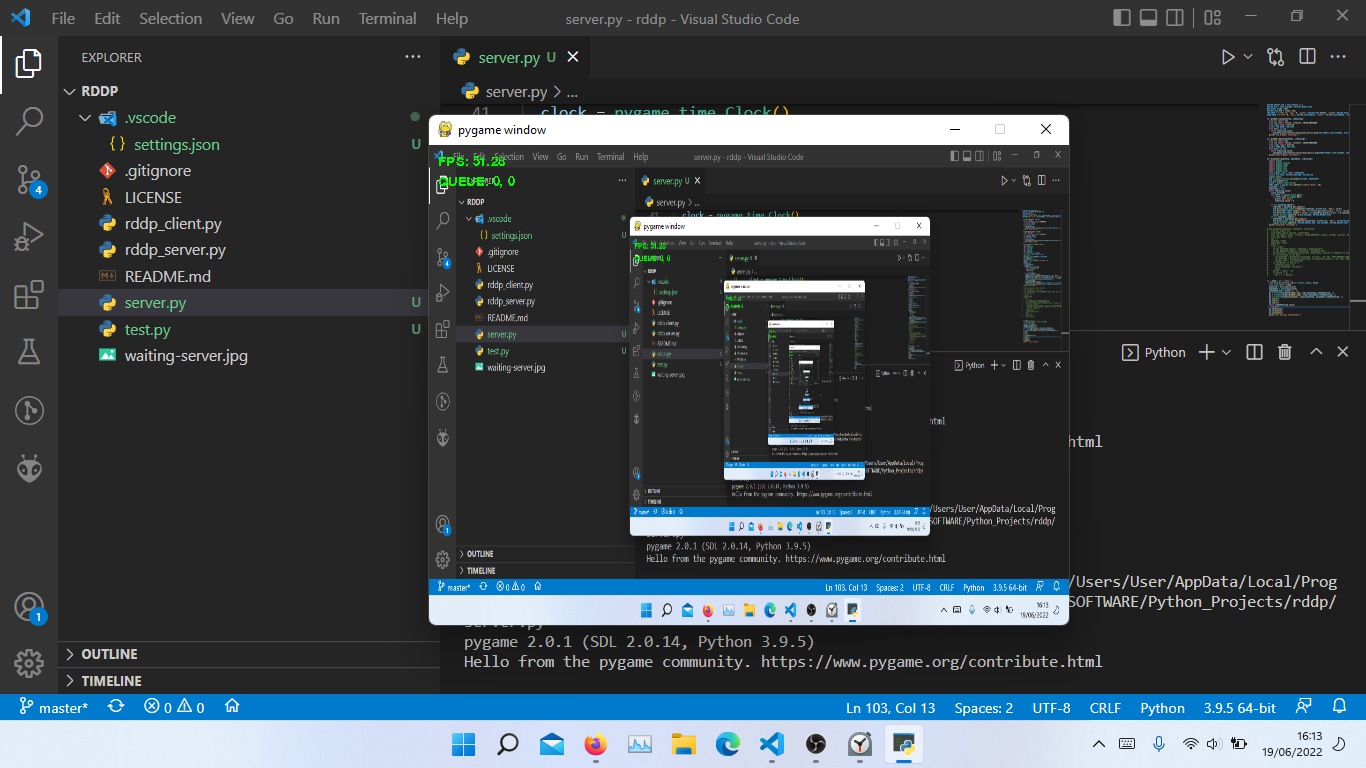
现在我得到了60个FPS :)
页面原文内容由Stack Overflow提供。腾讯云小微IT领域专用引擎提供翻译支持
原文链接:
https://stackoverflow.com/questions/72674737
复制相关文章
相似问题
腾讯云开发者

Copyright © 2013 - 2026 Tencent Cloud. All Rights Reserved. 腾讯云 版权所有
深圳市腾讯计算机系统有限公司 ICP备案/许可证号:粤B2-20090059  粤公网安备44030502008569号
腾讯云计算(北京)有限责任公司 京ICP证150476号 | 京ICP备11018762号