
如何使用IEnumerable<string>替换TextReader?
我正在做一个TimeRegistry。我有一个正在运行的C#程序,它可以读取和XML文件,从服务器下载新数据,将其添加到XML文件,并将数据从XML文件导出到SQL数据库。我要做的是跳过XML文件作为输入的部分。我希望从SQL数据库中选择数据,使用它从服务器获取数据,然后将其添加到SQL数据库中。
但问题是,我使用的SDK只接受某种类型的输入。我已经添加了包含此类型的类。为了更好地理解我的问题,我还添加了一个工作代码示例和新的非工作代码示例。请有人帮助我将字符串列表转换为可以反序列化为Events类型的流吗?(或者对解决这个问题有更好的主意)
http://sqlfiddle.com/#!9/0f856/8
工作的原始样本
    public static Events Load(string aFileName)
    {
        XmlSerializer xs = new XmlSerializer(typeof(Events));
        TextReader tr = new StreamReader(aFileName);
        try
        {
            return (Events)xs.Deserialize(tr);
        }
        finally
        {
            tr.Close();
            tr.Dispose();
        }
    }
不起作用的新样本
    public static Events Load()
    {
        XmlSerializer xs = new XmlSerializer(typeof(Events));
        using (IDbConnection connection = new SqlConnection(Helper.CnnVal("TimeReg")))
        {
            try
            {
                IEnumerable<string> lst = connection.Query<string>($"select * from Events");
                var stream = new ByteStream(Encode(lst, Encoding.UTF8));
                return (Events)xs.Deserialize(stream);
            }
            finally
            {
                connection.Close();
            }
         }
     }
类包含所需的数据类型。
    public static Events Load(string aFileName)
    {
        XmlSerializer xs = new XmlSerializer(typeof(Events));
        TextReader tr = new StreamReader(aFileName);
        try
        {
            return (Events)xs.Deserialize(tr);
        }
        finally
        {
            tr.Close();
            tr.Dispose();
        }
    }


    public Events()
    {
        EventList = new List<ReadEventRequestResponse.DATA>();
    }

    static public class ReadEventRequestResponse
    {
        [XmlRoot(ElementName = "DATA")]
        public class DATA
        {
            [XmlAttribute(AttributeName = "dt")]
            public string LocalTime { get; set; }
输入到WriteXML
    public class Events
{
    public List<ReadEventRequestResponse.DATA> EventList { get; set; }

    public Events()
    {
        EventList = new List<ReadEventRequestResponse.DATA>();
    }
    const string FILENAME = @"C:\Users\...\Documents\Events_check.xml";
    public static Events Load(string aFileName)
    {

        DataTable dt = null;
        XmlSerializer xs = new XmlSerializer(typeof(Events));
        using (SqlConnection connection = new SqlConnection("connection string")
        {
            try
            {
                string query = "select * from Events";
                SqlDataAdapter adapter = new SqlDataAdapter(query, connection);
                dt = new DataTable("Events");
                adapter.Fill(dt);
            }
            finally
            {
                connection.Close();
            }
            dt.WriteXml(FILENAME);
            MemoryStream ms = new MemoryStream();
            dt.WriteXml(ms);
            ms.Position = 0;
            try
            {
                return (Events)xs.Deserialize(ms);
            }
            finally
            {
                ms.Close();
                ms.Dispose();
            }

        }
    }
使用WriteXML输出的DataTable
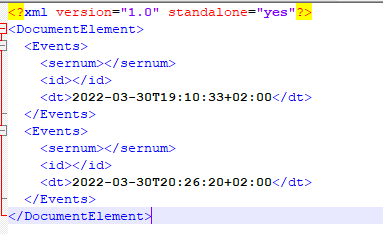
使用WriteXML输出的DataSet
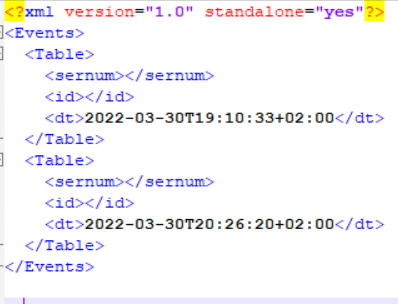
期望输出XML

回答 2
Stack Overflow用户
发布于 2022-06-17 13:02:45
尝试下面的代码:
using System;
using System.Collections.Generic;
using System.Linq;
using System.Text;
using System.Xml;
using System.Xml.Linq;
using System.Data;
using System.Data.SqlClient;
using System.IO;


namespace ConsoleApplication23
{

    class Program
    {
        const string FILENAME = @"c:\temp\test.xml";
        static void Main(string[] args)
        {
            DataTable dt = null;
            DataRow row = null;
            MemoryStream ms = null;
            //add test data to datatable
            //this is equivalent to the adapter.Fill below.
            //remove this code when getting data from query
            dt = new DataTable();
            dt.Columns.Add("sernum", typeof(int));
            dt.Columns.Add("id",typeof(string));
            dt.Columns.Add("dt", typeof(DateTime));
            row = dt.Rows.Add();
            row["dt"] = DateTime.Parse("2022-03-30T19:10:33+02:00");
            row = dt.Rows.Add();
            row["dt"] = DateTime.Parse("2022-03-30T19:10:33+02:00");

            string ident = "<?xml version=\"1.0\" encoding=\"utf-8\"?><Events xmlns:xsi=\"w3.org/2001/XMLSchema-instaqnce\" xmlns:xsd=\"w3.org/2001/XMLSchema\"></Events>";
            XDocument doc = XDocument.Parse(ident);
            XElement events = doc.Root;
            XElement eventList = new XElement("EventList");
            events.Add(eventList);


            //move this code to after the try below where query files the datatable
            foreach(DataRow dataRow in dt.AsEnumerable())
            {
                XElement data = new XElement("DATA", new XAttribute("dt", dataRow.Field<DateTime>("dt").ToString("yyyy-MM-dd HH:mm")));
                eventList.Add(data);
            }
            doc.Save(FILENAME);
            ms = new MemoryStream();
            doc.Save(ms);
            ms.Position = 0;

            Console.ReadLine();


            SqlConnection conn = new SqlConnection("connection string");
            using (SqlConnection connection = new SqlConnection())
            {
                try
                {
                    string query = "select * from Events";
                    SqlDataAdapter adapter = new SqlDataAdapter(query, connection);
                    dt = new DataTable();
                    adapter.Fill(dt);
                }
                finally
                {
                    connection.Close();
                }


                doc.Save(FILENAME);
                ms = new MemoryStream();
                doc.Save(ms);
                ms.Position = 0;
                try
                {

                }
                finally
                {
                    ms.Close();
                    ms.Dispose();
                }

            }

        }
    }

}Stack Overflow用户
发布于 2022-06-22 09:28:52
server可以为您生成xml,因为这就是您要像解析字符串那样解析字符串的内容,请尝试如下
IEnumerable<string> lst = connection.Query<string>("select * from Events FOR XML PATH");假设连接查询确实返回一个有效的字符串结果,如果所有行现在都在XML字符串中。如果不让我知道,我也将验证这个部分的语义:)
https://stackoverflow.com/questions/72659174
复制相似问题
腾讯云开发者

Copyright © 2013 - 2026 Tencent Cloud. All Rights Reserved. 腾讯云 版权所有
深圳市腾讯计算机系统有限公司 ICP备案/许可证号:粤B2-20090059  粤公网安备44030502008569号
腾讯云计算(北京)有限责任公司 京ICP证150476号 | 京ICP备11018762号