
'tokenURI‘未定义为no-undef。
'tokenURI‘未定义为no-undef。
提问于 2022-06-17 07:00:51
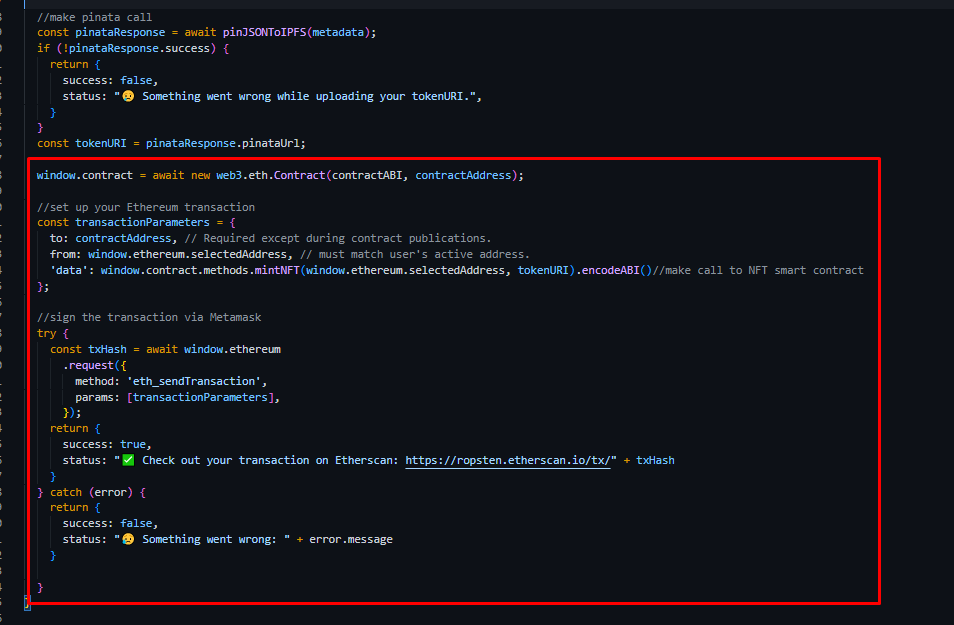
我正在创建一个NFT网站使用以下教程https://docs.alchemy.com/alchemy/tutorials/nft-minter。我遵循了教程的最后一步。当我试图在本地主机上运行这段代码时,我遇到了一个错误"tokenURI‘是没有定义的undef“。你对解决这个问题有什么建议吗?
import React from 'react';
import ReactDOM from 'react-dom';

import {pinJSONToIPFS} from './pinata.js'
require('dotenv').config();
const alchemyKey = process.env.REACT_APP_ALCHEMY_KEY;
const { createAlchemyWeb3 } = require("@alch/alchemy-web3");
const web3 = createAlchemyWeb3(alchemyKey);

const contractABI = require('../contract-abi.json')
const contractAddress = "0x4C4a07F737Bf57F6632B6CAB089B78f62385aCaE";

export const mintNFT = async(url, name, description) => {
    //error handling
    if (url.trim() == "" || (name.trim() == "" || description.trim() == "")) {
           return {
               success: false,
               status: "❗Please make sure all fields are completed before minting.",
           }
     }

     //make metadata
     const metadata = new Object();
     metadata.name = name;
     metadata.image = url;
     metadata.description = description;

     //make pinata call
     const pinataResponse = await pinJSONToIPFS(metadata);
     if (!pinataResponse.success) {
         return {
             success: false,
             status: " Something went wrong while uploading your tokenURI.",
         }
     }
     const tokenURI = pinataResponse.pinataUrl;
   }

window.contract = await new web3.eth.Contract(contractABI, contractAddress);

//set up your Ethereum transaction
const transactionParameters = {
    to: contractAddress, // Required except during contract publications.
    from: window.ethereum.selectedAddress, // must match user's active address.
    'data': window.contract.methods.mintNFT(window.ethereum.selectedAddress, tokenURI).encodeABI()//make call to NFT smart contract
};

//sign the transaction via Metamask
try {
const txHash = await window.ethereum
    .request({
        method: 'eth_sendTransaction',
        params: [transactionParameters],
    });
return {
    success: true,
    status: "✅ Check out your transaction on Etherscan: https://ropsten.etherscan.io/tx/" + txHash
}
} catch (error) {
return {
    success: false,
    status: " Something went wrong: " + error.message
}

}

export const connectWallet = async () => {
    if (window.ethereum) {
      try {
        const addressArray = await window.ethereum.request({
          method: "eth_requestAccounts",
        });
        const obj = {
          status: " Write a message in the text-field above.",
          address: addressArray[0],
        };
        return obj;
      } catch (err) {
        return {
          address: "",
          status: " " + err.message,
        };
      }
    } else {
      return {
        address: "",
        status: (
          <span>
            <p>
              {" "}
              {" "}
              <a target="_blank" href={`https://metamask.io/download.html`}>
                You must install Metamask, a virtual Ethereum wallet, in your
                browser.
              </a>
            </p>
          </span>
        ),
      };
    }
  };

  export const getCurrentWalletConnected = async () => {
    if (window.ethereum) {
      try {
        const addressArray = await window.ethereum.request({
          method: "eth_accounts",
        });
        if (addressArray.length > 0) {
          return {
            address: addressArray[0],
            status: " Write a message in the text-field above.",
          };
        } else {
          return {
            address: "",
            status: " Connect to Metamask using the top right button.",
          };
        }
      } catch (err) {
        return {
          address: "",
          status: " " + err.message,
        };
      }
    } else {
      return {
        address: "",
        status: (
          <span>
            <p>
              {" "}
              {" "}
              <a target="_blank" href={`https://metamask.io/download.html`}>
                You must install Metamask, a virtual Ethereum wallet, in your
                browser.
              </a>
            </p>
          </span>
        ),
      };
    }
};回答 1
Stack Overflow用户
发布于 2022-06-17 19:21:19
在检查您所链接的文档之后,您似乎将这段代码放在函数之外,而它应该在函数中。
import React from 'react';

import { pinJSONToIPFS } from './pinata.js'
require('dotenv').config();
const alchemyKey = process.env.REACT_APP_ALCHEMY_KEY;
const { createAlchemyWeb3 } = require("@alch/alchemy-web3");
const web3 = createAlchemyWeb3(alchemyKey);

const contractABI = require('../contract-abi.json')
const contractAddress = "0x4C4a07F737Bf57F6632B6CAB089B78f62385aCaE";
let tokenURI;

export const mintNFT = async (url, name, description) => {
  //error handling
  if (url.trim() == "" || (name.trim() == "" || description.trim() == "")) {
    return {
      success: false,
      status: "❗Please make sure all fields are completed before minting.",
    }
  }

  //make metadata
  const metadata = new Object();
  metadata.name = name;
  metadata.image = url;
  metadata.description = description;

  //make pinata call
  const pinataResponse = await pinJSONToIPFS(metadata);
  if (!pinataResponse.success) {
    return {
      success: false,
      status: " Something went wrong while uploading your tokenURI.",
    }
  }
  const tokenURI = pinataResponse.pinataUrl;

  window.contract = await new web3.eth.Contract(contractABI, contractAddress);

  //set up your Ethereum transaction
  const transactionParameters = {
    to: contractAddress, // Required except during contract publications.
    from: window.ethereum.selectedAddress, // must match user's active address.
    'data': window.contract.methods.mintNFT(window.ethereum.selectedAddress, tokenURI).encodeABI()//make call to NFT smart contract
  };

  //sign the transaction via Metamask
  try {
    const txHash = await window.ethereum
      .request({
        method: 'eth_sendTransaction',
        params: [transactionParameters],
      });
    return {
      success: true,
      status: "✅ Check out your transaction on Etherscan: https://ropsten.etherscan.io/tx/" + txHash
    }
  } catch (error) {
    return {
      success: false,
      status: " Something went wrong: " + error.message
    }

  }
}


export const connectWallet = async () => {
  if (window.ethereum) {
    try {
      const addressArray = await window.ethereum.request({
        method: "eth_requestAccounts",
      });
      const obj = {
        status: " Write a message in the text-field above.",
        address: addressArray[0],
      };
      return obj;
    } catch (err) {
      return {
        address: "",
        status: " " + err.message,
      };
    }
  } else {
    return {
      address: "",
      status: (
        <span>
          <p>
            {" "}
            {" "}
            <a target="_blank" href={`https://metamask.io/download.html`}>
              You must install Metamask, a virtual Ethereum wallet, in your
              browser.
            </a>
          </p>
        </span>
      ),
    };
  }
};

export const getCurrentWalletConnected = async () => {
  if (window.ethereum) {
    try {
      const addressArray = await window.ethereum.request({
        method: "eth_accounts",
      });
      if (addressArray.length > 0) {
        return {
          address: addressArray[0],
          status: " Write a message in the text-field above.",
        };
      } else {
        return {
          address: "",
          status: " Connect to Metamask using the top right button.",
        };
      }
    } catch (err) {
      return {
        address: "",
        status: " " + err.message,
      };
    }
  } else {
    return {
      address: "",
      status: (
        <span>
          <p>
            {" "}
            {" "}
            <a target="_blank" href={`https://metamask.io/download.html`}>
              You must install Metamask, a virtual Ethereum wallet, in your
              browser.
            </a>
          </p>
        </span>
      ),
    };
  }
};页面原文内容由Stack Overflow提供。腾讯云小微IT领域专用引擎提供翻译支持
原文链接:
https://stackoverflow.com/questions/72655473
复制相关文章
相似问题
腾讯云开发者

Copyright © 2013 - 2026 Tencent Cloud. All Rights Reserved. 腾讯云 版权所有
深圳市腾讯计算机系统有限公司 ICP备案/许可证号:粤B2-20090059  粤公网安备44030502008569号
腾讯云计算(北京)有限责任公司 京ICP证150476号 | 京ICP备11018762号