
Power自定义列以获取级别
我已经像这样创建了成本账户
这就是在Power中导入数据时的样子。
我不知道如何在Power中开发一个可以返回级别同时维护关系的自定义列。
例如
- 对于站点工作,我在自定义列中得到一个值“级别0”。
- 对于子结构,我在自定义列子到站点WORKS父级中得到一个值“Level 1”
- 对于在未分类的土壤中挖掘,我在自定义列子到子结构父母中得到一个“二级”值
该列指示子属性属于哪个父级。如果为762,则为“1级”至762“级1”。
有人能帮忙处理这个用例吗?
非常感谢。
回答 3
Stack Overflow用户
发布于 2022-06-28 13:15:37
由于您在Power中工作,您可能需要尝试使用DAX的方法。
这种方法可能会更好,原因有二:
- 这要简单得多。
- 它可以自动适应未来水平的变化,比如你增加了NBA的水平。(使用我以前的基于M的方法,如果添加了另一个级别,就必须编辑代码--这肯定不是最优的。)
所以,试试这个吧:
将原始表加载到Power中。然后切换到数据视图来查看它。
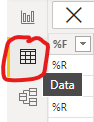
然后单击“列工具”>“新建列”,并将其输入公式框:
Hierarchy = PATH(Sheet1[acct_id],Sheet1[parent_acct_id])然后再次单击New列并将其输入公式框:
Level = "Level " & CONVERT(LEN(Sheet1[Hierarchy])-LEN(SUBSTITUTE(Sheet1[Hierarchy],"|","")),STRING)然后点击Enter键,或者点击公式框之外的任何地方。
这样就行了。你应该看到这样的东西:
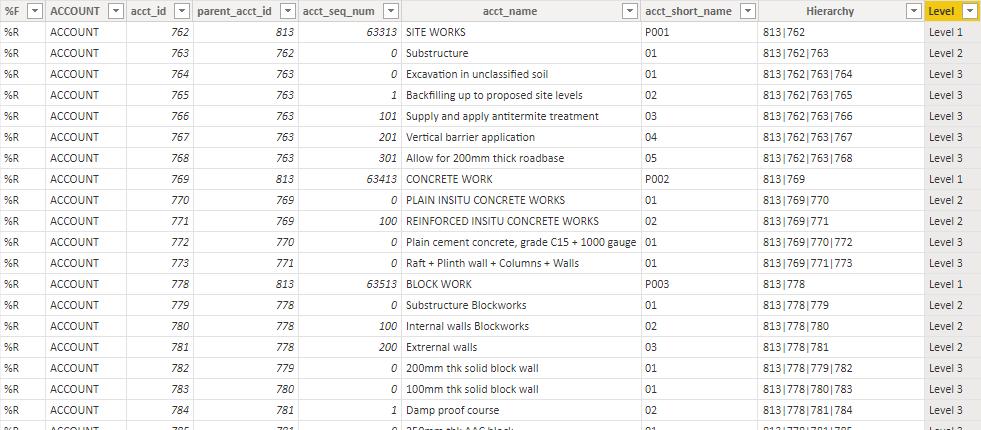
你可能会觉得这很有帮助。我做到了。
Stack Overflow用户
发布于 2022-06-22 20:16:18
这是更新根据你最近的评论,你添加了NBA。它需要一个不同的,也许更好(?)比我最初的答案更接近。
我从一个像Power Query中的你这样的表开始:
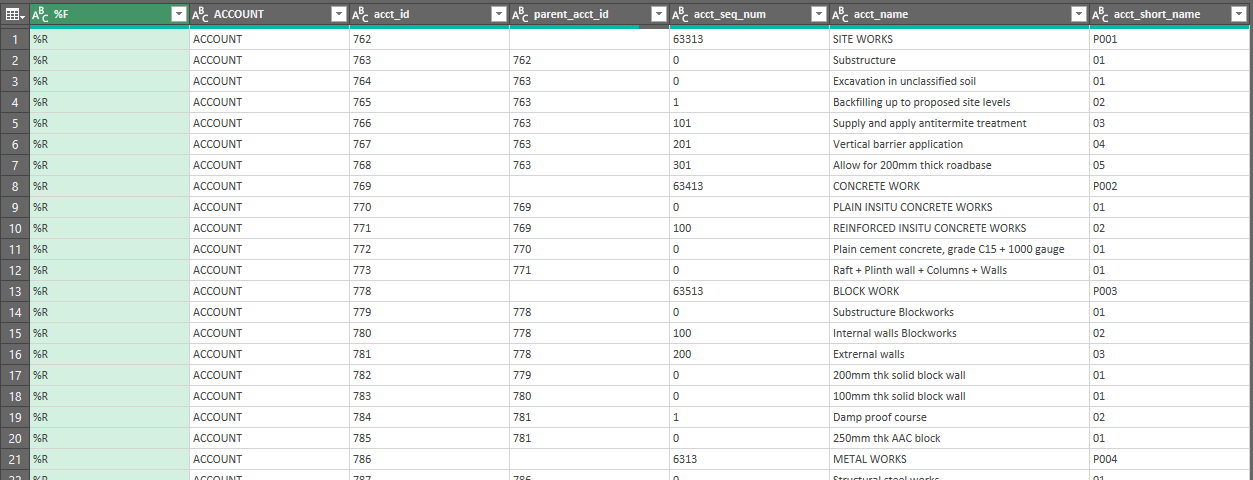
我将其命名为"Table“,并将其引用如下:
let
    Source = Table,
    #"Added Custom" = Table.AddColumn(Source, "Custom", each try if [parent_acct_id] = "" then [acct_short_name] else Source[acct_short_name]{List.PositionOf(Source[acct_id],[parent_acct_id])} & "." & [acct_short_name] otherwise [acct_short_name]),
    #"Added Custom1" = Table.AddColumn(#"Added Custom", "Custom.1", each  try #"Added Custom"[Custom]{List.PositionOf(#"Added Custom"[acct_id],[parent_acct_id])} & "." & [acct_short_name] otherwise [Custom] ),
    #"Added Custom2" = Table.AddColumn(#"Added Custom1", "Custom.2", each try #"Added Custom1"[Custom.1]{List.PositionOf(#"Added Custom1"[acct_id],[parent_acct_id])} & "." & [acct_short_name] otherwise [Custom.1]),
    #"Added Custom3" = Table.AddColumn(#"Added Custom2", "Custom.3", each "Level " & Text.From(List.Count(List.FindText(Text.ToList([Custom.2]),".")))),
    #"Removed Other Columns" = Table.SelectColumns(#"Added Custom3",{"acct_name", "Custom.2", "Custom.3"}),
    #"Sorted Rows" = Table.Sort(#"Removed Other Columns",{{"Custom.2", Order.Ascending}})
in
    #"Sorted Rows"
它给了我这样的结果:
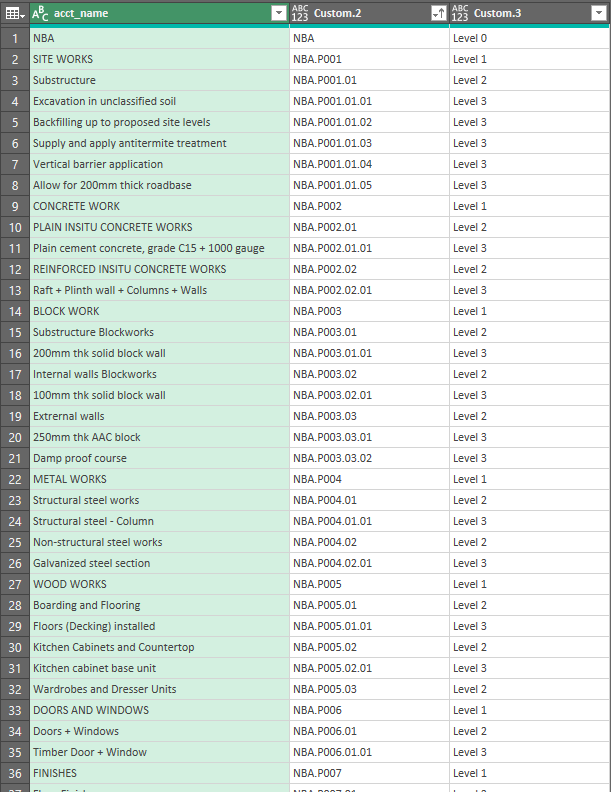
假设您在post中共享了Power查询中的表,您只需要更改对Table1的引用就可以使用我的代码。
Stack Overflow用户
发布于 2022-06-25 01:02:14
谢谢你帮我救了马克·平森。我使用的代码与您提供的代码相同,结果略有不同,如下所示:捕捉

let
    Source = ALL_XER,
    #"Filtered Rows" = Table.SelectRows(Source, each ([TABLE REF] = "ACCOUNT") and ([Column1] <> "%T")),
    #"Promoted Headers" = Table.PromoteHeaders(#"Filtered Rows", [PromoteAllScalars=true]),
    #"Filtered Rows1" = Table.SelectRows(#"Promoted Headers", each ([#"%F"] = "%R")),
    #"Removed Columns" = Table.RemoveColumns(#"Filtered Rows1",{"acct_descr", "", "_1", "_2", "_3", "_4", "_5", "_6", "_7", "_8", "_9", "_10", "_11", "_12", "_13", "_15", "_16", "_17", "_18", "_19", "_20", "_21", "_22", "_23", "_24", "_25", "_26", "_27", "_28", "_29", "_30", "_31", "_32", "_33", "_34", "_35", "_36", "_37", "_38", "_39", "_40", "_41", "_42", "_43", "_44", "_45", "_46", "_47", "_48", "_49", "_50", "_51", "_52", "_53", "_54", "_55", "_14"}),
    #"Removed Duplicates" = Table.Distinct(#"Removed Columns", {"acct_id"}),
    #"Added Custom" = Table.AddColumn(#"Removed Duplicates", "Custom", each try if [parent_acct_id] = "" then [acct_short_name] else Source[acct_short_name]{List.PositionOf(Source[acct_id],[parent_acct_id])}&"."&[acct_short_name] otherwise [acct_short_name]),
    #"Added Custom1" = Table.AddColumn(#"Added Custom", "Custom.1", each  try #"Added Custom"[Custom]{List.PositionOf(#"Added Custom"[acct_id],[parent_acct_id])} & "." & [acct_short_name] otherwise [Custom] ),
    #"Added Custom2" = Table.AddColumn(#"Added Custom1", "Custom.2", each try #"Added Custom1"[Custom.1]{List.PositionOf(#"Added Custom1"[acct_id],[parent_acct_id])} & "." & [acct_short_name] otherwise [Custom.1]),
    #"Added Custom3" = Table.AddColumn(#"Added Custom2", "Custom.3", each "Level " & Text.From(List.Count(List.FindText(Text.ToList([Custom.2]),".")))),
    #"Removed Other Columns" = Table.SelectColumns(#"Added Custom3",{"acct_name", "Custom.2", "Custom.3"}),
    #"Sorted Rows" = Table.Sort(#"Removed Other Columns",{{"Custom.2", Order.Ascending}})
in
#"Sorted Rows"https://stackoverflow.com/questions/72639870
复制相似问题
腾讯云开发者

Copyright © 2013 - 2026 Tencent Cloud. All Rights Reserved. 腾讯云 版权所有
深圳市腾讯计算机系统有限公司 ICP备案/许可证号:粤B2-20090059  粤公网安备44030502008569号
腾讯云计算(北京)有限责任公司 京ICP证150476号 | 京ICP备11018762号