
当RShiny switchInput在uiOutput中时,它的样式如何?
当RShiny switchInput在uiOutput中时,它的样式如何?
提问于 2022-06-13 17:24:07
我以前曾在UI中使用以下样式标记来为来自ShinyWidgets的ShinyWidgets样式设置样式:
#switchInput color while on
  tags$head(tags$style(HTML('.bootstrap-switch .bootstrap-switch-handle-off.bootstrap-switch-danger,
                                       .bootstrap-switch .bootstrap-switch-handle-on.bootstrap-switch-danger {
                                        background: #eef4fa;
                                        color: black;
                                        }'))),

  #switchInput color while off
  tags$head(tags$style(HTML('.bootstrap-switch .bootstrap-switch-handle-off.bootstrap-switch-success,
                                       .bootstrap-switch .bootstrap-switch-handle-on.bootstrap-switch-success {
                                        background: #fdf1f1;
                                        color: black;
                                        }'))),
但是,现在我已经将开关呈现为uiOutput,然后是renderUI,这些标记似乎没有被识别。
当开关是通过uiOutput生成的,而不是直接放到ui中时,我该如何设计开关的开、关版本呢?
library(shiny)
library(shinyjs)
library(bslib)
library(shinyBS)
library(shinyWidgets)

ui <- fluidPage(

  #switchInput color while on
  tags$head(tags$style(HTML('.bootstrap-switch .bootstrap-switch-handle-off.bootstrap-switch-danger,
                                       .bootstrap-switch .bootstrap-switch-handle-on.bootstrap-switch-danger {
                                        background: #eef4fa;
                                        color: black;
                                        }'))),

  #switchInput color while off
  tags$head(tags$style(HTML('.bootstrap-switch .bootstrap-switch-handle-off.bootstrap-switch-success,
                                       .bootstrap-switch .bootstrap-switch-handle-on.bootstrap-switch-success {
                                        background: #fdf1f1;
                                        color: black;
                                        }'))),


  fluidRow(
    column(2,
           offset = 5,
           align = "center",
           uiOutput('log_axis_output')
    )),


)

server <- function(input, output) {

  output$log_axis_output <- renderUI({

    switchInput(
      inputId = "log_axis1",
      offLabel = "Log X\naxis?",
      onLabel = "Normal\nX axis",
      value = FALSE,
      offStatus = "success",
      onStatus = "danger",
      disabled = FALSE)

  })

}

# Run the application
shinyApp(ui = ui, server = server)回答 1
Stack Overflow用户
回答已采纳
发布于 2022-06-13 21:07:46
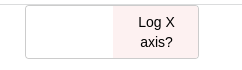
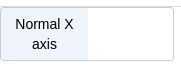
这不是R码的问题。这是CSS代码的问题所在。
您的CSS选择器没有足够的优先级作为原始样式选择器。
若要修复,请更改为:
    tags$head(tags$style(HTML('.bootstrap-switch .bootstrap-switch-handle-off.bootstrap-switch-danger,
                                       .bootstrap-switch .bootstrap-switch-container .bootstrap-switch-handle-on.bootstrap-switch-danger {
                                        background: #eef4fa;
                                        color: black;
                                        }'))),

    #switchInput color while off
    tags$head(tags$style(HTML('.bootstrap-switch .bootstrap-switch-handle-off.bootstrap-switch-success,
                                       .bootstrap-switch .bootstrap-switch-container .bootstrap-switch-handle-off.bootstrap-switch-success {
                                        background: #fdf1f1;
                                        color: black;
}'))),我在中间增加了.bootstrap-switch-container以提高特异性水平。了解有关如何计算CSS特异性的更多信息。
另一种方法是使用!important,但通常不推荐使用它。
页面原文内容由Stack Overflow提供。腾讯云小微IT领域专用引擎提供翻译支持
原文链接:
https://stackoverflow.com/questions/72606798
复制相关文章
相似问题
腾讯云开发者

Copyright © 2013 - 2026 Tencent Cloud. All Rights Reserved. 腾讯云 版权所有
深圳市腾讯计算机系统有限公司 ICP备案/许可证号:粤B2-20090059  粤公网安备44030502008569号
腾讯云计算(北京)有限责任公司 京ICP证150476号 | 京ICP备11018762号