
在Laravel中向多个图像上传添加标题或描述
在Laravel中向多个图像上传添加标题或描述
提问于 2022-06-12 13:47:15
因此,我试图上传一个项目的图像,每个图像可以有自己的描述或说明。我正试图通过项目创建表单来完成这个任务。现在,除了在project_images表中获得重复的条目(因为嵌套的foreach循环)之外,所有东西都正常工作,请看代码的概要结构--特别是storProject方法中的逻辑--如果有人能帮我的话,我将永远感激。谢谢。
我用的是拉拉维尔和Livewire。
模型
项目模型
public function up()
{
    Schema::create('projects', function (Blueprint $table) {
        $table->id();
        $table->unsignedBigInteger('user_id');
        $table->foreign('user_id')->references('id')->on('users');
        $table->string('title');
        $table->integer('budget');
        $table->string('proposed_by');
        $table->string('executed_by');
        $table->string('status')->nullable();
        $table->integer('progress_indicator')->nullable();
        $table->date('starting_date');
        $table->date('completion_date')->nullable();
        $table->string('cover_image')->nullable();
        $table->mediumText('body')->nullable();
        $table->timestamps();
    });
}
Project_images模型
 public function up()
{
    Schema::create('project_images', function (Blueprint $table) {
        $table->id();
        $table->string('images');
        $table->string('caption')->nullable();
        $table->UnsignedBigInteger('project_id');
        $table->foreign('project_id')->references('id')->on('projects')->onDelete('cascade');
        $table->timestamps();
    });
}
表单
<x-slot name="content">
        <x-errors />
        <div class="space-y-8 divide-y divide-gray-200  mt-10">

            <form method="#" enctype="multipart/form-data">


                    @if ($projectImages)
                        Images Preview:
                        <div class="flex flex-row m-8 ">

                            @foreach ($projectImages as $key => $projectImage)
                                <div class="flex flex-col gap-3">
                                    <img width="100%" src="{{ $projectImage->temporaryUrl() }}">
                                    <x-input placeholder="Caption"
                                        wire:model.defer="captions.{{ $key }}" />
                                </div>
                            @endforeach
                        </div>
                    @endif
                </div>

                <label class="inline-block mb-2 text-gray-500">Upload
                    Projects Images</label>
                <div class="flex items-center justify-center w-full">
                    <label
                        class="flex flex-col w-full h-32 border-2 border-dashed hover:bg-gray-500 hover:border-gray-300">
                        <div class="flex flex-col items-center justify-center pt-7">

                            <p class="pt-1 text-sm tracking-wider text-gray-400 group-hover:text-gray-600">
                                Select a photo</p>
                        </div>
                        <input wire:model="projectImages" type="file" multiple class="opacity-0" />
                    </label>
                </div>

                <x-textarea wire:model.lazy="body" label="Body" placeholder="write your article" />

            </form>

        </div>

    </x-slot>
    <x-slot name="footer">
        @if ($projectId)
            <div class="flex items-center gap-x-3 justify-end">
                <x-button wire:click="CancelConfirmation" label="Cancel" flat />
                <x-button type="submit" wire:click="updateProject" label="Update" wire:loading.attr="disabled"
                    primary />
            </div>
        @else
            <div class="flex items-center gap-x-3 justify-end">
                <x-button wire:click="CancelConfirmation" label="Cancel" flat />
                <x-button type="submit" wire:click="storeProject" label="Create" wire:loading.attr="disabled"
                    primary />
            </div>
        @endif

    </x-slot>

</x-jet-dialog-modal>
项目组件
public function storeProject()
{
    $this->validate([
        'title' => 'required',
        'status' => 'required',
        'budget' => 'required',
        'proposedBy' => 'required',
        'executedBy' => 'required',
        'startingDate' => 'required',
        'completionDate' => 'required',
        'progressIndicator' => 'required',
        'body'  => 'required',
        'image' => 'image|max:1024|nullable'
    ]);


    $image_name = $this->image->getClientOriginalName();
    $this->image->storeAs('public/photos', $image_name);
    $project = new Project();
    $project->user_id = auth()->user()->id;
    $project->title = $this->title;

    $project->status = $this->status;
    $project->budget = $this->budget;
    $project->proposed_by = $this->proposedBy;
    $project->executed_by = $this->executedBy;
    $project->starting_date = Carbon::create($this->startingDate);
    $project->completion_date = Carbon::create($this->completionDate);
    $project->progress_indicator = $this->progressIndicator;
    $project->body = $this->body;
    $project->cover_image = $image_name;
    $project->save();


    foreach ($this->projectImages as $projectImage) {

             $image_name = $projectImage->getClientOriginalName();

            $projectImage->storeAs('public/photos', $image_name);

            foreach ($this->captions as $caption) {

                $projectImages = new ProjectImages();
                $projectImages->project_id = $project->id;
                $projectImages->images = $image_name;
                $projectImages->caption = $caption;

               $projectImages->save();
            }


    }

    $this->notification()->success(
        $title = 'Success',
        $description = 'Project Created Successfully'
    );
    $this->reset();
}
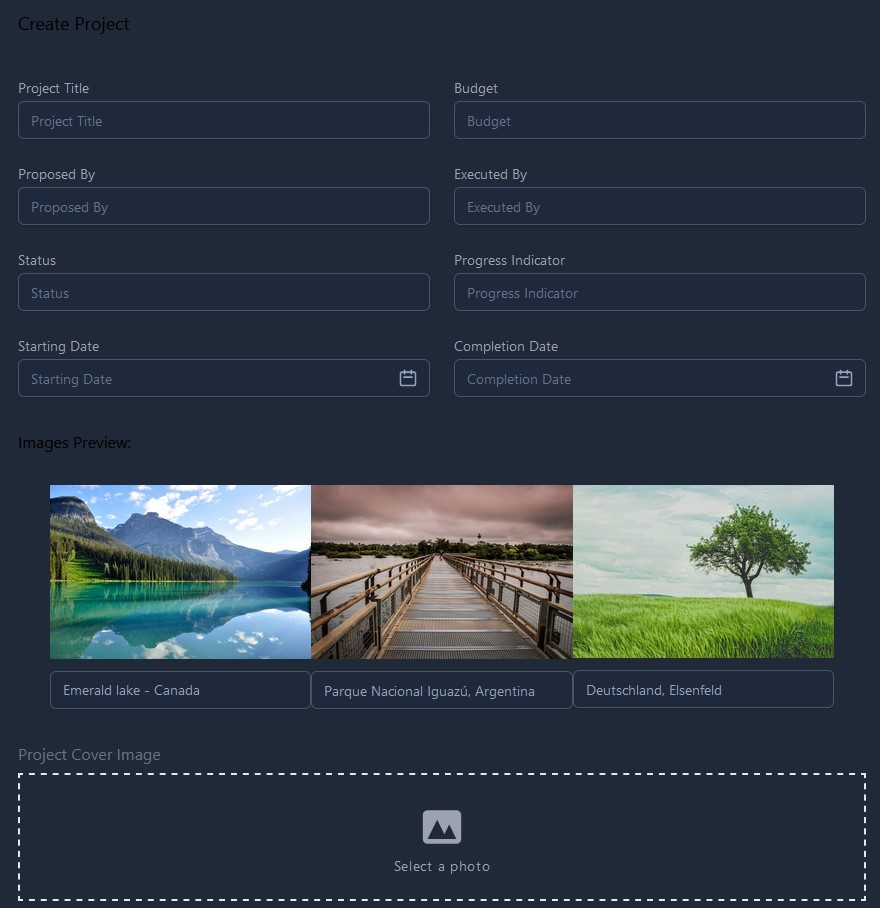
因此,您可以直观地看到我在这里所做的是表单的屏幕截图。
回答 1
Stack Overflow用户
回答已采纳
发布于 2022-06-12 14:12:11
我假设您只希望每个项目图像都有一个标题。如果是这样的话,那么嵌套的foreach循环是不必要的,并且将其更改为一个foreach应该可以解决这个问题。
foreach ($this->projectImages as $key => $value) {
        $image_name = $value->getClientOriginalName();
        $value->storeAs('public/photos', $image_name);
        $projectImages = new ProjectImages();
        $projectImages->project_id = $project->id;
        $projectImages->images = $image_name;
        $projectImages->caption = $this->captions[$key];
        $projectImages->save();
}页面原文内容由Stack Overflow提供。腾讯云小微IT领域专用引擎提供翻译支持
原文链接:
https://stackoverflow.com/questions/72592785
复制相关文章
相似问题
腾讯云开发者

Copyright © 2013 - 2026 Tencent Cloud. All Rights Reserved. 腾讯云 版权所有
深圳市腾讯计算机系统有限公司 ICP备案/许可证号:粤B2-20090059  粤公网安备44030502008569号
腾讯云计算(北京)有限责任公司 京ICP证150476号 | 京ICP备11018762号