
将Strapi v4的默认WYSIWYG替换为TinyMCE
我正在使用Strapi v4启动一个新项目。我想用TinyMCE (使用微云)更改默认的WYSIWYG。
我阅读并遵循了以下内容:
- https://docs.strapi.io/developer-docs/latest/guides/registering-a-field-in-admin.html
- https://strapi.io/blog/replace-strapi-default-wysiwyg-editor-with-tiny-mce
- https://vbm.io/til/20220110-strapi-v4-wysiwyg-tinymce/
- https://www.tiny.cloud/docs/tinymce/6/react-cloud/
现在发行:
TinyMCE在运行strapi develop时不可见。
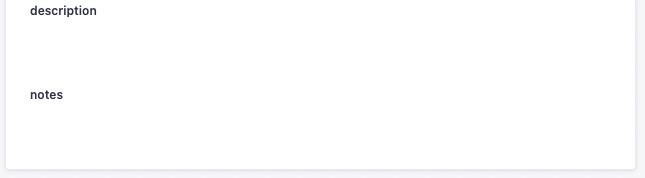
但是,在使用命令strapi develop --watch-admin进行测试时,它是可见的。
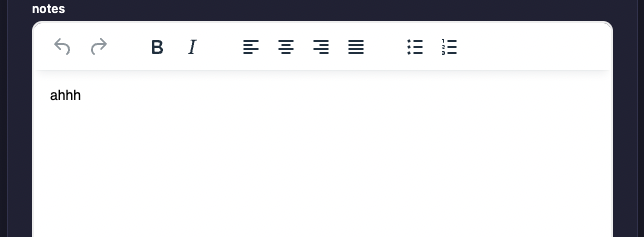
经过几个小时的尝试和阅读我之前多次提到的文章,我无法让它与strapi develop或strapi start一起工作。
这里是我的配置:
config/plugins.js
module.exports = ({ env }) => ({
  'wysiwyg': {
    enabled: true,
    resolve: './src/plugins/wysiwyg'
  },
});
src/plugins/wysiwyg/admin/src/components/MediaLib/index.js
import React from 'react';
import {prefixFileUrlWithBackendUrl, useLibrary} from '@strapi/helper-plugin';
import PropTypes from 'prop-types';

const MediaLib = ({isOpen, onChange, onToggle}) => {
  const {components} = useLibrary();
  const MediaLibraryDialog = components['media-library'];

  const handleSelectAssets = (files) => {
    const formattedFiles = files.map((f) => ({
      alt: f.alternativeText || f.name,
      url: prefixFileUrlWithBackendUrl(f.url),
      mime: f.mime,
    }));

    onChange(formattedFiles);
  };

  if (!isOpen) {
    return null;
  }

  return (
    <MediaLibraryDialog
      onClose={onToggle}
      onSelectAssets={handleSelectAssets}
    />
  );
};

MediaLib.defaultProps = {
  isOpen: false,
  onChange: () => {
  },
  onToggle: () => {
  },
};

MediaLib.propTypes = {
  isOpen: PropTypes.bool,
  onChange: PropTypes.func,
  onToggle: PropTypes.func,
};

export default MediaLib;
src/plugins/wysiwyg/admin/src/components/Tinymce/index.js
import React, {useRef} from 'react';
import {Editor} from '@tinymce/tinymce-react';
import PropTypes from 'prop-types';

const TinyEditor = ({onChange, name, value, disabled}) => {
  const onChangeRef = useRef(onChange);

  function onBlur(ev, editor) {
    const content = editor.getContent();
    onChangeRef.current({target: {name, value: content, type: 'wysiwyg'}});
  }

  return (
    <>
      <Editor
        apiKey="abc123"
        disabled={disabled}
        onInit={(evt, editor) => editorRef.current = editor}
        onBlur={onBlur}
        initialValue={value}
        init={{
          selector: 'textarea',
          height: 400,
          menubar: false,
          plugins: ['lists'],
          toolbar: 'undo redo',
          content_style: 'body { font-family:Helvetica,Arial,sans-serif; font-size:14px }'
        }}
      />
    </>
  );
}

TinyEditor.defaultProps = {
  value: '',
  disabled: false,
};

TinyEditor.propTypes = {
  onChange: PropTypes.func.isRequired,
  name: PropTypes.string.isRequired,
  value: PropTypes.string,
  disabled: PropTypes.bool,
};

export default TinyEditor;
src/plugins/wysiwyg/admin/src/components/Wysiwyg/index.js
import React, {useState} from 'react';
import PropTypes from 'prop-types';
import {Stack} from '@strapi/design-system/Stack';
import {Box} from '@strapi/design-system/Box';
import {Button} from '@strapi/design-system/Button';
import {Typography} from '@strapi/design-system/Typography';
import Landscape from '@strapi/icons/Landscape';
import MediaLib from '../MediaLib';
import Tinymce from '../Tinymce';
import {useIntl} from 'react-intl';

const Wysiwyg = ({
                   name,
                   onChange,
                   value,
                   intlLabel,
                   disabled,
                   error,
                   description,
                   required,
                 }) => {
  const {formatMessage} = useIntl();
  const [mediaLibVisible, setMediaLibVisible] = useState(false);

  const handleToggleMediaLib = () => setMediaLibVisible((prev) => !prev);

  const handleChangeAssets = (assets) => {
    let newValue = value ? value : '';

    assets.map((asset) => {
      if (asset.mime.includes('image')) {
        const imgTag = `<p><img src="${asset.url}" alt="${asset.alt}"></img></p>`;

        newValue = `${newValue}${imgTag}`;
      }

      // Handle videos and other type of files by adding some code
    });

    onChange({target: {name, value: newValue}});
    handleToggleMediaLib();
  };

  return (
    <>
      <Stack size={1}>

        <Box>
          <Typography variant="pi" fontWeight="bold">
            {formatMessage(intlLabel)}
          </Typography>
          {required && (
            <Typography variant="pi" fontWeight="bold" textColor="danger600">
              *
            </Typography>
          )}
        </Box>

        <Button
          startIcon={<Landscape/>}
          variant="secondary"
          fullWidth
          onClick={handleToggleMediaLib}
        >
          Media library
        </Button>

        <Tinymce
          disabled={disabled}
          name={name}
          onChange={onChange}
          value={value}
        />

        {error && (
          <Typography variant="pi" textColor="danger600">
            {formatMessage({id: error, defaultMessage: error})}
          </Typography>
        )}
        {description && (
          <Typography variant="pi">{formatMessage(description)}</Typography>
        )}

      </Stack>

      <MediaLib
        isOpen={mediaLibVisible}
        onChange={handleChangeAssets}
        onToggle={handleToggleMediaLib}
      />

    </>
  );
};

Wysiwyg.defaultProps = {
  description: '',
  disabled: false,
  error: undefined,
  intlLabel: '',
  required: false,
  value: '',
};

Wysiwyg.propTypes = {
  description: PropTypes.shape({
    id: PropTypes.string,
    defaultMessage: PropTypes.string,
  }),
  disabled: PropTypes.bool,
  error: PropTypes.string,
  intlLabel: PropTypes.shape({
    id: PropTypes.string,
    defaultMessage: PropTypes.string,
  }),
  name: PropTypes.string.isRequired,
  onChange: PropTypes.func.isRequired,
  required: PropTypes.bool,
  value: PropTypes.string,
};

export default Wysiwyg;
src/plugins/wysiwyg/admin/src/index.js
import pluginPkg from '../../package.json';
import pluginId from './pluginId';
import Initializer from './components/Initializer';
import Wysiwyg from './components/Wysiwyg';

const name = pluginPkg.strapi.name;

export default {
  register(app) {
    app.registerPlugin({
      id: pluginId,
      initializer: Initializer,
      isReady: false,
      name,
    });
    app.addFields({type: 'wysiwyg', Component: Wysiwyg});
  },

  bootstrap(app) {
  },
};
src/plugins/wysiwyg/package.json
{
  ....
  ...
  "dependencies": {
    "@tinymce/tinymce-react": "^4.1.0"
  },
  ...
  ....
}我的目标是能够使用和看到TinyMCE使用strapi develop或strapi start命令。
回答 2
Stack Overflow用户
发布于 2022-09-10 13:14:48
我想我找到了解决办法。如果您查看控制台,它表示在没有https://cdn.tiny.cloud的情况下运行时它无法加载--watch。因此,我所做的是在middleware.js文件中,在“指令”中添加了以下一行:
"script-src": [
            "https://cdn.tiny.cloud",
            "self",
            "'self'",
            "data:",
            "blob:",
],Stack Overflow用户
发布于 2022-11-08 16:50:44
将config/middleware.js文件更新为:
export default [
  'strapi::errors',
  {
    name: 'strapi::security',
    config: {
      contentSecurityPolicy: {
        useDefaults: true,
        directives: {
          'connect-src': ["'self'", 'https:'],
          'img-src': [
            "'self'",
            'data:',
            'blob:',
            'cdn.tiny.cloud',
          ],
          "script-src": [
            "cdn.tiny.cloud",
            "self",
            "'self'",
            "data:",
            "blob:",
          ],
          'media-src': [
            "'self'",
            'data:',
            'blob:',
            'cdn.tiny.cloud',
          ],
          upgradeInsecureRequests: null,
        },
      },
    },
  },
  'strapi::cors',
  // 'strapi::poweredBy',
  'strapi::logger',
  'strapi::query',
  'strapi::body',
  'strapi::session',
  'strapi::favicon',
  'strapi::public',
];https://stackoverflow.com/questions/72588758
复制相似问题
腾讯云开发者

Copyright © 2013 - 2026 Tencent Cloud. All Rights Reserved. 腾讯云 版权所有
深圳市腾讯计算机系统有限公司 ICP备案/许可证号:粤B2-20090059  粤公网安备44030502008569号
腾讯云计算(北京)有限责任公司 京ICP证150476号 | 京ICP备11018762号