
尝试使用剧作家选择电子邮件字段
尝试使用剧作家选择电子邮件字段
提问于 2022-06-11 13:36:41
使用剧作家,我试图在一个网站上做一个简单的登录操作。
这些步骤很简单:
- 点击登录按钮
- 尝试输入电子邮件(Playwright在这里失败)
我可以看到,选择器正在进入正确的字段,但未能将用户名输入到输入中(而不是超时)
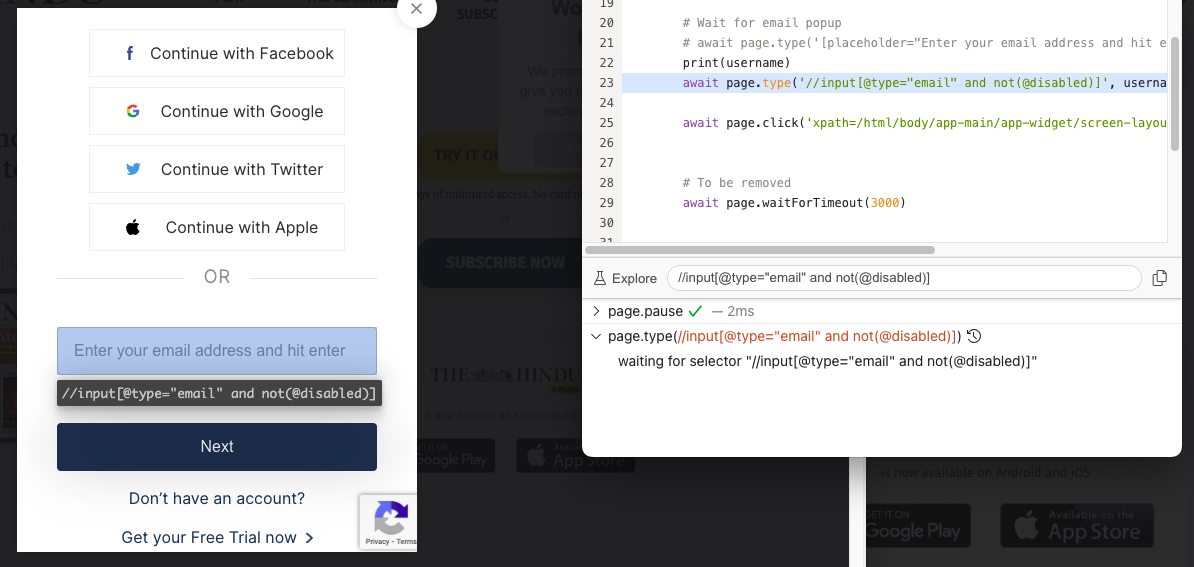
async def login(url, username, password):
    async with async_playwright() as p:
        browser = await p.chromium.launch(headless=False)
        page = await browser.new_page()
        await page.goto(url)

        print(await page.title())

        # Click login
        await page.click('xpath=/html/body/nav[2]/div/ul/li[4]/a')

        await page.pause()

        # Wait for email popup
        # await page.type('[placeholder="Enter your email address and hit enter"]', username)

        await page.type('//input[@type="email" and not(@disabled)]', username, delay = 10) # fails here
        await page.click('xpath=/html/body/app-main/app-widget/screen-layout/main/current-screen/div/screen-login/p[2]/button')


asyncio.run(login(url, username, password))
我得到的错误是超时:
   return await self.inner_send(method, params, False)
  File "/Users/work/Documents/Code/venv/lib/python3.9/site-packages/playwright/_impl/_connection.py", line 63, in inner_send
    result = next(iter(done)).result()
playwright._impl._api_types.TimeoutError: Timeout 30000ms exceeded.
=========================== logs ===========================
waiting for selector "//input[@type="email" and not(@disabled)]"
============================================================
这实际上意味着剧作家在等待这个元素而没有运气找到它,所以它在默认的30秒之后爆炸。
我试着用
selectors
- Text选择器
- CSS
我也试过使用selenium,奇怪的是,它的行为是一样的。
有关网站:https://epaper.thehindu.com/
我想在网站上输入的那个特定元素
<input _ngcontent-ttw-c171="" fieldloginemail="" type="email" placeholder="Enter your email address and hit enter" id="email" class="sub margin-0 empty" autocorrect="off" autocapitalize="off">问题是:为什么剧作家找不到这种输入?(剧作家探长可以在光天化日之下清楚地看到它)
回答 3
Stack Overflow用户
发布于 2022-06-13 13:08:03
整个元素是iFrame。先得到那个iFrame,然后键入。https://playwright.dev/docs/release-notes#frame-locators
Stack Overflow用户
发布于 2022-06-14 09:10:02
正如@senaid已经指出的,您想要访问的元素在iframe中。因此,您可以使用senaid提供的链接中给出的iframe定位器,然后使用它登录。
loc = await page.frameLocator('#piano-id-u4ajR').locator('#email');
await loc.type("username");Stack Overflow用户
发布于 2022-06-14 04:02:19
检查是否有iFrame存在。如果不存在的话,你可以试试这个。
const element = page.locator("//input[@type="email" and not(@disabled)]").first();
await element.focus();
await element.click();
await page.locator("//input[@type="email" and not(@disabled)]").first().fill(textTobeEntered)页面原文内容由Stack Overflow提供。腾讯云小微IT领域专用引擎提供翻译支持
原文链接:
https://stackoverflow.com/questions/72584813
复制相关文章
相似问题
腾讯云开发者

Copyright © 2013 - 2026 Tencent Cloud. All Rights Reserved. 腾讯云 版权所有
深圳市腾讯计算机系统有限公司 ICP备案/许可证号:粤B2-20090059  粤公网安备44030502008569号
腾讯云计算(北京)有限责任公司 京ICP证150476号 | 京ICP备11018762号