
平和nping的Rtt值有什么不同?
平和nping的Rtt值有什么不同?
提问于 2022-06-10 19:37:24
我正在使用ping从host2从host1点击
ping 10.0.0.1
PING 10.0.0.1 (10.0.0.1) 56(84) bytes of data.
64 bytes from 10.0.0.1: icmp_seq=1 ttl=64 time=0.290 ms
64 bytes from 10.0.0.1: icmp_seq=2 ttl=64 time=0.369 ms
当我使用nping时:
sudo nping --icmp 10.0.0.1Starting Nping 0.7.60 ( https://nmap.org/nping ) at 2022-06-10 12:28 PDT
SENT (0.0372s) ICMP [10.0.0.2 > 10.0.0.1 Echo request (type=8/code=0) id=52987 seq=1] IP [ttl=64 id=5607 iplen=28 ]
RCVD (0.2196s) ICMP [10.0.0.1 > 10.0.0.2 Echo reply (type=0/code=0) id=52987 seq=1] IP [ttl=64 id=2449 iplen=28 ]
...
Max rtt: 202.001ms | Min rtt: 15.774ms | Avg rtt: 97.067ms
Raw packets sent: 5 (140B) | Rcvd: 5 (230B) | Lost: 0 (0.00%)
Nping done: 1 IP address pinged in 4.13 seconds我的问题是:为什么我会有不同的rtts来做ping和nping呢?
回答 1
Stack Overflow用户
发布于 2022-06-14 13:33:47
RTT (往返时间)除其他外,取决于数据包的长度。数据包越长,以相同的媒体物理速度传送它所需的时间就越长。您使用的两个工具具有不同的默认数据包长度。
你可以用Wireshark自己检查一下情况。查看Length列。
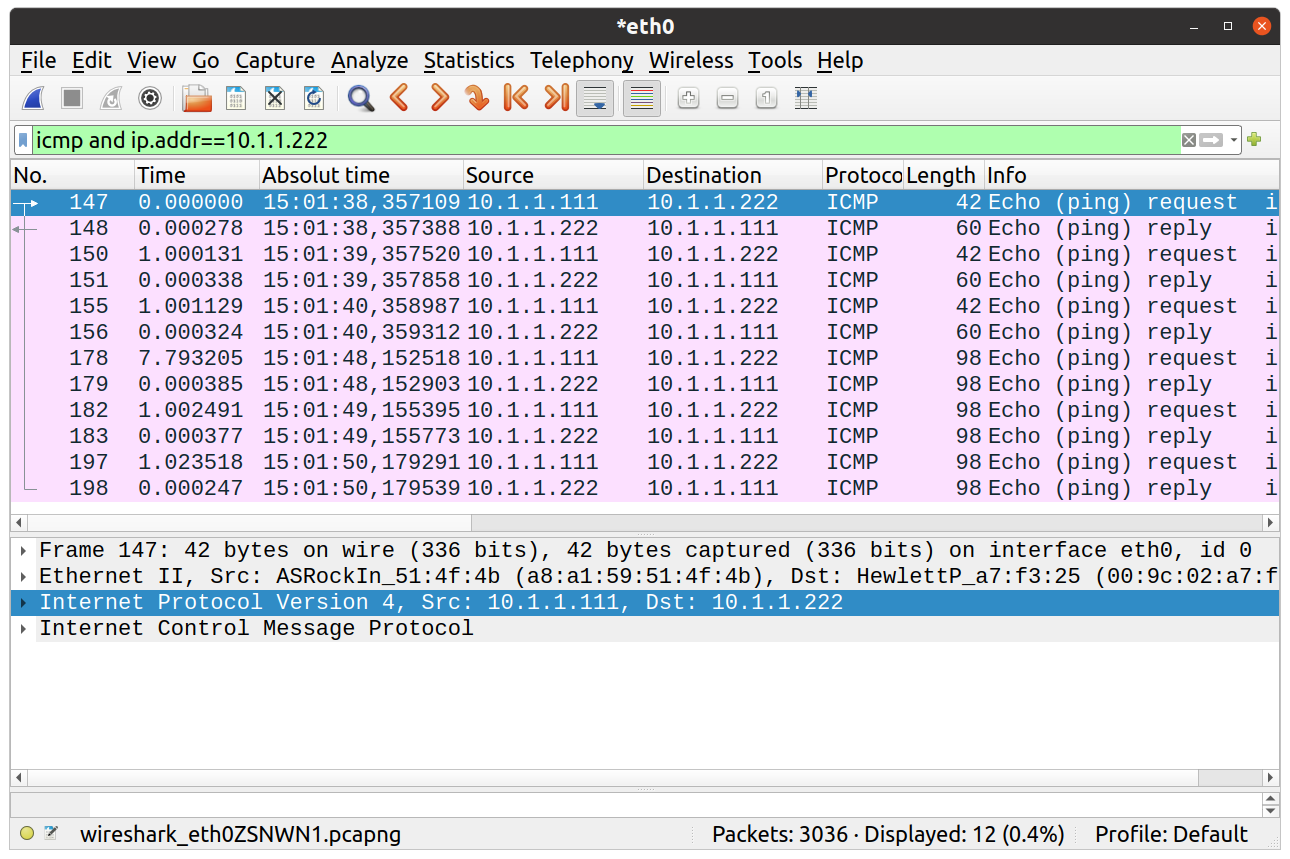
图中显示了使用nping (数据包147-156)生成的三个ping及其响应,以及使用ping (数据包178-198)生成的另外三个pings。
在 length 列中,您可以看到在第一种情况下,Echo request的长度为42 B,而Echo response的长度为60 B。在第二种情况下,请求和响应都是98字节。因为ping发送的数据比nping多,所以它的RTT更长。
您可以通过-s (数据包大小)参数来更改Linux中ping数据包中数据的长度。若要发送较短的ping数据包,请使用以下命令:
ping -s 16 <IP_address>

ping -s 0 <IP_address>在后一种情况下(当-s小于16),有时不显示RTT值。您必须通过使用Wireshark捕获数据来找到它们。
页面原文内容由Stack Overflow提供。腾讯云小微IT领域专用引擎提供翻译支持
原文链接:
https://stackoverflow.com/questions/72579109
复制相关文章
相似问题
腾讯云开发者

Copyright © 2013 - 2026 Tencent Cloud. All Rights Reserved. 腾讯云 版权所有
深圳市腾讯计算机系统有限公司 ICP备案/许可证号:粤B2-20090059  粤公网安备44030502008569号
腾讯云计算(北京)有限责任公司 京ICP证150476号 | 京ICP备11018762号