
如何将次要顺序编号添加到使用jstree拖动到层次结构树节点中的元素?
如何将次要顺序编号添加到使用jstree拖动到层次结构树节点中的元素?
提问于 2022-06-10 11:58:53
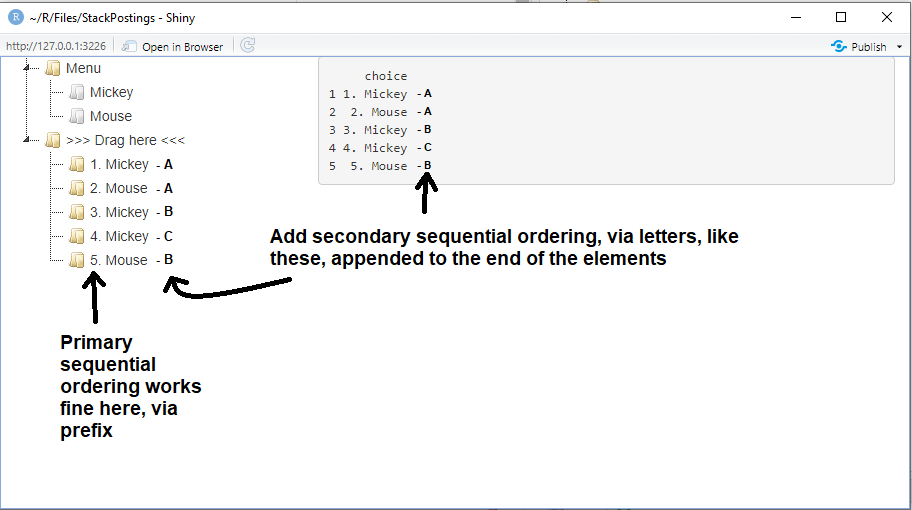
我试图使用包jsTreeR向拖放到层次结构树节点中的元素添加二级顺序编号,如下面的插图所示。下面是用于说明的可复制代码。这种顺序编号(通过字母而不是数字)表示特定元素被拖入目标节点的次数。
有什么好办法吗?
请注意,在一个相关的帖子,In R Shiny how to append to each list element the sequential number of times it appears in the list using sortable js?,同样的问题得到了解决,但使用HTML/CSS与可排序包替代。
可复制代码:
library(jsTreeR)
library(shiny)

nodes <- list(
  list(
    text = "Menu",
    state = list(opened = TRUE),
    children = list(
      list(
        text = "Mickey",
        type = "moveable",
        state = list(disabled = TRUE)
      ),
      list(
        text = "Mouse",
        type = "moveable",
        state = list(disabled = TRUE)
      )
    )
  ),
  list(
    text = ">>> Drag here <<<",
    type = "target",
    state = list(opened = TRUE)
    )
)

checkCallback <- JS(
  "function(operation, node, parent, position, more) { ",
  "  if(operation === 'copy_node') {",
  "    if(parent.id === '#' || node.parent !== 'j1_1' || parent.type !== 'target') {",
  "      return false;", # prevent moving an item above or below the root
  "    }",               # and moving inside an item except a 'target' item
  "  }",
  "  if(operation === 'delete_node') {",
  "    Shiny.setInputValue('deletion', position + 1);",
  "  }",
  "  return true;",      # allow everything else
  "}"
)

dnd <- list(
  always_copy = TRUE,
  # inside_pos = "last",
  is_draggable = JS(
    "function(node) {",
    "  return node[0].type === 'moveable';",
    "}"
  )
)

mytree <- jstree(
  nodes, dragAndDrop = TRUE, dnd = dnd, checkCallback = checkCallback,
  types = list(moveable = list(), target = list())
)

script <- '
$(document).ready(function(){
  $("#mytree").on("copy_node.jstree", function(e, data){
    var instance = data.new_instance;
    var node = data.node;
    var id = node.id;
    var index = $("#"+id).index() + 1;
    var text = index + ". " + node.text;
    Shiny.setInputValue("choice", text);
    instance.rename_node(node, text);
  });
});
'

library(shiny)
ui <- fluidPage(
  tags$head(tags$script(HTML(script))),
  fluidRow(
    column(width = 4,jstreeOutput("mytree")),
    column(width = 8,verbatimTextOutput("choices"))
  )
)

server <- function(input, output, session){
  output[["mytree"]] <- renderJstree(mytree)
  Choices <- reactiveVal(data.frame(choice = character(0)))
  observeEvent(input[["choice"]],{Choices(rbind(Choices(),data.frame(choice = input[["choice"]])))})
  observeEvent(input[["deletion"]], {Choices(Choices()[-input[["deletion"]], , drop = FALSE])})
  output[["choices"]] <- renderPrint({Choices()})
}

shinyApp(ui, server)
说明:
回答 1
Stack Overflow用户
回答已采纳
发布于 2022-06-10 13:08:08
script <- '
$(document).ready(function(){
  var LETTERS = ["A", "B", "C", "D", "E", "F", "G", "H", "I", "J", "K", "L", "M", "N", "O", "P", "Q", "R", "S", "T", "U", "V", "W", "X", "Y", "Z"];
  var Visited = {};
  $("#mytree").on("copy_node.jstree", function(e, data){
    var oldid = data.original.id;
    var visited = Object.keys(Visited);
    if(visited.indexOf(oldid) === -1){
      Visited[oldid] = 0;
    }else{
      Visited[oldid]++;
    }
    var letter = LETTERS[Visited[oldid]];
    var node = data.node;
    var id = node.id;
    var index = $("#"+id).index() + 1;
    var text = index + ". " + node.text + " " + letter;
    Shiny.setInputValue("choice", text);
    var instance = data.new_instance;
    instance.rename_node(node, text);
  });
});
'页面原文内容由Stack Overflow提供。腾讯云小微IT领域专用引擎提供翻译支持
原文链接:
https://stackoverflow.com/questions/72573949
复制相关文章
相似问题
腾讯云开发者

Copyright © 2013 - 2026 Tencent Cloud. All Rights Reserved. 腾讯云 版权所有
深圳市腾讯计算机系统有限公司 ICP备案/许可证号:粤B2-20090059  粤公网安备44030502008569号
腾讯云计算(北京)有限责任公司 京ICP证150476号 | 京ICP备11018762号