
如何将特定的节点元素从jsTree中提取到R数据帧中?
如何将特定的节点元素从jsTree中提取到R数据帧中?
提问于 2022-06-09 18:50:13
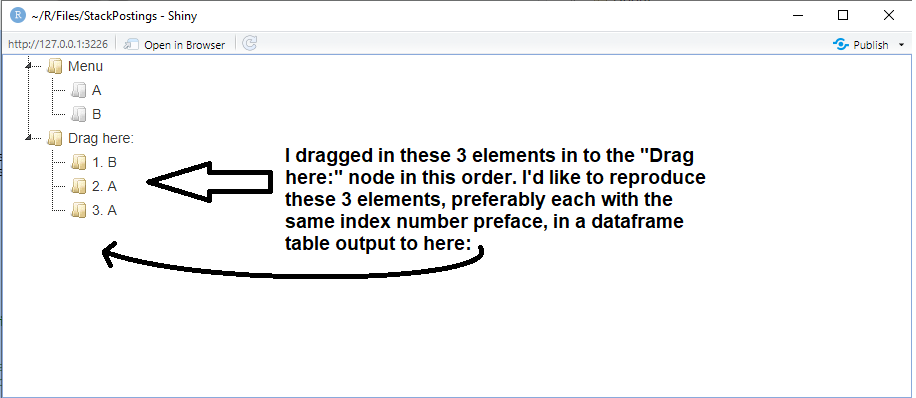
在运行下面的可重复代码时,我试图从jsTree (使用jsTreeR包)中提取特定的节点元素到数据帧中。类似于相关文章中使用sortable DnD而不是jstree at How to pull list elements from HTML/CSS and into an R data frame?所做的工作。
有什么想法可以从jsTree中提取特定的节点元素以供数据访问吗?
这是为了进一步的R操作可以执行那些拖入(或更好地说,复制)元素。
底部的图像更好地解释了。
可重复的代码(我在下面对解决此问题的尝试进行了注释):
library(jsTreeR)
library(shiny)

nodes <- list(
  list(
    text = "Menu",
    state = list(opened = TRUE),
    children = list(
      list(text = "A", type = "moveable", state = list(disabled = TRUE)),
      list(text = "B", type = "moveable", state = list(disabled = TRUE))
    )
  ),
  list(text = "Drag here:",
       type = "target",
       state = list(opened = TRUE)
       )
)

checkCallback <- JS(
  "function(operation, node, parent, position, more) { console.log(node);",
  "  if(operation === 'copy_node') {",
  "    if(parent.id === '#' || node.parent !== 'j1_1' || parent.type !== 'target') {",
  "      return false;", # prevent moving an item above or below the root
  "    }",               # and moving inside an item except a 'target' item
  "  }",
  "  return true;",      # allow everything else
  "}"
)

dnd <- list(
  always_copy = TRUE,
  is_draggable = JS(
    "function(node) {",
    "  return node[0].type === 'moveable';",
    "}"
  )
)

ui <- fluidPage(
  tags$head(
    tags$script(
      HTML(
        script <-
          '
            $(document).ready(function(){
              $("#mytree").on("copy_node.jstree", function(e, data){
                var instance = data.new_instance;
                var node = data.node;
                var id = node.id;
                var text = node.text;
                var index = $("#"+id).index() + 1;
                instance.rename_node(node, index + ". " + text);
              })
            });
          '
      )
    )
  ),

  jstreeOutput("mytree"),
  # tableOutput("table1")

  )

server <- function(input, output){
  output[["mytree"]] <- renderJstree({
    jstree(
      nodes,
      dragAndDrop = TRUE,
      dnd = dnd,
      checkCallback = checkCallback,
      types = list(moveable = list(),
                   target = list()),
    )
  })

  # draggedElements <- reactive({
  #   data.frame(data = paste0(seq_along(jstreeOutput("mytree")), ". ", jstreeOutput("mytree")))
  # })

  # output$table1 <- renderTable({draggedElements()})

}

shinyApp(ui, server)
回答 1
Stack Overflow用户
回答已采纳
发布于 2022-06-09 19:31:15
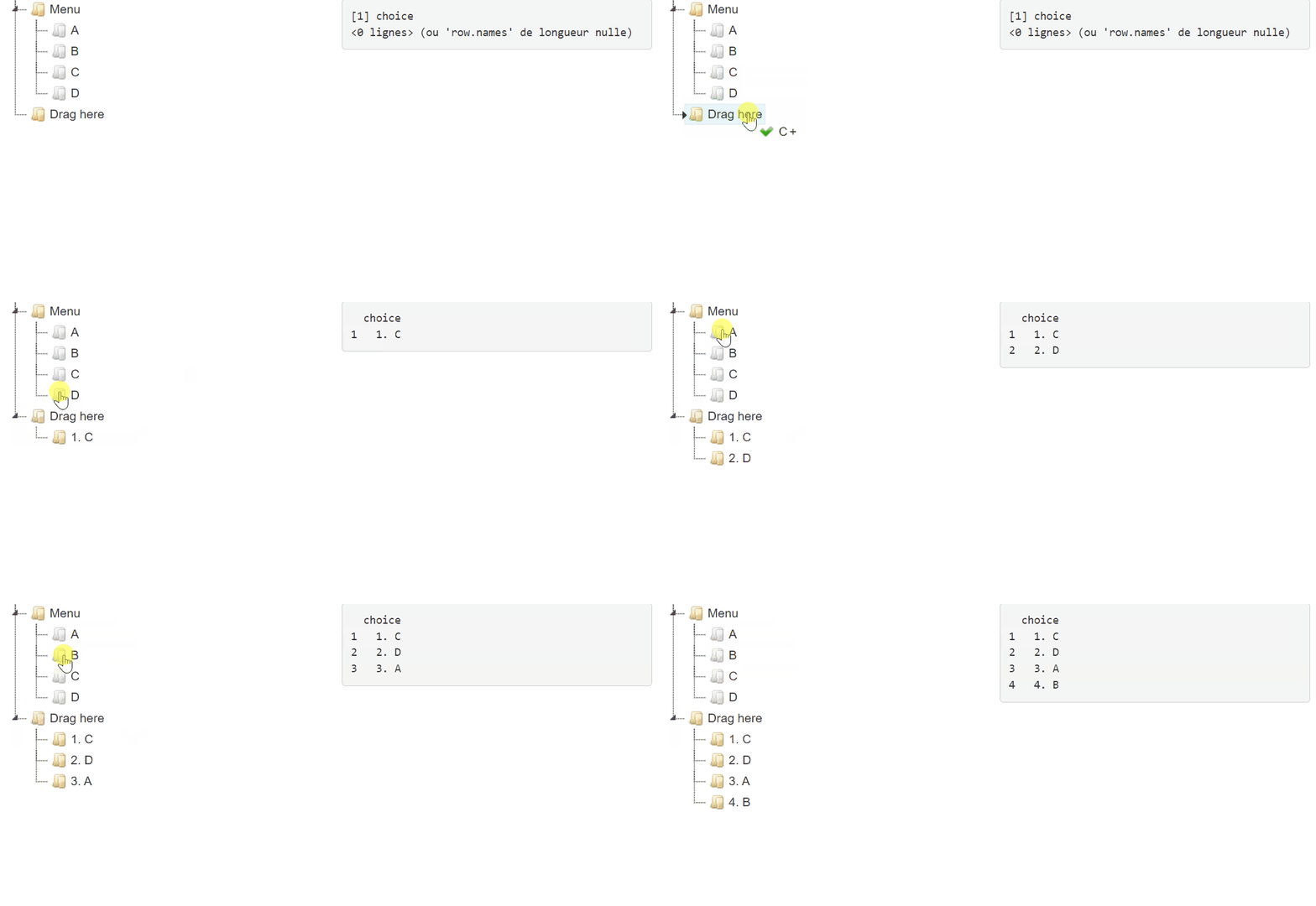
首先,与这个问题无关,我在拖放处理程序中添加了选项inside_pos="last":
dnd <- list(
  always_copy = TRUE,
  inside_pos = "last",
  is_draggable = JS(
    "function(node) {",
    "  return node[0].type === 'moveable';",
    "}"
  )
)使用此选项,您可以将节点放在上--节点“拖到这里”,然后它会自动转到最后一个位置(参见GIF)。非常方便。
现在,请回答你的问题。这是Shiny.setInputValue的工作。修改脚本:
script <- '
$(document).ready(function(){
  $("#mytree").on("copy_node.jstree", function(e, data){
    var instance = data.new_instance;
    var node = data.node;
    var id = node.id;
    var index = $("#"+id).index() + 1;
    var text = index + ". " + node.text;
    Shiny.setInputValue("choice", text);
    instance.rename_node(node, text);
  })
});
'
这是一个闪亮的应用程序:
ui <- fluidPage(
  tags$head(tags$script(HTML(script))),
  fluidRow(
    column(
      width = 6,
      jstreeOutput("mytree")
    ),
    column(
      width = 6,
      verbatimTextOutput("choices")
    )
  )
)

server <- function(input, output, session){

  output[["mytree"]] <- renderJstree(mytree)

  choices <- reactiveVal(data.frame(choice = character(0)))

  observeEvent(input[["choice"]], {
    choices(
      rbind(
        choices(),
        data.frame(choice = input[["choice"]])
      )
    )
  })

  output[["choices"]] <- renderPrint({
    choices()
  })

}
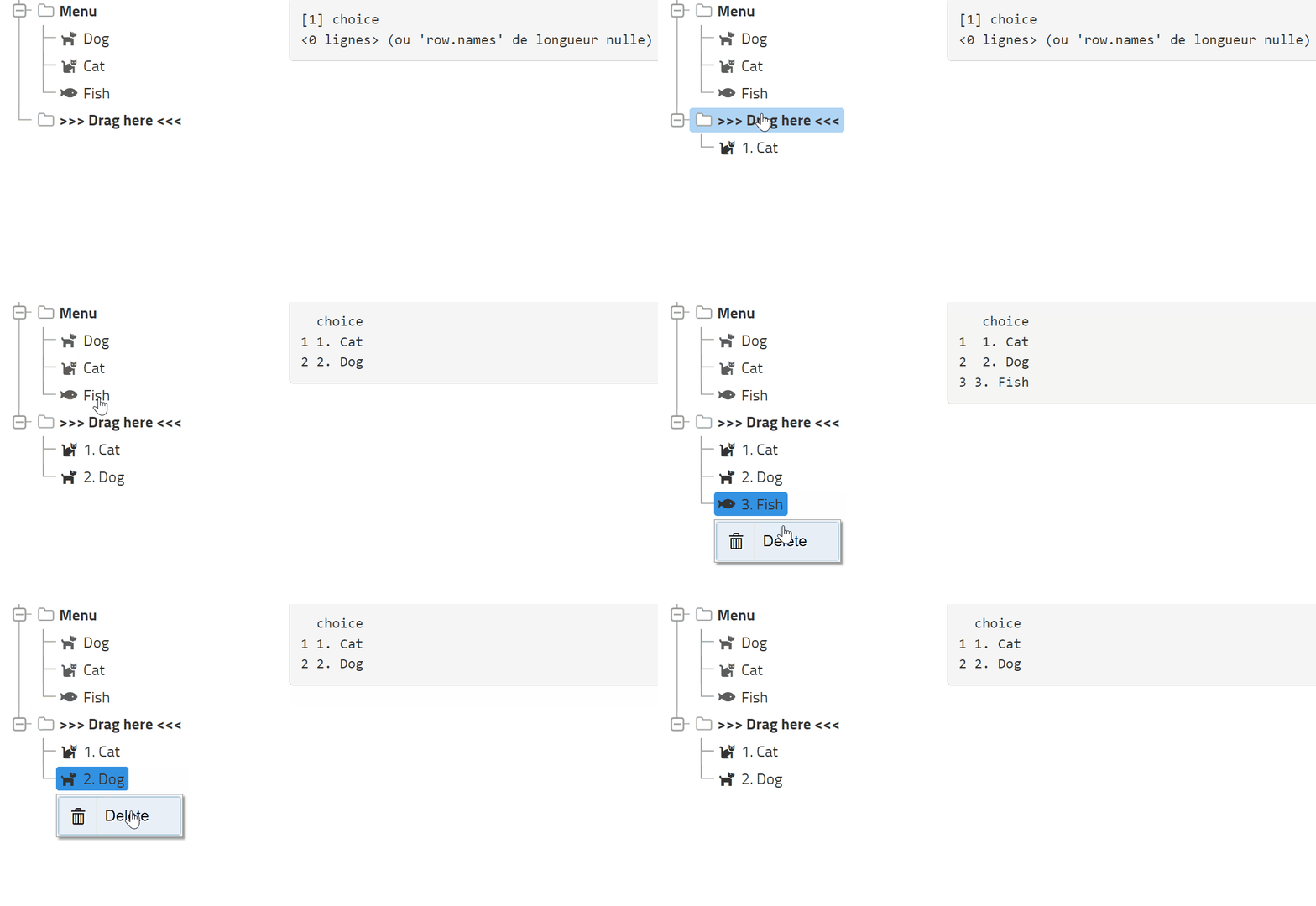
编辑:删除
checkCallback <- JS(
  "function(operation, node, parent, position, more) { ",
  "  if(operation === 'copy_node') {",
  "    if(parent.id === '#' || node.parent !== 'j1_1' || parent.type !== 'target') {",
  "      return false;", # prevent moving an item above or below the root
  "    }",               # and moving inside an item except a 'target' item
  "  }",
  "  if(operation === 'delete_node') {",
  "    Shiny.setInputValue('deletion', position + 1);",
  "  }",
  "  return true;",      # allow everything else
  "}"
)

server <- function(input, output, session){

  output[["mytree"]] <- renderJstree(mytree)

  Choices <- reactiveVal(data.frame(choice = character(0)))

  observeEvent(input[["choice"]], {
    Choices(
      rbind(
        Choices(),
        data.frame(choice = input[["choice"]])
      )
    )
  })

  observeEvent(input[["deletion"]], {
    Choices(
      Choices()[-input[["deletion"]], , drop = FALSE]
    )
  })

  output[["choices"]] <- renderPrint({
    Choices()
  })

}完全应用程序,带有图标和质子主题:
library(jsTreeR)

nodes <- list(
  list(
    text = "Menu",
    state = list(opened = TRUE),
    a_attr = list(style = "font-weight: bold;"),
    children = list(
      list(
        text = "Dog",
        type = "moveable",
        state = list(disabled = TRUE),
        icon = "fas fa-dog"
      ),
      list(
        text = "Cat",
        type = "moveable",
        state = list(disabled = TRUE),
        icon = "fas fa-cat"
      ),
      list(
        text = "Fish",
        type = "moveable",
        state = list(disabled = TRUE),
        icon = "fas fa-fish"
      )
    )
  ),
  list(
    text = ">>> Drag here <<<",
    type = "target",
    state = list(opened = TRUE),
    a_attr = list(style = "font-weight: bold;")
  )
)

checkCallback <- JS(
  "function(operation, node, parent, position, more) { ",
  "  if(operation === 'copy_node') {",
  "    if(parent.id === '#' || node.parent !== 'j1_1' || parent.type !== 'target') {",
  "      return false;", # prevent moving an item above or below the root
  "    }",               # and moving inside an item except a 'target' item
  "  }",
  "  if(operation === 'delete_node') {",
  "    Shiny.setInputValue('deletion', position + 1);",
  "  }",
  "  return true;",      # allow everything else
  "}"
)

dnd <- list(
  always_copy = TRUE,
  inside_pos = "last",
  is_draggable = JS(
    "function(node) {",
    "  return node[0].type === 'moveable';",
    "}"
  )
)

customMenu <- JS(
  "function customMenu(node) {",
  "  var tree = $('#mytree').jstree(true);", # 'mytree' is the Shiny id or the elementId
  "  var items = {",
  "    'delete' : {",
  "      'label'  : 'Delete',",
  "      'action' : function (obj) { tree.delete_node(node); },",
  "      'icon'   : 'glyphicon glyphicon-trash'",
  "     }",
  "  }",
  "  return items;",
  "}")


mytree <- jstree(
  nodes, dragAndDrop = TRUE, dnd = dnd, checkCallback = checkCallback,
  types = list(moveable = list(), target = list()),
  contextMenu = list(items = customMenu),
  theme = "proton"
)

script <- '
$(document).ready(function(){
  $("#mytree").on("copy_node.jstree", function(e, data){
    var instance = data.new_instance;
    var node = data.node;
    var id = node.id;
    var index = $("#"+id).index() + 1;
    var text = index + ". " + node.text;
    Shiny.setInputValue("choice", text);
    instance.rename_node(node, text);
  });
});
'

library(shiny)
ui <- fluidPage(
  tags$head(tags$script(HTML(script))),
  fluidRow(
    column(
      width = 4,
      jstreeOutput("mytree")
    ),
    column(
      width = 8,
      verbatimTextOutput("choices")
    )
  )
)

server <- function(input, output, session){

  output[["mytree"]] <- renderJstree(mytree)

  Choices <- reactiveVal(data.frame(choice = character(0)))

  observeEvent(input[["choice"]], {
    Choices(
      rbind(
        Choices(),
        data.frame(choice = input[["choice"]])
      )
    )
  })

  observeEvent(input[["deletion"]], {
    Choices(
      Choices()[-input[["deletion"]], , drop = FALSE]
    )
  })

  output[["choices"]] <- renderPrint({
    Choices()
  })

}

shinyApp(ui, server)
页面原文内容由Stack Overflow提供。腾讯云小微IT领域专用引擎提供翻译支持
原文链接:
https://stackoverflow.com/questions/72565261
复制相关文章
相似问题
腾讯云开发者

Copyright © 2013 - 2026 Tencent Cloud. All Rights Reserved. 腾讯云 版权所有
深圳市腾讯计算机系统有限公司 ICP备案/许可证号:粤B2-20090059  粤公网安备44030502008569号
腾讯云计算(北京)有限责任公司 京ICP证150476号 | 京ICP备11018762号