
使用Visual扩展的自定义IntelliCode预测
使用Visual扩展的自定义IntelliCode预测
提问于 2022-06-07 20:21:15
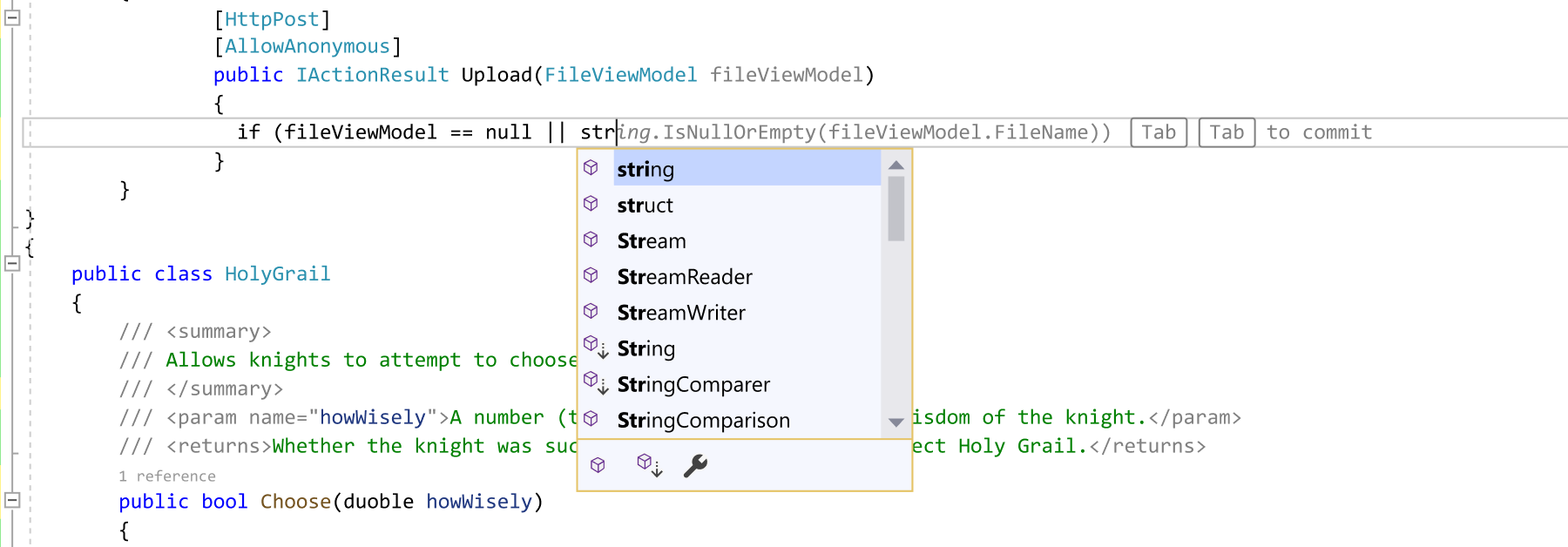
我想在Visual中添加带有扩展的自定义IntelliCode预测/内联建议。在VSCode中,我可以使用vscode.InlineCompletionProvider/InlineCompletionItem来做到这一点。在Visual扩展中执行相同任务的类/方法是什么?
回答 2
Stack Overflow用户
发布于 2022-06-16 19:48:04
您可以实现基于自定义语言的语句完成。请看一看:
另一个不同的选项是使用Visual的GitHub副驾驶扩展,它使用AI来预测代码
Stack Overflow用户
发布于 2022-10-14 15:08:54
我有同样的要求,但我没有找到任何API。
但是,您可以做的是使用装饰来绘制一个看起来像代码的文本。
定义装饰:
[Export(typeof(AdornmentLayerDefinition))]
[Name("TextAdornment1")]
[Order(After = PredefinedAdornmentLayers.Text)]
private AdornmentLayerDefinition editorAdornmentLayer;
获取该层并添加一个TextBlock:
_layer = view.GetAdornmentLayer("TextAdornment1");

// triggeringLine is your current line
var geometry = _view.TextViewLines.GetMarkerGeometry(triggeringLine.Extent);
var textBlock = new TextBlock
{
    Width = 600,
    Foreground = _textBrush,
    Height = geometry.Bounds.Height,
    FontFamily = new FontFamily(_settings.FontFamily),
    FontSize = _fontSize,
    Text = $"Your completion text"
};
// put the box at the end of your current line
Canvas.SetLeft(textBlock, geometry.Bounds.Right);
Canvas.SetTop(textBlock, geometry.Bounds.Top);

_layer.AddAdornment(AdornmentPositioningBehavior.TextRelative, triggeringLine.Extent, "your tag", textBlock, (tag, ui) => { });
您可以按以下方式获得当前编辑器设置:
// Get TextEditor properties
var propertiesList = dte.get_Properties("FontsAndColors", "TextEditor");

// Get the items that are shown in the dialog in VS
var itemsList = (FontsAndColorsItems)propertiesList.Item("FontsAndColorsItems").Object;

// Get color for comments
var commentItem = itemsList.Cast<ColorableItems>().Single(i => i.Name=="Comment");
var colorBytes = BitConverter.GetBytes(commentItem.Foreground);
var commentColor = Color.FromRgb(colorBytes[2], colorBytes[1], colorBytes[0]);

// Get editor BG
var textItem = itemsList.Cast<ColorableItems>().Single(i => i.Name == "Plain Text");
var bgColorBytes = BitConverter.GetBytes(textItem.Background);
var bbgColor = Color.FromRgb(bgColorBytes[2], bgColorBytes[1], bgColorBytes[0]);

// Get font size in points
var fontSize = (short)propertiesList.Item("FontSize").Value;

// Get current font family
var fontFamily = (string)propertiesList.Item("FontFamily").Value;
这种方法的问题是样式和字体大小与编辑器略有不同。即使您使用编辑器设置。
然而,我认为IntelliCode和GitHub副驾驶使用了另一种技术。如您所见:GitHub线圈

似乎整个代码已经插入到编辑器中,但是有一种特殊的样式/行为。因此,这是可能的,但我不知道如何实现。
有关装饰品的更多信息,请参见此处:使用Roslyn的Visual文本装饰VSIX
页面原文内容由Stack Overflow提供。腾讯云小微IT领域专用引擎提供翻译支持
原文链接:
https://stackoverflow.com/questions/72537148
复制相关文章
相似问题
腾讯云开发者

Copyright © 2013 - 2026 Tencent Cloud. All Rights Reserved. 腾讯云 版权所有
深圳市腾讯计算机系统有限公司 ICP备案/许可证号:粤B2-20090059  粤公网安备44030502008569号
腾讯云计算(北京)有限责任公司 京ICP证150476号 | 京ICP备11018762号