
层次字典(减少内存占用或使用数据库)
我正在处理非常高维的生物计数数据(单细胞RNA测序,其中行是细胞ID,列是基因)。
每个数据集都是一个单独的平面文件(AnnData格式)。每个平面文件可以按各种元数据属性进行细分,包括细胞类型(如:肌肉细胞、心脏细胞)、亚型(例如:肺数据集可分为正常肺和癌变肺)、癌症分期(例如:第1阶段、第2阶段)等。
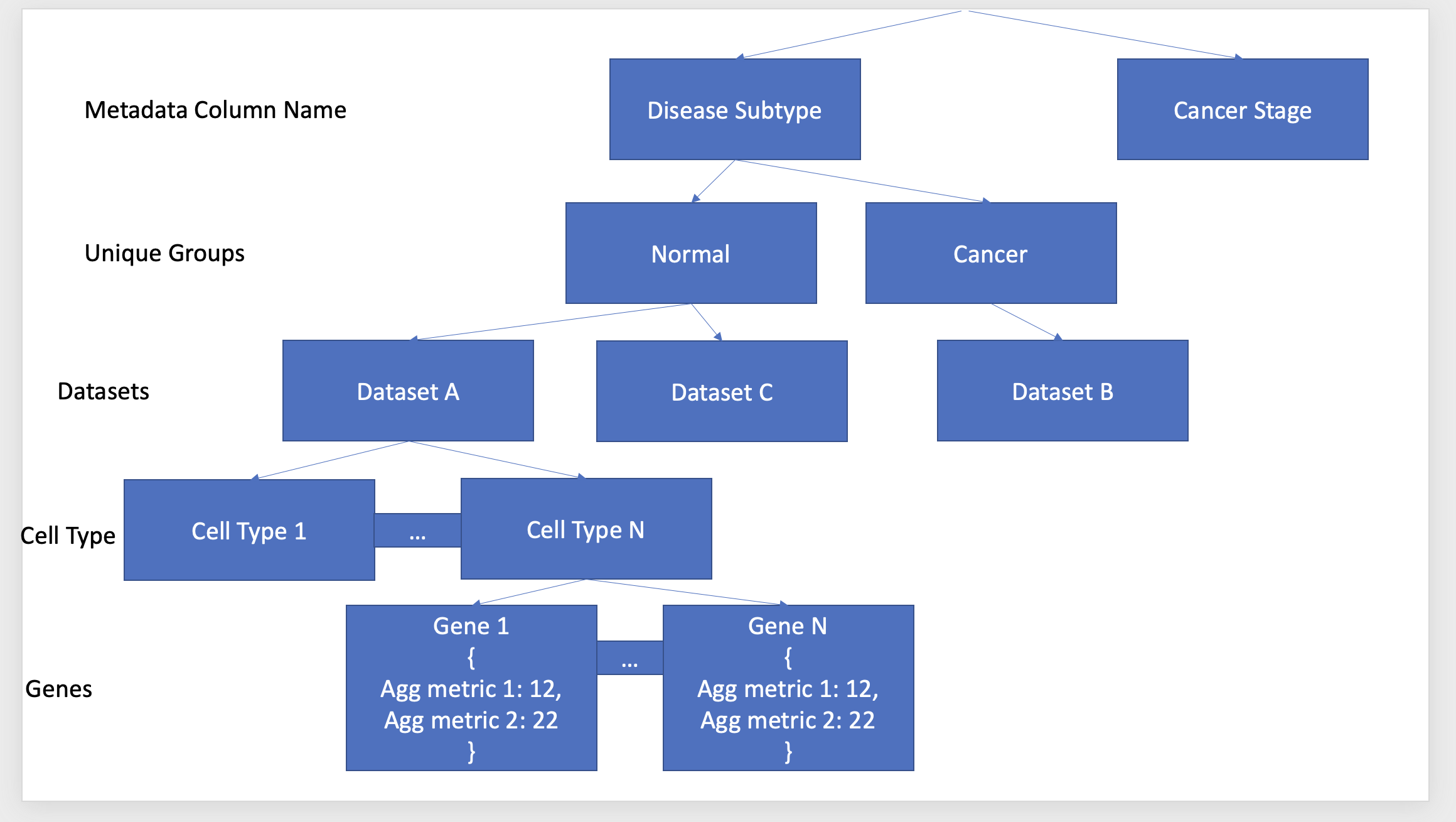
其目标是预先计算特定元数据列、子组、数据集、单元类型、基因组合的汇总指标,并使其易于访问,这样当一个人查询我的web应用程序时,我可以快速检索结果(请参阅下图,以了解我想要创建的内容)。我已经生成了Python代码来组装下面的字典,它加快了我创建可视化的速度。
现在唯一的问题是,这个字典的内存占用很大(每个数据集有10,000个基因)。减少本词典内存占用的最佳方法是什么?或者,我是否应该考虑另一个存储框架(简略地看到了称为Redis散列的东西)?
回答 2
Stack Overflow用户
发布于 2022-06-09 22:12:35
减少内存占用但保持快速查找的一个选择是使用hdf5文件作为数据库。这将是一个驻留在磁盘上而不是内存上的单个大文件,但其结构与嵌套字典的结构相同,并且仅通过读取所需的数据来实现快速查找。编写文件将是缓慢的,但你只需要做一次,然后上传到你的网页应用程序。
为了测试这个想法,我创建了两个测试嵌套字典,它们都是您共享的图表的格式。小的一个有1e5元数据/组/数据集/细胞型/基因条目,另一个大10倍。
将小数据集写入hdf5需要2分钟,导致文件大小为140 MB,而更大的数据集则需要14分钟才能写入hdf5,是一个1.4GB的文件。
查询小型和大型hdf5文件的时间相似,表明查询扩展到更多的数据。
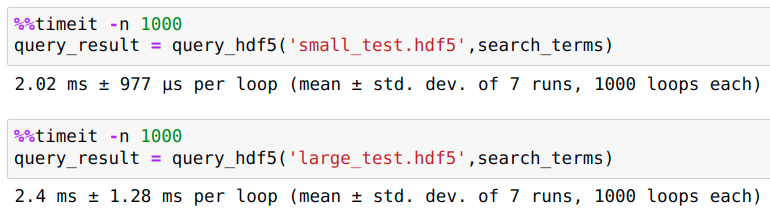
下面是我用来创建测试数据集、写入hdf5和查询的代码
import h5py
import numpy as np
import time

def create_data_dict(level_counts):
    """
    Create test data in the same nested-dict format as the diagram you show
    The Agg_metric values are random floats between 0 and 1
    (you shouldn't need this function since you already have real data in dict format)
    """
    if not level_counts:
        return {f'Agg_metric_{i+1}':np.random.random() for i in range(num_agg_metrics)}

    level,num_groups = level_counts.popitem()
    return {f'{level}_{i+1}':create_data_dict(level_counts.copy()) for i in range(num_groups)}


def write_dict_to_hdf5(hdf5_path,d):
    """
    Write the nested dictionary to an HDF5 file to act as a database
    only have to create this file once, but can then query it any number of times
    (unless the data changes)
    """
    def _recur_write(f,d):
        for k,v in d.items():
            #check if the next level is also a dict
            sk,sv = v.popitem()
            v[sk] = sv

            if type(sv) == dict:
                #this is a 'node', move on to next level
                _recur_write(f.create_group(k),v)
            else:
                #this is a 'leaf', stop here
                leaf = f.create_group(k)
                for sk,sv in v.items():
                    leaf.attrs[sk] = sv

    with h5py.File(hdf5_path,'w') as f:
        _recur_write(f,d)


def query_hdf5(hdf5_path,search_terms):
    """
    Query the hdf5_path with a list of search terms
    The search terms must be in the order of the dict, and have a value at each level
    Output is a dict of agg stats
    """
    with h5py.File(hdf5_path,'r') as f:
        k = '/'.join(search_terms)
        try:
            f = f[k]
        except KeyError:
            print('oh no! at least one of the search terms wasnt matched')
            return {}

        return dict(f.attrs)

################
#     start    #
################
#this "small_level_counts" results in an hdf5 file of size 140 MB (took < 2 minutes to make)
#all possible nested dictionaries are made,
#so there are 40*30*10*3*3 = ~1e5 metadata/group/dataset/celltype/gene entries
num_agg_metrics = 7
small_level_counts = {
    'Gene':40,
    'Cell_Type':30,
    'Dataset':10,
    'Unique_Group':3,
    'Metadata':3,
}

#"large_level_counts" results in an hdf5 file of size 1.4 GB (took 14 mins to make)
#has 400*30*10*3*3 = ~1e6 metadata/group/dataset/celltype/gene combinations
num_agg_metrics = 7
large_level_counts = {
    'Gene':400,
    'Cell_Type':30,
    'Dataset':10,
    'Unique_Group':3,
    'Metadata':3,
}

#Determine which test dataset to use
small_test = True
if small_test:
    level_counts = small_level_counts
    hdf5_path = 'small_test.hdf5'
else:
    level_counts = large_level_counts
    hdf5_path = 'large_test.hdf5'


np.random.seed(1)
start = time.time()
data_dict = create_data_dict(level_counts)
print('created dict in {:.2f} seconds'.format(time.time()-start))

start = time.time()
write_dict_to_hdf5(hdf5_path,data_dict)
print('wrote hdf5 in {:.2f} seconds'.format(time.time()-start))

#Search terms in order of most broad to least
search_terms = ['Metadata_1','Unique_Group_3','Dataset_8','Cell_Type_15','Gene_17']

start = time.time()
query_result = query_hdf5(hdf5_path,search_terms)
print('queried in {:.2f} seconds'.format(time.time()-start))

direct_result = data_dict['Metadata_1']['Unique_Group_3']['Dataset_8']['Cell_Type_15']['Gene_17']

print(query_result == direct_result)Stack Overflow用户
发布于 2022-06-10 07:39:19
虽然Python字典本身在内存使用方面相当有效,但您可能会存储多个字符串的副本,作为字典键使用。根据您对数据结构的描述,您可能对数据集中的每个基因都有10000份“Ag度量1”、“Ag度量2”等副本。很可能这些重复的字符串占用了大量内存。这些可以与sys.inten进行重复,这样虽然字典中仍然有同样多的对字符串的引用,但它们都指向内存中的单个副本。只需简单地将赋值更改为data[sys.intern(‘Agg metric 1’)] = value,就只需对代码进行最小的调整。我会对字典层次结构的所有级别使用的所有键都这样做。
https://stackoverflow.com/questions/72537008
复制相似问题
腾讯云开发者

Copyright © 2013 - 2026 Tencent Cloud. All Rights Reserved. 腾讯云 版权所有
深圳市腾讯计算机系统有限公司 ICP备案/许可证号:粤B2-20090059  粤公网安备44030502008569号
腾讯云计算(北京)有限责任公司 京ICP证150476号 | 京ICP备11018762号