
如何使用shinyTree、jsTreeR或类似的包构建具有用户输入的拖放层次树?
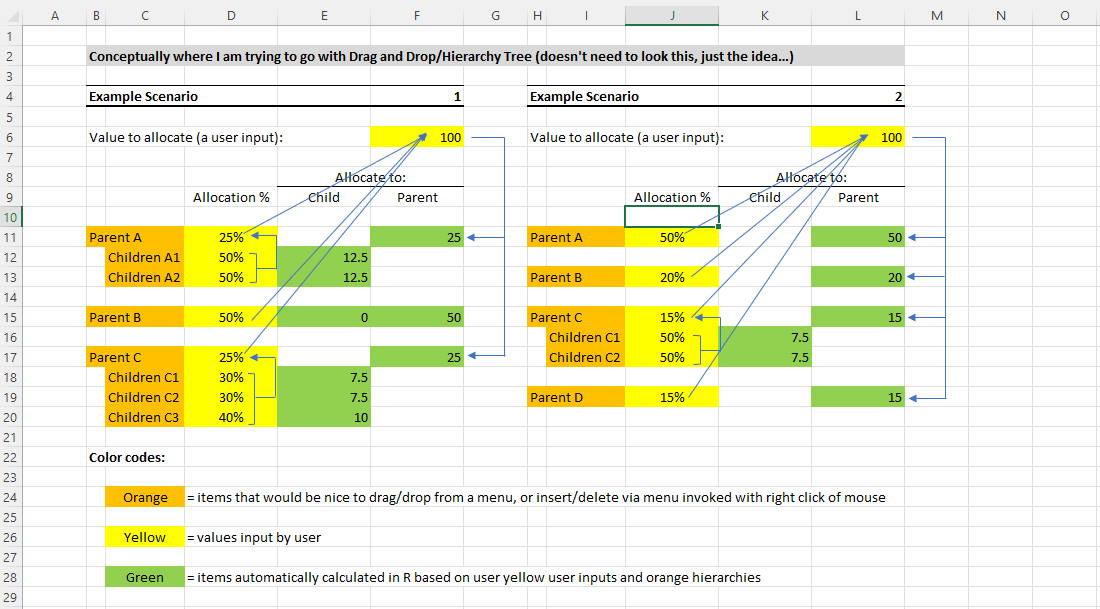
这是发布How to build a drag and drop hierarchical tree that automatically updates的后续。我正在探索在闪亮中可视化和操作层次树的方法,以便允许用户灵活地应用一系列的数学操作。层次树将允许用户安排数学操作的顺序(最好使用拖放),并作出某些输入,如下图所示。
在最初和理想的情况下,当调用时,用户将得到一个父程序,并将100%的分配给该父服务器。从那里开始,用户将能够添加父/子/节点,构建一个复杂程度越来越高的层次结构树;最好使用拖放或选项列表,例如鼠标右键单击。
我一直在审查包jsTreeR和shinyTree,它们看起来可能为此目的而工作。如果你认为这些工作,你能提供任何例子让我开始在正确的道路上吗?或者还有其他的软件包可以更好地解决这个问题?我的最后一招可能是使用类似Excel的方法的rhandsontable,这是我多年使用XLS的默认思维方式,但这将放弃我的视觉愿望。我也一直在探索shinyDND和sortable包,它们最终可能会起作用,但我需要在冒险陷进兔子洞之前,尽早探索所有的选择。而且,当我摆弄层次树时,它们在视觉上似乎对我的应用程序的上下文最有意义。
示例可复制代码(它可以给我一个正确的开始):
library(shiny)
library(shinyTree)

values_parents <- function(tree){
  sapply(tree, function(parent) attr(parent, "stinfo"))
}

total_values_children <- function(tree){
  sapply(
    lapply(tree, function(parent){
      sapply(parent, function(children){
        attr(children, "stinfo")
      })
    }),
    function(x){if(is.list(x)) NA else sum(x)}
  )
}

ui <- fluidPage(
  tags$head(
    tags$style(HTML("pre {font-size: 17px;} .jstree-anchor {font-size: large;}"))
  ),
  fluidRow(
    column(
      width = 6,
      shinyTree("tree", dragAndDrop = TRUE, checkbox = FALSE)
    ),
    column(
      width = 6,
      tags$fieldset(
        tags$legend("Values of parents:"),
        verbatimTextOutput("parentsValues")
      ),
      br(),
      tags$fieldset(
        tags$legend("Total value of children:"),
        verbatimTextOutput("childrenTotalValue")
      )
    )
  )
)


server <- function(input, output, session) {

  output[["tree"]] <- renderTree({
    list(

      ParentA = structure(list(
        ChildrenA1 = structure(NA, stinfo = 5),
        ChildrenA2 = structure(NA, stinfo = 4)
      ),
      stinfo = 10, stopened = FALSE),

      ParentB = structure(list(
        ChildrenB1 = structure(NA, stinfo = 6),
        ChildrenB2 = structure(NA, stinfo = 8)
      ),
      stinfo = 12, stopened = FALSE)

    )
  })

  output[["parentsValues"]] <- renderPrint({
    values_parents(input[["tree"]])
  })

  output[["childrenTotalValue"]] <- renderPrint({
    total_values_children(input[["tree"]])
  })

}

shinyApp(ui, server)
说明:
回答 1
Stack Overflow用户
发布于 2022-06-07 08:57:11
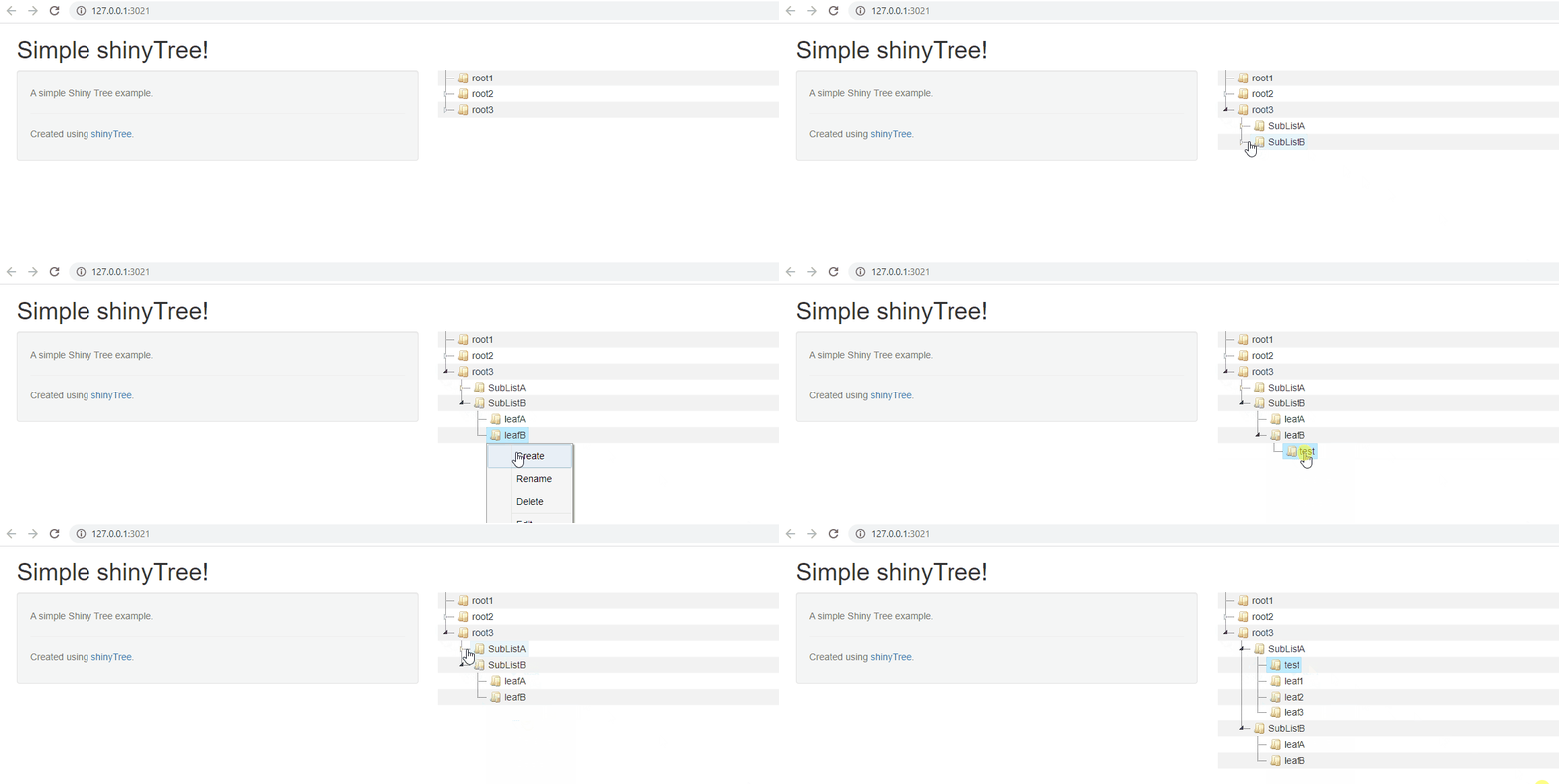
我会给shinyTree一次机会。在设置dragAndDrop = TRUE和contextmenu = TRUE时,它似乎适合您的要求。
library(shiny)
library(shinyTree)

ui <- fluidPage(
  pageWithSidebar(
    # Application title
    headerPanel("Simple shinyTree!"),

    sidebarPanel(
      helpText(HTML("A simple Shiny Tree example.
                  <hr>Created using <a href = \"http://github.com/trestletech/shinyTree\">shinyTree</a>."))
    ),
    mainPanel(
      shinyTree("tree", stripes = TRUE, multiple = FALSE, animation = FALSE, dragAndDrop = TRUE, contextmenu = TRUE)
    )
  )
)

server <- function(input, output, session) {
  output$tree <- renderTree({
    list(
      root1 = "",
      root2 = list(
        SubListA = list(leaf1 = "", leaf2 = "", leaf3=""),
        SubListB = list(leafA = "", leafB = "")
      ),
      root3 = list(
        SubListA = list(leaf1 = "", leaf2 = "", leaf3=""),
        SubListB = list(leafA = "", leafB = "")
      )
    )
  })
}

shinyApp(ui, server)
https://stackoverflow.com/questions/72527992
复制相似问题
腾讯云开发者

Copyright © 2013 - 2026 Tencent Cloud. All Rights Reserved. 腾讯云 版权所有
深圳市腾讯计算机系统有限公司 ICP备案/许可证号:粤B2-20090059  粤公网安备44030502008569号
腾讯云计算(北京)有限责任公司 京ICP证150476号 | 京ICP备11018762号