
由于依赖关系问题,Heroku没有部署构建
由于依赖关系问题,Heroku没有部署构建
提问于 2022-06-03 13:08:13
在heroku中部署构建时,它会导致依赖错误,是否有人面临过同样的问题?根本原因是什么?有办法解决这个问题吗?heroku构建以前曾经工作过,但是现在这个错误发生了,它真的让人困惑。
remote: -----> Installing dependencies
    remote:        Installing node modules
    remote:        npm ERR! code ERESOLVE
    remote:        npm ERR! ERESOLVE could not resolve
    remote:        npm ERR!
    remote:        npm ERR! While resolving: next@12.1.6
    remote:        npm ERR! Found: react@16.14.0
    remote:        npm ERR! node_modules/react
    remote:        npm ERR!   react@"^16.10.1" from the root project
    remote:        npm ERR!   peer react@"^16.8.0" from @apollo/react-common@3.1.4
    remote:        npm ERR!   node_modules/@apollo/react-common
    remote:        npm ERR!     @apollo/react-common@"^3.1.4" from @apollo/react-components@3.1.5
    remote:        npm ERR!     node_modules/@apollo/react-components
    remote:        npm ERR!       @apollo/react-components@"^3.1.5" from @apollo/react-hoc@3.1.5
    remote:        npm ERR!       node_modules/@apollo/react-hoc
    remote:        npm ERR!         @apollo/react-hoc@"^3.1.5" from react-apollo@3.1.5
    remote:        npm ERR!         node_modules/react-apollo
    remote:        npm ERR!       1 more (react-apollo)
    remote:        npm ERR!     @apollo/react-common@"^3.1.4" from @apollo/react-hoc@3.1.5
    remote:        npm ERR!     node_modules/@apollo/react-hoc
    remote:        npm ERR!       @apollo/react-hoc@"^3.1.5" from react-apollo@3.1.5
    remote:        npm ERR!       node_modules/react-apollo
    remote:        npm ERR!         react-apollo@"^3.1.3" from the root project
    remote:        npm ERR!     3 more (@apollo/react-hooks, @apollo/react-ssr, react-apollo)
    remote:        npm ERR!   14 more (@apollo/react-components, @apollo/react-hoc, ...)
    remote:        npm ERR!
    remote:        npm ERR! Could not resolve dependency:
    remote:        npm ERR! peer react@"^17.0.2 || ^18.0.0-0" from next@12.1.6
    remote:        npm ERR! node_modules/next
    remote:        npm ERR!   next@"^12.1.6" from the root project
    remote:        npm ERR!   peer next@">= 5.1.0" from next-env@1.1.1
    remote:        npm ERR!   node_modules/next-env
    remote:        npm ERR!     next-env@"^1.1.0" from the root project
    remote:        npm ERR!
    remote:        npm ERR! Conflicting peer dependency: react@18.1.0
    remote:        npm ERR! node_modules/react
    remote:        npm ERR!   peer react@"^17.0.2 || ^18.0.0-0" from next@12.1.6
    remote:        npm ERR!   node_modules/next
    remote:        npm ERR!     next@"^12.1.6" from the root project
    remote:        npm ERR!     peer next@">= 5.1.0" from next-env@1.1.1
    remote:        npm ERR!     node_modules/next-env
    remote:        npm ERR!       next-env@"^1.1.0" from the root project
    remote:        npm ERR!
    remote:        npm ERR! Fix the upstream dependency conflict, or retry
    remote:        npm ERR! this command with --force, or --legacy-peer-deps
    remote:        npm ERR! to accept an incorrect (and potentially broken) dependency resolution.
    remote:        npm ERR!
    remote:        npm ERR! See /tmp/npmcache.KnKS4/eresolve-report.txt for a full report.
    remote:
    remote:        npm ERR! A complete log of this run can be found in:
    remote:        npm ERR!     /tmp/npmcache.KnKS4/_logs/2022-06-03T12_47_36_545Z-debug-0.log
    remote:
remote: -----> Build failed回答 2
Stack Overflow用户
回答已采纳
发布于 2022-06-10 20:00:22
几天前(6月初),我在Heroku上部署了我的React应用程序,我也遇到了同样的问题。问题似乎是由国家预防机制版本更新引起的。默认情况下,Heroku使用节点和npm的最新稳定版本作为构建引擎,但如果使用以前的版本,则可能会导致相互冲突的依赖关系。
因此,如果在本地完全正常,但是在Heroku上部署它时会发生此问题,下面是解决方案:
使用node --version和npm --version签出本地实例上的版本,然后将它们添加到package.json文件中的engines部分中,如下所示(用所拥有的版本替换16.0.0和7.10.0 ):
"engines": {
    "node": "16.0.0",
    "npm": "7.10.0"
},
然后将应用程序重新部署到Heroku上。问题应该解决。
Stack Overflow用户
发布于 2022-06-23 00:01:24
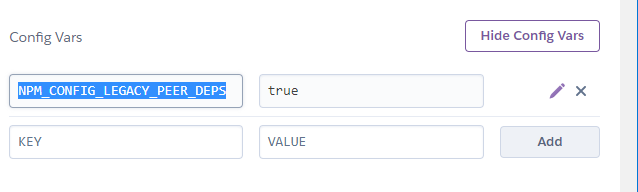
将NPM_CONFIG_LEGACY_PEER_DEPS环境变量添加到Heroku应用程序中,并将其值设置为true。
页面原文内容由Stack Overflow提供。腾讯云小微IT领域专用引擎提供翻译支持
原文链接:
https://stackoverflow.com/questions/72490093
复制相关文章
相似问题
腾讯云开发者

Copyright © 2013 - 2026 Tencent Cloud. All Rights Reserved. 腾讯云 版权所有
深圳市腾讯计算机系统有限公司 ICP备案/许可证号:粤B2-20090059  粤公网安备44030502008569号
腾讯云计算(北京)有限责任公司 京ICP证150476号 | 京ICP备11018762号