
CosmosDB模拟器Linux映像-挂载卷
CosmosDB模拟器Linux映像-挂载卷
提问于 2022-06-01 19:10:03
将目录映射到cosmosDB模拟器linux映像以便数据(数据库)持久化在主机文件系统上的正确路径是什么?
 cosmosdb:
        container_name: cosmosdb
        image: mcr.microsoft.com/cosmosdb/linux/azure-cosmos-emulator:latest
        mem_reservation: 3G
        cpu_count: 2
        tty: true
        ports:
            - "8081:8081"
            - "8900:8900"
            - "8901:8901"
            - "8979:8979"
            - "10250:10250"
            - "10251:10251"
            - "10252:10252"
            - "10253:10253"
            - "10254:10254"
            - "10255:10255"
            - "10256:10256"
            - "10350:10350"
        environment:
            AZURE_COSMOS_EMULATOR_PARTITION_COUNT: 3
            AZURE_COSMOS_EMULATOR_ENABLE_DATA_PERSISTENCE: true
            AZURE_COSMOS_EMULATOR_IP_ADDRESS_OVERRIDE: 127.0.0.1
        volumes:
           - ???
对于Windows来说,这似乎是
C:/CosmosDB.Emulator/bind-mount我已经查看了正在运行的映像,但是我不知道在哪个目录数据库/数据文件中存储.
与通常情况一样,docu是相当短的https://learn.microsoft.com/en-us/azure/cosmos-db/linux-emulator?tabs=sql-api%2Cssl-netstd21
上面只写着
If the Cosmos DB emulator data folder is "volume mounted", ensure that the volume has enough space and is read/write.但是,数据文件夹是什么?)
回答 1
Stack Overflow用户
发布于 2022-06-03 06:39:10
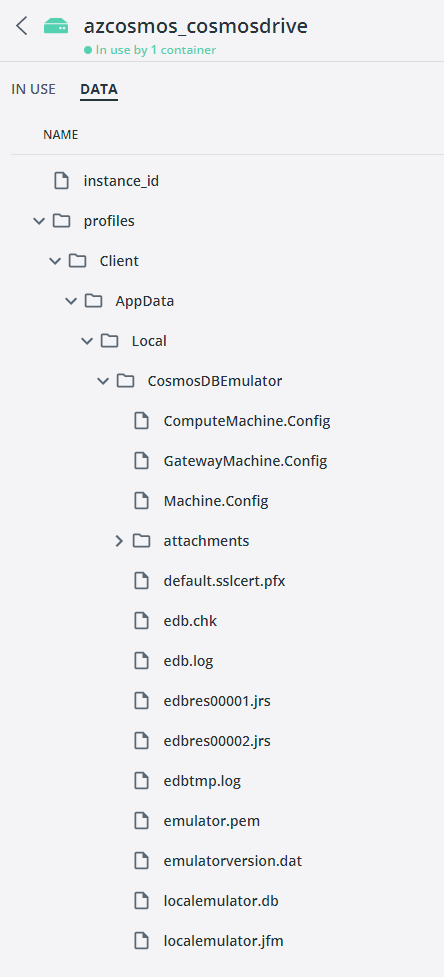
/tmp/cosmos/appdata
通过在交互式和"find / cosmos“命令中运行docker找到了它.我没有得到任何发现的结果,但是它输出了它扫描的所有目录的列表。我找到了那条路。只是测试了一下就行了。
这是我的码头编剧
version: '3.7'

networks:
  default:
    external: false
    ipam:
      driver: default
      config:
        - subnet: "172.16.238.0/24"

services:
  cosmosdb:
    container_name: "azurecosmosdbemulatorcontainer"
    hostname: "azurecosmosdbemulatorhostname"
    image:  mcr.microsoft.com/cosmosdb/linux/azure-cosmos-emulator
    platform: linux
    stdin_open: true
    tty: true
    mem_limit: 3GB
    ports:
      - '8081:8081'
      - '8900:8900'
      - '8901:8901'
      - '8902:8902'
      - '10250:10250'
      - '10251:10251'
      - '10252:10252'
      - '10253:10253'
      - '10254:10254'
      - '10255:10255'
      - '10256:10256'
      - '10350:10350'
    environment:
      AZURE_COSMOS_EMULATOR_PARTITION_COUNT: 2
      AZURE_COSMOS_EMULATOR_ENABLE_DATA_PERSISTENCE: true
      AZURE_COSMOS_EMULATOR_IP_ADDRESS_OVERRIDE: ${External_IP}
    networks:
      default:
        ipv4_address: 172.16.238.246
    volumes:
      - cosmosdrive:/tmp/cosmos/appdata

volumes:
  cosmosdrive:
  recipientdrive:
页面原文内容由Stack Overflow提供。腾讯云小微IT领域专用引擎提供翻译支持
原文链接:
https://stackoverflow.com/questions/72466963
复制相关文章
相似问题
腾讯云开发者

Copyright © 2013 - 2026 Tencent Cloud. All Rights Reserved. 腾讯云 版权所有
深圳市腾讯计算机系统有限公司 ICP备案/许可证号:粤B2-20090059  粤公网安备44030502008569号
腾讯云计算(北京)有限责任公司 京ICP证150476号 | 京ICP备11018762号