
在Docker容器中的Cypress测试中没有生成JSON和Mochawesome?
我正在一个Docker容器中运行Cypress测试来生成一个HTML测试报告。
这是我的文件夹结构:
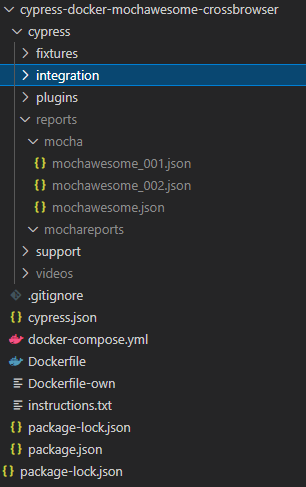
正如您在cypress/reports/mocha文件夹中看到的那样,生成了一些JSON测试结果。所有的测试都通过了&那里的3个JSON文件已经被填充。
另外,请注意空的cypress/reports/mochareports文件夹。这应该包含所有测试结果的组合JSON &一个HTML测试报告。
这是我的package.json
{
  "name": "cypress-docker",
  "version": "1.0.0",
  "description": "",
  "main": "index.js",
  "scripts": {
    "clean:reports": "mkdir -p cypress/reports && rm -R -f cypress/reports/* && mkdir cypress/reports/mochareports",
    "pretest": "npm run clean:reports",
    "scripts": "cypress run",
    "chrome:scripts": "cypress run --browser chrome ",
    "firefox:scripts": "cypress run --browser firefox ",
    "combine-reports": "mochawesome-merge cypress/reports/mocha/*.json > cypress/reports/mochareports/report.json",
    "generate-report": "marge cypress/reports/mochareports/report.json -f report -o cypress/reports/mochareports",
    "posttest": "npm run combine-reports && npm run generate-report",
    "test": "npm run scripts || npm run posttest",
    "chrome:test": "npm run pretest && npm run chrome:scripts || npm run posttest",
    "firefox:test": "npm run pretest && npm run firefox:scripts || npm run posttest"
  },
  "keywords": [],
  "author": "QA BOX <qabox@gmail.com>",
  "license": "MIT",
  "dependencies": {
    "cypress": "^6.8.0",
    "cypress-multi-reporters": "^1.4.0",
    "mocha": "^8.2.1",
    "mochawesome": "^6.2.1",
    "mochawesome-merge": "^4.2.0",
    "mochawesome-report-generator": "^5.1.0"
  }
}这是我的cypress.json
{
    "reporter": "cypress-multi-reporters",
    "reporterOptions": {
        "reporterEnabled": "mochawesome",
        "mochawesomeReporterOptions": {
            "reportDir": "cypress/reports/mocha",
            "quite": true,
            "overwrite": false,
            "html": false,
            "json": true
        }
    }
}
下面是我用来运行测试的命令:
构建图像的docker build -t cyp-dock-mocha-report .
docker-compose run e2e-chrome
的
这是我的Dockerfile
FROM cypress/included:6.8.0
RUN mkdir /cypress-docker
WORKDIR /cypress-docker
COPY ./package.json .
COPY ./package-lock.json .
COPY ./cypress.json .
COPY ./cypress ./cypress
RUN npm install
ENTRYPOINT ["npm", "run"]这是我的docker-compose.yml
version: "3"
services:
  # this container will run Cypress test using built-in Electron browser
  e2e-electron:
    image: "cyp-dock-mocha-report"
    command: "test"
    volumes:
      - ./cypress/videos:/cypress-docker/cypress/videos
      - ./cypress/reports:/cypress-docker/cypress/reports

  # this container will run Cypress test using Chrome browser
  e2e-chrome:
    image: "cyp-dock-mocha-report"
    command: "chrome:test"
    volumes:
      - ./cypress/videos:/cypress-docker/cypress/videos
      - ./cypress/reports:/cypress-docker/cypress/reports

  # this container will run Cypress test using Firefox browser
  # note that both Chrome and Firefox browsers were pre-installed in the Docker image
  e2e-firefox:
    image: "cyp-dock-mocha-report"
    command: "firefox:test"
    # if you want to debug FF run, pass DEBUG variable like
    environment:
      - DEBUG=cypress:server:browsers:firefox-util,cypress:server:util:process_profiler
    volumes:
      - ./cypress/videos:/cypress-docker/cypress/videos
      - ./cypress/reports:/cypress-docker/cypress/reports
所有测试都通过了,如下所示:
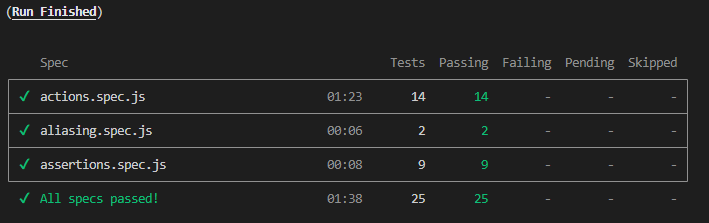
我不知道为什么Mochawesome报告没有生成,或者合并的JSO,请有人告诉我为什么合并的JSON和HTML报告没有在mochareports文件夹中生成,我怎样才能让它们生成呢?
回答 1
Stack Overflow用户
发布于 2022-08-29 21:39:59
谢谢你给我一个提示,如何使用对接撰写与此图像!我想我看到了问题所在:在package.json文件中,在脚本下,而不是在“合并”下,您写了"marge":
“生成-报告”:"marge cypress/reports/mochareports/report.json -f report -o cypress/reports/mochareports“
https://stackoverflow.com/questions/72462425
复制相似问题
腾讯云开发者

Copyright © 2013 - 2026 Tencent Cloud. All Rights Reserved. 腾讯云 版权所有
深圳市腾讯计算机系统有限公司 ICP备案/许可证号:粤B2-20090059  粤公网安备44030502008569号
腾讯云计算(北京)有限责任公司 京ICP证150476号 | 京ICP备11018762号