
自定义平移标签背景
自定义平移标签背景
提问于 2022-05-28 14:36:50
我正在做一个学校项目,现在我遇到了标签背景的问题。
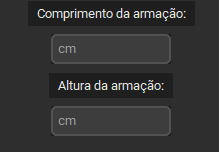
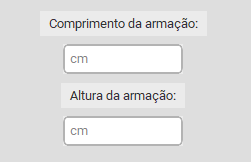
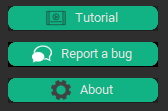
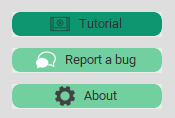
其目的是使标签的背景在黑暗和光明的主题,如果可能的话,删除按钮边缘的小不同颜色的框架相同。
import tkinter
import customtkinter
root_tk = customtkinter.CTk()  # create CTk window like you do with the Tk window
root_tk.geometry("1280x720")
root_tk.minsize(1280, 720)
class GUI:
    def __init__(self, root_tk):
        Frame1 = customtkinter.CTkFrame(root_tk)
        Frame1.pack
        frame2 = customtkinter.CTkFrame(Frame1, width=100, height=720)
        frame2.pack(pady=20,padx=20)
        frame3 = customtkinter.CTkFrame(root_tk, width=250, height=725)
        frame3.pack()
        frame3.place(anchor="w", relx=0.0, rely=0.5, relwidth=0.2, relheight=1)
        self.test()

    def test(self):
        self.switch = customtkinter.CTkSwitch(master=root_tk, text="Dark Mode", command=self.theme_change)
        self.switch.toggle(1)
        self.switch.place(relx=0.05, rely=0.05)
        self.label_width = customtkinter.CTkLabel(root_tk, text="glasses width:")
        self.label_width.place(relx=0.1, rely=0.67, anchor=tkinter.CENTER)
        self.label_height = customtkinter.CTkLabel(root_tk, text="glasses height:")
        self.label_height.place(relx=0.1, rely=0.77, anchor=tkinter.CENTER)
        self.button_add_Face = customtkinter.CTkButton(root_tk, width=200, height=50, border_width=0, corner_radius=8, hover=True, text="Adicionar Rostos", command=print("added"))
        self.button_add_Face.place(relx=0.1, rely=0.6, anchor=tkinter.CENTER)
    def theme_change(self):
        if self.switch.get() == 1:
            customtkinter.set_appearance_mode("dark")
        else:
            customtkinter.set_appearance_mode("light")
start = GUI(root_tk)
root_tk.mainloop()回答 1
Stack Overflow用户
回答已采纳
发布于 2022-05-28 16:40:16
根据小部件的CTkBaseClass源代码。只要您还没有为您的小部件显式定义一个fg_color,背景色就应该与您的主部件的bg_color相同。
其目的是使标签的背景在黑暗和光明的主题中与框架相同
所以这应该能起作用:
Frame1 = customtkinter.CTkFrame(root_tk,fg_color=root_tk.fg_color)
Frame1.pack()

self.button_add_Face = customtkinter.CTkButton(Frame1, width=200, height=50, border_width=0, corner_radius=8, hover=True, text="Adicionar Rostos", command=print("added"), border_color=root_tk.fg_color)但是你可能对ThemeManager更感兴趣。有一些主题,您只需以示例的形式执行另一个.json文件,并将其添加到这个目录中以应用您自己的样式。
页面原文内容由Stack Overflow提供。腾讯云小微IT领域专用引擎提供翻译支持
原文链接:
https://stackoverflow.com/questions/72416527
复制相关文章
相似问题
腾讯云开发者

Copyright © 2013 - 2026 Tencent Cloud. All Rights Reserved. 腾讯云 版权所有
深圳市腾讯计算机系统有限公司 ICP备案/许可证号:粤B2-20090059  粤公网安备44030502008569号
腾讯云计算(北京)有限责任公司 京ICP证150476号 | 京ICP备11018762号