
用Wkwebview更改ObservedObject值
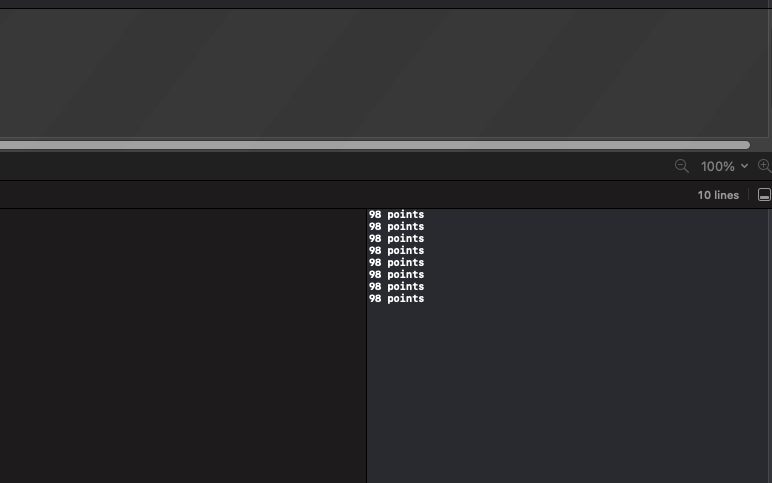
我正在使用WkWebView作为我的应用程序。在加载视图时,我希望以本地方式显示得分,而不是在WkWebView中显示。我使用combine框架工作来创建一个ObservableObject,以便当分数在WkWebview中发生变化时,将我的分数显示给视图和其他视图。我使用window.onload获取最近的得分,并在页面第一次呈现时显示它。为此,我调用一个JS函数,该函数向带有score的本地webkit.messageHandlers.bridge.postMessage("0")发送一条消息,并将发送的分数分配给我的ObservedObject。问题在土著一方。UserContentController函数处理来自WkWebview的消息,它不断打印分数并将分数重新分配给my ObservedObject。好像被困在了一个循环里。我提供了下面代码的简化版本。已经被困在这个问题上几天了,似乎无法解决这个问题。
 //Holds the score
class Myscore:ObservableObject{
@Published var score = "0"

}


 //Wkwebview
struct WebView: UIViewRepresentable {
@ObservedObject var myScore : Myscore

 class Coordinator: NSObject, WKNavigationDelegate, WKScriptMessageHandler {
    var webView: WKWebView?
    var myScore: Myscore
    init(myScore:Myscore) {
        self.myScore = myScore
        super.init()

    }


    func webView(_ webView: WKWebView, didFinish navigation: WKNavigation!) {
        self.webView = webView
    }

    // receive message from wkwebview
    func userContentController(
        _ userContentController: WKUserContentController,
        didReceive message: WKScriptMessage
    ) {
        // This is where the issue occurs
        var newscore = message.body as! String
        myScore.score = newscore
        print(myScore.score)

    }

  }

func makeCoordinator() -> Coordinator {
    return Coordinator(myScore:myScore)
}

func makeUIView(context: Context) -> WKWebView {
    let coordinator = makeCoordinator()
    let userContentController = WKUserContentController()
    userContentController.add(coordinator, name: "bridge")

    let configuration = WKWebViewConfiguration()
    configuration.userContentController = userContentController

    let _wkwebview = WKWebView(frame: .zero, configuration: configuration)
    _wkwebview.navigationDelegate = coordinator

    return _wkwebview
}

  func updateUIView(_ webView: WKWebView, context: Context) {
    guard let path: String = Bundle.main.path(forResource: "index", ofType: "html")
 else { return }
    let localHTMLUrl = URL(fileURLWithPath: path, isDirectory: false)
    webView.loadFileURL(localHTMLUrl, allowingReadAccessTo: localHTMLUrl)
   }
 }

//Content View to display the Score
struct ContentView: View {
 @StateObject var myScore = Myscore()

var body: some View {
    VStack {

        Text("Your Score is\( myScore.score)")
        WebView(myScore: myScore)
    }
   }
  }
编辑这里是html的一面:
<!DOCTYPE html>
<html>
<head>
<meta name="viewport" content="width=device-width, height=device-height, initial-scale=1, minimum-scale=1, viewport-fit=cover">
</head>
<body>
<button>click me</button>
<hr/>
<div id="log"></div>
<script>
    window.onload = function () {
        webkit.messageHandlers.bridge.postMessage("98 points")


    }

</script>
</body>
</html>
编辑2:这就是控制台输出的内容。
回答 2
Stack Overflow用户
发布于 2022-05-26 04:17:03
在这里,我看到通过更新Myscore来加载循环,这会导致updateUIView调用等等。
初始加载应放在makeUIView中
func makeUIView(context: Context) -> WKWebView {
    let coordinator = makeCoordinator()
    let userContentController = WKUserContentController()
    userContentController.add(coordinator, name: "bridge")

    let configuration = WKWebViewConfiguration()
    configuration.userContentController = userContentController

    let _wkwebview = WKWebView(frame: .zero, configuration: configuration)
    _wkwebview.navigationDelegate = coordinator

    // make here initial loading !!!
    guard let path: String = Bundle.main.path(forResource: "index", ofType: "html")
 else { return _wkwebview }

    let localHTMLUrl = URL(fileURLWithPath: path, isDirectory: false)
    _wkwebview.loadFileURL(localHTMLUrl, allowingReadAccessTo: localHTMLUrl)


    return _wkwebview
}

  func updateUIView(_ webView: WKWebView, context: Context) {
     // reload should be made here only if base url changed
     // externally
   }
用Xcode 13.4 / iOS 15.5测试
Stack Overflow用户
发布于 2022-05-26 12:46:01
score应该是@Binding,当它发生变化时会自动调用updateUIView。不幸的是,这是SwiftUI结构中许多无文档化的魔术行为之一。
FYI ObservableObject被设计为将组合管道分配给@Published。尝试并坚持数据的结构,并使用@State和@Binding使您的值类型具有引用类型语义。
https://stackoverflow.com/questions/72386187
复制相似问题
腾讯云开发者

Copyright © 2013 - 2026 Tencent Cloud. All Rights Reserved. 腾讯云 版权所有
深圳市腾讯计算机系统有限公司 ICP备案/许可证号:粤B2-20090059  粤公网安备44030502008569号
腾讯云计算(北京)有限责任公司 京ICP证150476号 | 京ICP备11018762号