
如何在控制器salesforce中插入主细节字段?
如何在控制器salesforce中插入主细节字段?
提问于 2022-05-26 02:52:40
这里有两个master_deatils,即课程和培训师的名字。我需要插入数据。但不能insert.Please提前帮助me...Thaks ..。
<顶点:表单>
 <apex:pageBlock >
   <apex:pageBlockButtons >
     <apex:commandButton value="SAVE" action="{!save}"/>
     <apex:commandButton value="CANCEL" action="{!cancel}"/>
     </apex:pageBlockButtons>

     <apex:pageBlockSection title="Student Details">

      <apex:pageBlockSectionItem >
        <apex:outputLabel value="Student Name"/>
        <apex:inputText value="{!Sname}" />
      </apex:pageBlockSectionItem><br/>


      <apex:pageBlockSectionItem >
        <apex:outputLabel value="Contact Number"/>
        <apex:inputText value="{!Snumber}"/>
      </apex:pageBlockSectionItem><br/>

      <apex:pageBlockSectionItem >
        <apex:outputLabel value="Course Name"/>
        <apex:inputText value="{!SCourseName}" />
      </apex:pageBlockSectionItem><br/>

      <apex:pageBlockSectionItem >
       <apex:outputLabel value="Trainer Name"/>
       <apex:inputText value="{!trainername}"/>
      </apex:pageBlockSectionItem><br/>

      <apex:pageBlockSectionItem >
        <apex:outputLabel value="Date Of Birth"/>
         <apex:inputText value="{!dob}"/>
        </apex:pageBlockSectionItem><br/>

     <apex:pageBlockSectionItem >
        <apex:outputLabel value="Qualification"/>
        <apex:selectList size="1">
      <apex:selectOption itemValue="B-Tech" />
      <apex:selectOption itemValue="Diploma" />
      <apex:selectOption itemValue="Graduate" />
      <apex:selectOption itemValue="MBA" />
      <apex:selectOption itemValue="MCA" />
      <apex:selectOption itemValue="PG" />
      <apex:selectOption itemValue="PHD" />
      <apex:selectOption itemValue="Under Graduate" />
      </apex:selectList>
     </apex:pageBlockSectionItem><br/>

     <apex:pageBlockSectionItem >
        <apex:outputLabel value="State"/>
        <apex:inputText value="{!state}"/>
     </apex:pageBlockSectionItem><br/>

     <apex:pageBlockSectionItem >
       <apex:outputLabel value="City"/>
       <apex:inputText value="{!city}"/>
     </apex:pageBlockSectionItem>

    </apex:pageBlockSection>
 </apex:pageBlock>
公共类insert_cc_Class {
//专用ApexPages.StandardController控制器;
public String city { get; set; }

public String state { get; set; }

public String qualification { get; set; }

public integer dob { get; set; }

public String trainername { get; set; }

public String SCourseName { get; set; }

public integer Snumber { get; set; }

public String Sname { get; set; }

public PageReference cancel() {
    return null;
}
公共PageReference保存(){
Stud__C obj = new Stud__C();

     obj.Sname__c = Sname;
     obj.Contact_Number__c = String.valueOf(Snumber);
     obj.Qualification__c = qualification;
     obj.DOB__c = date.ValueOf(dob);
     obj.Course_Name__c = SCourseName;
     obj.Trainer_Name__c = trainername;
     obj.State__c = state;
     obj.City__c = city;

    Insert obj;
    return null;
}
}
回答 1
Stack Overflow用户
发布于 2022-05-26 09:46:55
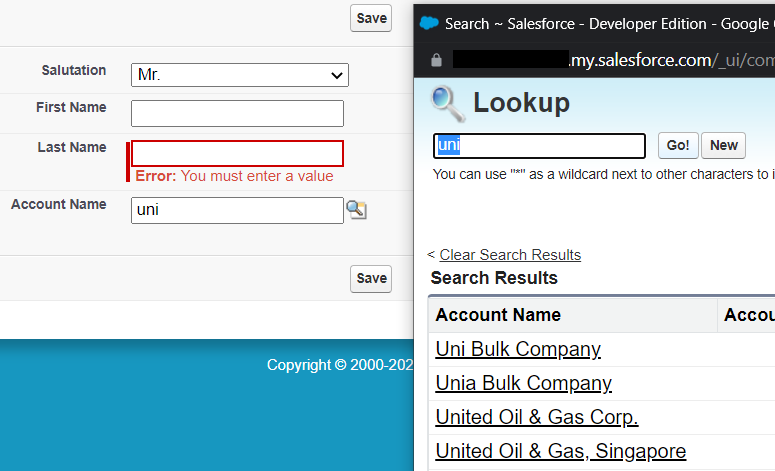
这是一种非常复杂的方法。你真的需要这些"outputLabel,inputText“等等吗?如果您使用too :inputField(它会神奇地知道字段标签以及字段类型是否是文本/日期/选择列表),它会更简单,还可以让您轻松地显示查找。
有一些情况下,您不能这样做(需要绕过SF配置文件字段权限),但它在“我真的知道我在做什么”类别。对于这些,如果你不能仅仅显示一个查找,你需要手工制作一些搜索+自动完成的解决方案。应该有很多的例子,在网上如何创建VF+apex搜索的名称功能。
不过,这真的是发明了方向盘。说真的,考虑使用<apex:inputField>
public class Stack72386167{

    public Contact con {get;set;}

    public Stack72386167(){
        con = new Contact();
    }

    public void save(){
        insert con;
    }
}

<apex:page controller="Stack72386167">
<apex:form>
    <apex:pageBlock>
        <apex:pageBlockButtons>
            <apex:commandButton value="Save" action="{!save}" />
        </apex:pageBlockButtons>
        <apex:pageBlockSection columns="1">
            <apex:inputField value="{!con.Salutation}" /> <!-- picklists -->
            <apex:inputField value="{!con.FirstName}" />
            <apex:inputField value="{!con.LastName}" />
            <apex:inputField value="{!con.AccountId}" />  <!-- lookups
            <apex:inputField value="{!con.Birthdate}" />  <!-- dates (and of course right field labels picked for "free", admin can change them without code changes -->

        </apex:pageBlockSection>
    </apex:pageBlock>
</apex:form>
</apex:page>
页面原文内容由Stack Overflow提供。腾讯云小微IT领域专用引擎提供翻译支持
原文链接:
https://stackoverflow.com/questions/72386167
复制相关文章
相似问题
腾讯云开发者

Copyright © 2013 - 2026 Tencent Cloud. All Rights Reserved. 腾讯云 版权所有
深圳市腾讯计算机系统有限公司 ICP备案/许可证号:粤B2-20090059  粤公网安备44030502008569号
腾讯云计算(北京)有限责任公司 京ICP证150476号 | 京ICP备11018762号