
Python Tesseract车牌识别
Python Tesseract车牌识别
提问于 2022-05-25 16:59:19
我是一名程序员,但我以前没有使用Python或它的任何库,甚至整个OCR/ALPR的经验。我有一个脚本,我做了(基本上复制和粘贴到整个网络的其他脚本),我假装使用它来识别车牌。但事实是我的代码现在很糟糕。它能很好地识别图像中的文本,但是捕捉车牌很糟糕。我很少能用它弄到车牌。
因此,我想要一些帮助,我应该如何改变我的代码,使其更好。
在我的代码中,我只需选择一个图像,将其转换为二进制和BW,然后尝试读取它。
我只需要字符串(image_to_string);我不需要图像。
同样重要的是要注意,正如我所说的,我对这段代码或我正在使用的函数没有专门知识。
我的代码:
from PIL import Image
import pytesseract
import numpy as np
import cv2


image = cv2.imread('redcar.jpg')
image=cv2.cvtColor(image,cv2.COLOR_BGR2GRAY)
se=cv2.getStructuringElement(cv2.MORPH_RECT , (8,8))
bg=cv2.morphologyEx(image, cv2.MORPH_DILATE, se)
out_gray=cv2.divide(image, bg, scale=255)
out_binary=cv2.threshold(out_gray, 0, 255, cv2.THRESH_OTSU )[1]

#cv2.imshow('binary', out_binary)
cv2.imwrite('binary.png',out_binary)

#cv2.imshow('gray', out_gray)
cv2.imwrite('gray.png',out_gray)

filename = 'gray.png'
img1 = np.array(Image.open(filename))


text = pytesseract.image_to_string(filename,config ='--psm 6')
print(text)
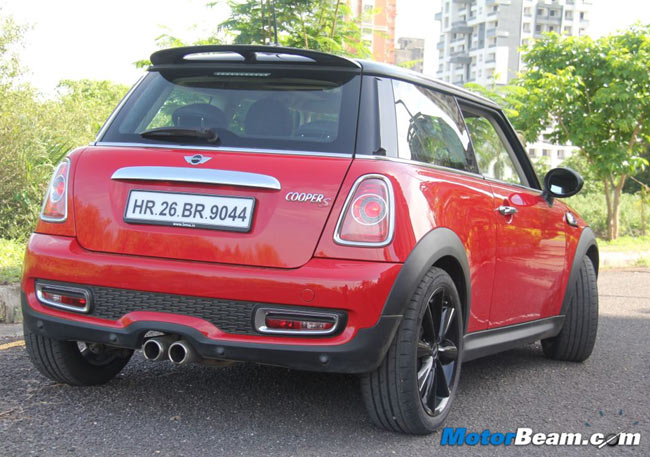
我所用的图像:
回答 1
Stack Overflow用户
发布于 2022-05-25 17:43:26
我希望在这种情况下易如反掌会有所帮助。您可以使用opencv版本的pip install easyocr安装easyocr。
import easyocr

IMAGE_PATH = 'AQFCB.jpg'
reader = easyocr.Reader(['en'])
result = reader.readtext(IMAGE_PATH)
for detection in result:
    if detection[2] > 0.5:
        print(detection[1])
输出是
HR.26 BR.9044页面原文内容由Stack Overflow提供。腾讯云小微IT领域专用引擎提供翻译支持
原文链接:
https://stackoverflow.com/questions/72381645
复制相关文章
相似问题
腾讯云开发者

Copyright © 2013 - 2026 Tencent Cloud. All Rights Reserved. 腾讯云 版权所有
深圳市腾讯计算机系统有限公司 ICP备案/许可证号:粤B2-20090059  粤公网安备44030502008569号
腾讯云计算(北京)有限责任公司 京ICP证150476号 | 京ICP备11018762号