
在一个ttk无线电按钮内,如何对文本进行居中?(锚不起作用)
在一个ttk无线电按钮内,如何对文本进行居中?(锚不起作用)
提问于 2022-05-24 12:42:50
tkinker.ttk justify和anchor并不为ttk.Radiobutton工作。
这是我的密码:
from tkinter import *
from tkinter import ttk

window = Tk()
style = ttk.Style()
sty = ttk.Style(window)
op=IntVar(master=window)
sty.configure("TRadiobutton", background="green",foreground="red", anchor="center",justify='center')
entry_0 = ttk.Radiobutton(window,text="text",value=1,variable=op,style="white.TRadiobutton")
entry_0.place(
    x=0,
    y=0,
    anchor="nw",
    width=150
)
mainloop()
我得到的是:
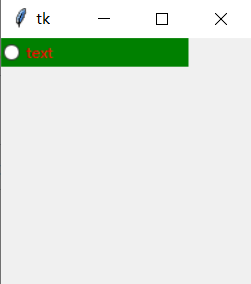
这就是我要做的,除了:
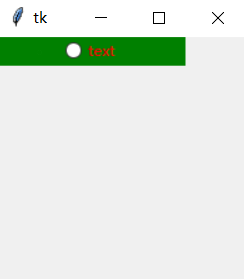
PS:我可以在tk小部件中使用anchor=center。
回答 1
Stack Overflow用户
发布于 2022-05-25 01:59:04
在初级阶段。你不能跳到直接的水平。你必须一步一步地倾斜。这里是一个新手教程:
from tkinter import *
from tkinter import ttk

window = Tk()
style = ttk.Style()
sty = ttk.Style(window)
op=IntVar(master=window)
sty.configure("TRadiobutton", background="green",
              foreground="red", anchor="center",
              justify='center')

entry_0 = ttk.Radiobutton(window,text="text",value=1,variable=op,
                          style="white.TRadiobutton").pack(side = TOP)

mainloop()页面原文内容由Stack Overflow提供。腾讯云小微IT领域专用引擎提供翻译支持
原文链接:
https://stackoverflow.com/questions/72363097
复制相关文章
相似问题
腾讯云开发者

Copyright © 2013 - 2026 Tencent Cloud. All Rights Reserved. 腾讯云 版权所有
深圳市腾讯计算机系统有限公司 ICP备案/许可证号:粤B2-20090059  粤公网安备44030502008569号
腾讯云计算(北京)有限责任公司 京ICP证150476号 | 京ICP备11018762号