
如何在tkinter用户界面中添加摄像头窗口
如何在tkinter用户界面中添加摄像头窗口
提问于 2022-05-20 11:48:59
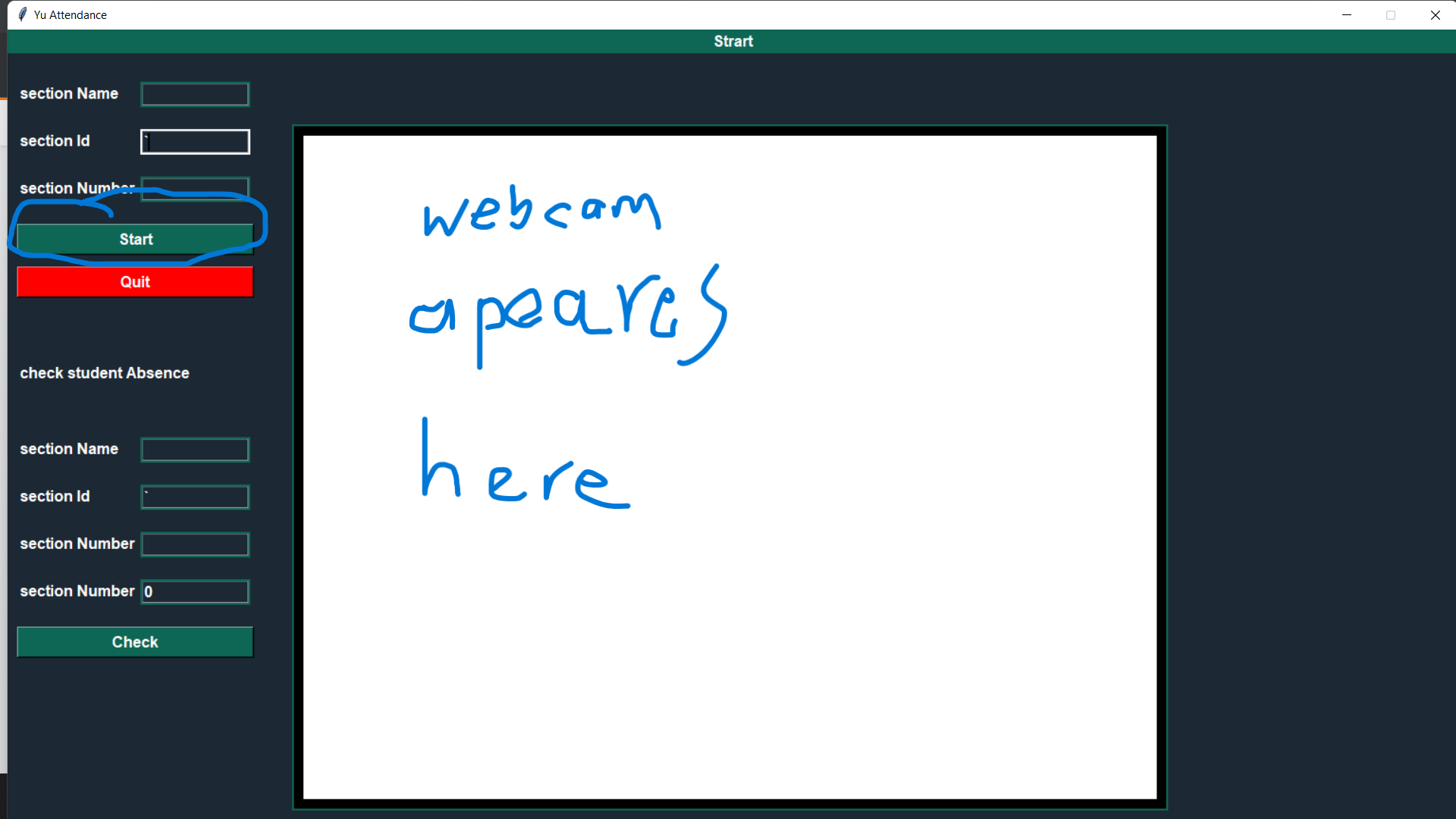
我需要在tkinter用户界面中添加摄像头窗口,当用户按下“开始”时,摄像头必须出现在白色框中,如图片中所示,下面的代码也已创建了一个类,打开webacam窗口并识别面孔。
    canvans=tkinter.Canvas(pro, width =900, height = 700, borderwidth=10, relief="solid",bg="#ffffff",
                           highlightbackground="#0E6655")
    canvans.place(x=300,y=100)


    pro.mainloop()


x=Gui()
回答 1
Stack Overflow用户
发布于 2022-05-20 15:01:40
在注释中,您可以链接到示例,但我做了一些更改
- 检查
read()是否给出任何帧 - 使用摄像头后使用
cap.release() - (PEP8)
import *不是首选 - (PEP8)组织代码-将所有函数放在
import之后
import tkinter as tk  # PEP8: `import *` is not preferred
from PIL import Image, ImageTk
import cv2

# --- functions ---  # PEP8: all functions after imports

def show_frame():
   # get frame
   ret, frame = cap.read()

   if ret:
       # cv2 uses `BGR` but `GUI` needs `RGB`
       frame = cv2.cvtColor(frame, cv2.COLOR_BGR2RGB)

       # convert to PIL image
       img = Image.fromarray(frame)

       # convert to Tkinter image
       photo = ImageTk.PhotoImage(image=img)

       # solution for bug in `PhotoImage`
       label.photo = photo

       # replace image in label
       label.configure(image=photo)

   # run again after 20ms (0.02s)
   root.after(20, show_frame)

# --- main ---

cap = cv2.VideoCapture(0)

root = tk.Tk()

# create a Label to display frames
label = tk.Label(root)
label.pack(fill='both', expand=True)  # to resize label when resize window

# start function which shows frame
show_frame()

root.mainloop()

cap.release()
顺便说一下:
编辑:
同样适用于Canvas
它使用图像的ID替换Canvas上的Canvas
import tkinter as tk  # PEP8: `import *` is not preferred
from PIL import Image, ImageTk
import cv2

# --- functions ---

def show_frame():
    global image_id  # inform function to assign new value to global variable instead of local variable

    # get frame
    ret, frame = cap.read()

    if ret:
        # cv2 uses `BGR` but `GUI` needs `RGB
        frame = cv2.cvtColor(frame, cv2.COLOR_BGR2RGB)

        # convert to PIL image
        img = Image.fromarray(frame)

        # convert to Tkinter image
        photo = ImageTk.PhotoImage(image=img)

        # solution for bug in `PhotoImage`
        canvas.photo = photo

        # check if image already exists
        if image_id:
            # replace image in PhotoImage on canvas
            canvas.itemconfig(image_id, image=photo)
        else:
            # create first image on canvas and keep its ID
            image_id = canvas.create_image((0,0), image=photo, anchor='nw')
            # resize canvas
            canvas.configure(width=photo.width(), height=photo.height())

    # run again after 20ms (0.02s)
    root.after(20, show_frame)

# --- main ---

image_id = None  # default value at start (to create global variable)

cap = cv2.VideoCapture(0)

root = tk.Tk()

# create a Label to display frames
canvas = tk.Canvas(root)
canvas.pack(fill='both', expand=True)

# start function which shows frame
show_frame()

root.mainloop()

cap.release()页面原文内容由Stack Overflow提供。腾讯云小微IT领域专用引擎提供翻译支持
原文链接:
https://stackoverflow.com/questions/72318466
复制相关文章
相似问题
腾讯云开发者

Copyright © 2013 - 2026 Tencent Cloud. All Rights Reserved. 腾讯云 版权所有
深圳市腾讯计算机系统有限公司 ICP备案/许可证号:粤B2-20090059  粤公网安备44030502008569号
腾讯云计算(北京)有限责任公司 京ICP证150476号 | 京ICP备11018762号