
无法使用PhpMqtt-Client从mqtt代理接收消息
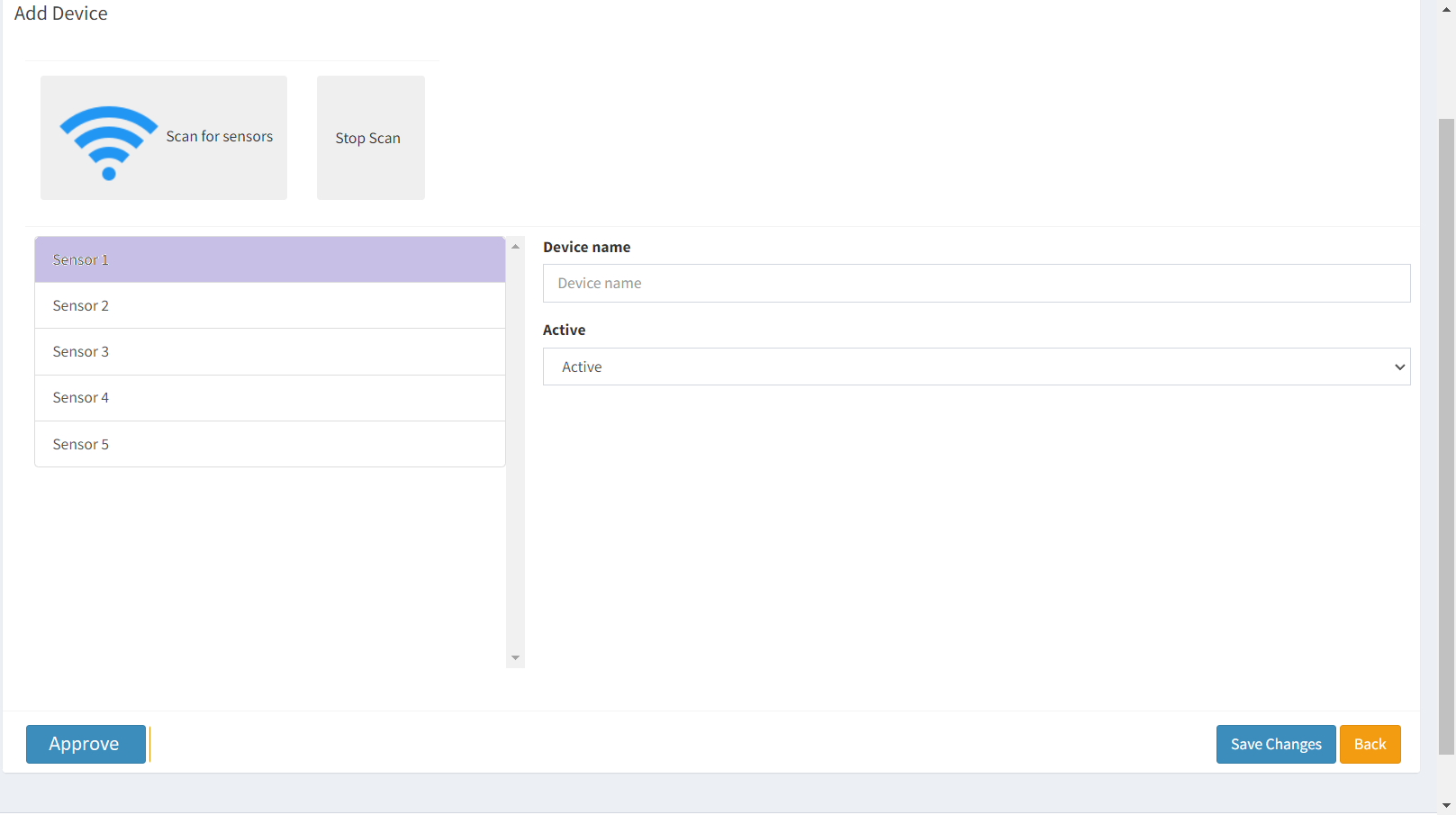
我下载了mqtt,并在本地机器上运行1883端口的代理,并使用提供的mosquitto_pub.exe和mosquitto_sub.exe文件成功地测试了它的工作。当我发布一个主题的消息时,我能够从它的订阅者那里接收到它。我使用windows 10中提供的cmd工具(对于同一台计算机上的发行者和订阅服务器)对其进行了测试。现在,我对客户机的理解是,代理需要运行才能订阅它。因此,根据我的要求,我下载了https://github.com/php-mqtt/client,并在我的php文件中使用ajax,我试图从发行者那里获得已发布的消息,这是之前启动的cmd工具。但是,我无法得到任何消息,在等待超时期间之后,我得到了错误消息(500-内部服务器错误),但是在订户cmd窗口中,我得到了消息。请帮助我理解我的方法有什么问题。我使用它来获取发布到上述主题的所有设备。我也给出了期望输出的图像,这是由代码给出的。“批准”按钮当然不在给定的代码中。一旦我得到左边列表中的出版商列表,我就会添加它。上面列出的传感器都是硬编码的html -以下是我的代码-
php代码-
<!-- Content Wrapper. Contains page content -->
<div class="content-wrapper">
<!-- Content Header (Page header) -->
<section class="content-header">
<h1>
Manage
<small>Devices</small>
</h1>
<ol class="breadcrumb">
<li><a href="#"><i class="fa fa-dashboard"></i>Home</a></li>
<li class="active">Devices</li>
</ol>
</section>
<!-- Main content -->
<section class="content">
<!-- Small boxes (Stat box) -->
<div class="row">
<div class="col-md-12 col-xs-12">
<?php
ini_set('display_errors', 1);
error_reporting(E_ALL);
if ($this->session->flashdata('success')) : ?>
<div class="alert alert-success alert-dismissible" role="alert">
<button type="button" class="close" data-dismiss="alert" aria-label="Close"><span aria-hidden="true">×</span></button>
<?php echo $this->session->flashdata('success'); ?>
</div>
<?php elseif ($this->session->flashdata('error')) : ?>
<div class="alert alert-error alert-dismissible" role="alert">
<button type="button" class="close" data-dismiss="alert" aria-label="Close"><span aria-hidden="true">×</span></button>
<?php echo $this->session->flashdata('error'); ?>
</div>
<?php endif; ?>
<div class="box">
<div class="box-header">
<h3 class="box-title">Add Device</h3>
</div>
<form role="form" action="<?php base_url('devices/create') ?>" method="post">
<div class="box-body">
<?php echo validation_errors(); ?>
<table style="width:max-content;" class="table">
<tr>
<td class="td">
<button id="btnscansensors" type="button" class="btn btn-light" style="margin:5px">
<img id="wifi" src="../images/icons/wi-fi.png" width="96" /> Scan for sensors
</button>
</td>
<td class="td">
<button id="btnstopscansensors" type="button" class="btn btn-light" style="width:96px; height: 110px;margin:5px">
<span style="margin-right:5px">Stop Scan</span>
</button>
</td>
</tr>
</table>
<table class="table">
<tr>
<td class="td">
<div class="list-group" style="overflow-y: scroll; height: 25vw;" ;>
<?php //sensor list populate on button click
?>
<a href="#" class="list-group-item list-group-item-action">Sensor 1</a>
<a href="#" class="list-group-item list-group-item-action">Sensor 2</a>
<a href="#" class="list-group-item list-group-item-action">Sensor 3</a>
<a href="#" class="list-group-item list-group-item-action">Sensor 4</a>
<a href="#" class="list-group-item list-group-item-action">Sensor 5</a>
</div>
</td>
<td class="td">
<div class="form-group">
<label for="group_name">Device name</label>
<input type="text" class="form-control" id="device_name" name="device_name" placeholder="Device name">
</div>
<div class="form-group">
<label for="group_name">Active</label>
<select class="form-control" id="status" name="status">
<option value="1">Active</option>
<option value="2">Inactive</option>
</select>
</div>
</td>
</tr>
</table>
</div>
<!-- /.box-body -->
<div class="box-footer">
<button type="submit" class="btn btn-primary">Save Changes</button>
<a href="<?php echo base_url('devices/') ?>" class="btn btn-warning">Back</a>
</div>
</form>
</div>
<!-- /.box -->
</div>
<!-- col-md-12 -->
</div>
<!-- /.row -->
</section>
<!-- /.content -->
</div>
<?php
$dir = dirname(__FILE__, 4);
require $dir.'/vendor/autoload.php';
use PhpMqtt\Client\MqttClient;
if (isset($_POST['function_to_call'])) {
echo "read_topic being called";
switch ($_POST['function_to_call']) {
case 0: {
echo "read_topic being called";
read_topic();
break;
}
default:
break;
}
}
//function read_topic($topic, $server, $port, $keepalive, $timeout) {
function read_topic()
{
$server = 'localhost';
$port = 1883;
$clientId = 'test-subscriber';
$mqtt = new MqttClient($server, $port, $clientId);
$mqtt->connect();

$mqtt->subscribe('Registration', function ($topic, $message) {
  echo $message; // for testing
  echo sprintf("Received message on topic [%s]: %s\n", $topic, $message);
}, 0);
$mqtt->loop(true);
$mqtt->disconnect();
}
?>
<script type="text/javascript">
$(document).ready(function() {
$("#devicesSideTree").addClass('active');
$("#createDevicesSideTree").addClass('active');
$('#btnstopscansensors').on('click', () => {
StopScanSensors();
});
$("#btnscansensors").on('click', (event) => {
ScanSensors();
//$.ajax();
$.ajax({
type: 'post',
//url: 'create.php',
data: "function_to_call=0",
success: function(data) {
alert('successful');
},
error: function (request, status, error) {
alert(request.responseText);
}
});
event.preventDefault();
//$.ajax();
});
function ScanSensors() {
$('#btnscansensors').prop('disabled', true);
$('#wifi[src$=".png"]').each(function(index, element) {
element.src = element.src.replace('.png', '.gif');
});
//$.ajax();
}
function StopScanSensors() {
$('#btnscansensors').prop('disabled', false);
$('#wifi[src$=".gif"]').each(function(index, element) {
element.src = element.src.replace('.gif', '.png');
});
//$.ajax();
}
});
</script>
回答 1
Stack Overflow用户
发布于 2022-05-19 21:52:07
PHP在服务器端运行并呈现HTML,然后发送到浏览器。当页面加载到浏览器中时,PHP代码已经停止运行,因此不会收到任何消息。
另外,PHP代码连接,然后立即断开与代理的连接。
$mqtt->connect();
$mqtt->subscribe('Registration', function ($topic, $message) {
echo $message; // for testing
echo sprintf("Received message on topic [%s]: %s\n", $topic, $message);
}, 0);
$mqtt->loop(true);
$mqtt->disconnect();如果要在网页中接收和显示活动MQTT消息,则不能使用PHP,则需要在代理中通过WebSockets启用MQTT,然后使用MQTT.js客户端上的Paho Javascript客户端订阅页面中的实际消息。
https://stackoverflow.com/questions/72308964
复制相似问题
腾讯云开发者

Copyright © 2013 - 2026 Tencent Cloud. All Rights Reserved. 腾讯云 版权所有
深圳市腾讯计算机系统有限公司 ICP备案/许可证号:粤B2-20090059  粤公网安备44030502008569号
腾讯云计算(北京)有限责任公司 京ICP证150476号 | 京ICP备11018762号