
Gtk4 GestureClick无释放信号
当我将一个Gtk.GestureClick分配给一个Gtk.Scale时,没有发出released信号。
例如,请参阅代码。
import gi
gi.require_version('Gtk', '4.0')
from gi.repository import Gtk

class Main():
    def on_activate(self, app):
        win = Gtk.ApplicationWindow(application=app)
        gesture = Gtk.GestureClick.new()
        gesture.connect("pressed", self.press)
        gesture.connect("released", self.release)
        scale = Gtk.Scale()
        win.set_child(scale)
        scale.add_controller(gesture)
        win.present()

    def press(self, *_):
        print("pressed")

    def release(self, *_):
        print("released")

app = Gtk.Application(application_id='com.example.GtkApplication')
runner = Main()
app.connect('activate', runner.on_activate)

app.run(None)回答 2
Stack Overflow用户
发布于 2022-05-19 16:59:17
实际上,我查看了GTK "GestureClick“小部件的源代码,我在代码中发现,”释放“信号只在单击事件(gtk_gesture_click_end)结束时发出。该事件与GTK手势部件的“结束”信号相关联。因此,作为测试,我修改了"self.release“函数,以利用小部件继承的"end”事件,如下所示。
gesture.connect("end", self.release)然后,在打印“按下”后,在终端上立即打印出“释放”一词,但它这样做是作为单击事件的一部分,而不是等待鼠标按钮的实际发布。
您可以尝试一下我的小代码更改,只是为了看看效果。我犹豫不决地称这是一个bug,因为我在GTK手势方面还不太有经验。但是,测试一下这个。您可能需要在此时只依赖于click事件。
其他调查结果。
简单地说,在查看其他GTK4单击手势示例时,“按”和“发布”手势都与其他小部件一起工作。显然,scale小部件有一些特性。我修改了示例代码,将标签小部件中的示例代码替换为scale小部件。
import gi
gi.require_version('Gtk', '4.0')
from gi.repository import Gtk

class Main():
    def on_activate(self, app):
        win = Gtk.ApplicationWindow(application=app)
        gesture = Gtk.GestureClick.new()
        gesture.connect("pressed", self.press)
        gesture.connect("released", self.release)
        label = Gtk.Label(label="This is a label widget")
        win.set_child(label)
        win.set_default_size(400, 200)
        label.add_controller(gesture)
        win.present()

    def press(self, *_):
        print("pressed")

    def release(self, *_):
        print("released")

app = Gtk.Application(application_id='com.example.GtkApplication')
runner = Main()
app.connect('activate', runner.on_activate)

app.run(None)
下面是用于单击和释放标签小部件上的鼠标按钮的终端输出的结果。
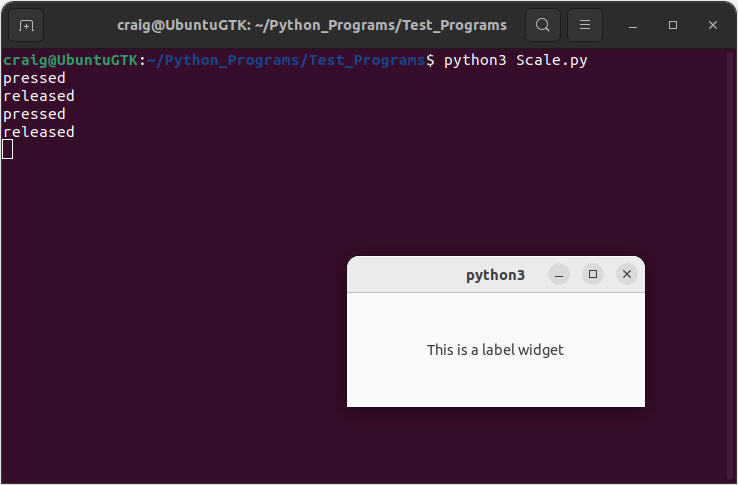
FYI,为了确认这个问题似乎与scale小部件有关,我在C中构建了一个类似的程序,测试一个scale小部件和其他小部件。同样,缩放小部件不会发出释放的信号。至少规模小部件的特性在不同的语言中是一致的。因此,它的底线似乎是,规模小部件不会发出释放的信号。我希望这些额外的信息能有所帮助。
致以问候。
Stack Overflow用户
发布于 2022-07-11 16:25:25
我也有同样的问题,但我临时用gtk按钮进行了修复。使用取消信号释放。对我来说很管用。
func (c *Control) topCenter() *gtk.Box {
    boxroot := gtk.NewBox(gtk.OrientationHorizontal, 0)
    boxroot.SetHExpand(true)

    root := gtk.NewOverlay()
    root.SetCSSClasses([]string{"player-control-scale"})
    root.SetHExpand(true)

    c.cacheadjustment = gtk.NewAdjustment(0, 0, 1, 1, 10, 0)
    c.cacheprocess = gtk.NewScale(gtk.OrientationHorizontal, c.cacheadjustment)
    c.cacheprocess.AddCSSClass("timescalebuffer")
    root.SetChild(c.cacheprocess)

    c.timeadjustment = gtk.NewAdjustment(0, 0, 1, 1, 10, 0)
    c.timeprocess = gtk.NewScale(gtk.OrientationHorizontal, c.timeadjustment)
    c.timeprocess.AddCSSClass("timescale")

    tsstext := gtk.NewLabel("testing")
    timepopover := gtk.NewPopover()
    timepopover.SetSizeRequest(80, 0)
    timepopover.SetChild(tsstext)
    timepopover.SetPosition(gtk.PosTop)
    timepopover.SetAutohide(false)
    boxroot.Append(timepopover)
    timepopover.AddCSSClass("timePopup")

    motionctrl := gtk.NewEventControllerMotion()
    c.timeprocess.AddController(motionctrl)

    motionctrl.ConnectEnter(func(x, y float64) {
        glib.IdleAddPriority(glib.PRIORITY_HIGH_IDLE, func() {
            rect := gdk.NewRectangle(int(x), 0, 0, 0)
            timepopover.SetPointingTo(&rect)
            timepopover.Show()
        })
    })

    motionctrl.ConnectLeave(func() {
        glib.IdleAddPriority(glib.PRIORITY_HIGH_IDLE, func() {
            timepopover.Hide()
        })
    })

    motionctrl.ConnectMotion(func(x, y float64) {
        glib.IdleAddPriority(glib.PRIORITY_HIGH_IDLE, func() {

            rect := gdk.NewRectangle(int(x), 0, 0, 0)
            timepopover.SetPointingTo(&rect)
            prr := math.Round(percent.PercentOf(int(x), c.timeprocess.AllocatedWidth()))
            step := c.timeadjustment.StepIncrement()
            value := (step*math.Round(prr*(c.duration-0)/step) + 0) / 100
            drtime, _ := time.ParseDuration(fmt.Sprintf("%fs", value))
            c.Lock()
            c.lastValPos = drtime
            c.Unlock()

            currentTime := parsing.NewTime().Duration(drtime)
            tsstext.SetText(currentTime)
            if drtime.Seconds() < 0 {
                timepopover.Hide()
            } else if drtime.Seconds() > c.duration {
                timepopover.Hide()
            } else {
                if !timepopover.IsVisible() {
                    timepopover.Show()
                }
            }

        })
    })

    root.AddOverlay(c.timeprocess)

    // add button for temp fixed when gtk scale not emitted release signal
    c.btntracks = gtk.NewButton()
    c.btntracks.SetCSSClasses([]string{"transparent-btn"})

    clickges := gtk.NewGestureClick()
    c.timeprocess.AddController(clickges)

    clickges.ConnectPressed(func(nPress int, x, y float64) {
        fmt.Println("ConnectPressed")
        c.Lock()
        c.seekOnHold = true
        c.Unlock()
    })

    // use cancel for release signal
    clickges.ConnectCancel(func(sequence *gdk.EventSequence) {
        fmt.Println("ConnectCancel")
        c.Lock()
        c.seekOnHold = false
        c.Unlock()

        glib.IdleAddPriority(glib.PRIORITY_HIGH_IDLE, func() {
            c.Lock()
            val := c.lastValPos.Seconds()
            c.Unlock()
            c.timeadjustment.SetValue(val)
            c.main.player.Bridge().Seek(val)
        })
    })

    c.btntracks.SetChild(root)
    c.timeprocess.SetSensitive(false)
    c.cacheprocess.SetSensitive(false)
    c.btntracks.SetSensitive(false)
    boxroot.Append(c.btntracks)

    return boxroot
}
并为透明按钮添加css。
.transparent-btn{
    background:transparent;
    box-shadow: none;
    border-radius: 0px;
    border: 0px;
    text-shadow: none;
    -gtk-icon-shadow: none;
    padding: 0px;
    &:hover{
        box-shadow: none;
        background: transparent;
    }
}https://stackoverflow.com/questions/72303475
复制相似问题
腾讯云开发者

Copyright © 2013 - 2026 Tencent Cloud. All Rights Reserved. 腾讯云 版权所有
深圳市腾讯计算机系统有限公司 ICP备案/许可证号:粤B2-20090059  粤公网安备44030502008569号
腾讯云计算(北京)有限责任公司 京ICP证150476号 | 京ICP备11018762号