
为什么成本资源管理器客户端显示错误的结果,当我有AWS学分?
为什么成本资源管理器客户端显示错误的结果,当我有AWS学分?
提问于 2022-05-19 08:58:56
当使用AWS控制台--> AWS成本管理->成本资源管理器--我得到以下值:
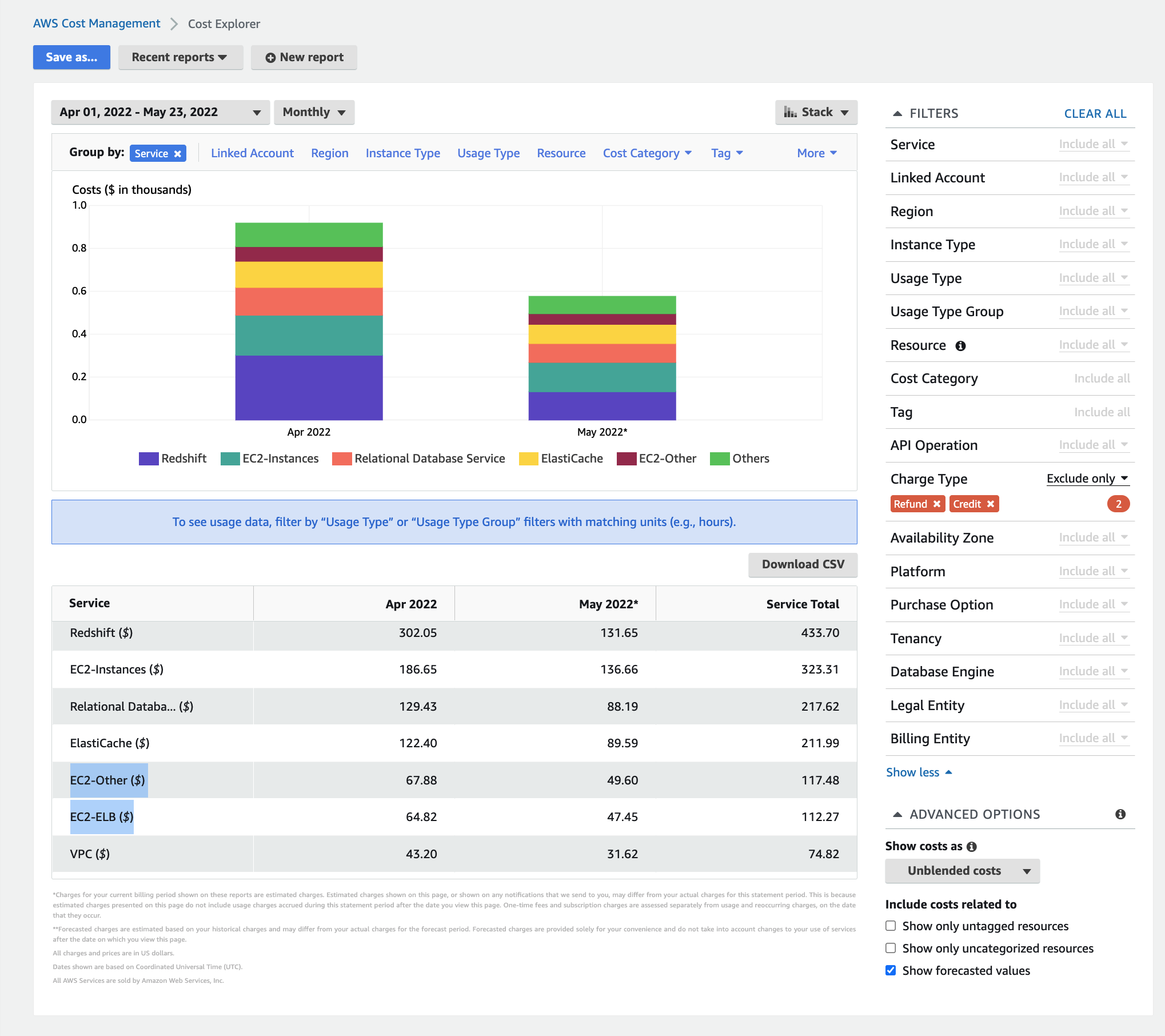
当我使用@aws-sdk/client-cost-explorer时,我会得到'EC2 - Other‘和'Amazon’的不同结果。
配置:
import { CostExplorerClient, GetCostAndUsageCommand } from '@aws-sdk/client-cost-explorer';

const client = new CostExplorerClient({
        region,
        credentials: {
          accessKeyId,
          secretAccessKey
        }
      });

      const params = {
        TimePeriod: {
          Start: startDate,
          End: endDate
        },
        Filter: {
         Dimensions: {
           Key: 'SERVICE',
           Values: [
             'EC2 - Other', 'Amazon ElastiCache'
           ]
         }
        },
        GroupBy: [
          {
            Type: 'DIMENSION',
            Key: 'SERVICE',
          },
        ],
        Granularity: 'DAILY',
        Metrics: [
          'BLENDED_COST',
          'UNBLENDED_COST',
          'AMORTIZED_COST',
          'NET_AMORTIZED_COST',
     ]
      };
      const command = new GetCostAndUsageCommand(params);
      try {
        const data = await client.send(command);
        log.info(data);
其结果是:
GroupDefinitions: [
    {
      "Key": "AZ",
      "Type": "DIMENSION"
    },
    {
      "Key": "SERVICE",
      "Type": "DIMENSION"
    }
  ]
  --
  ResultsByTime: [
    {
      "Estimated": false,
      "Groups": [
        {
          "Keys": [
            "NoAZ",
            "Amazon ElastiCache"
          ],
          "Metrics": {
            "AmortizedCost": {
              "Amount": "-122.4",
              "Unit": "USD"
            },
            "BlendedCost": {
              "Amount": "-122.4",
              "Unit": "USD"
            },
            "NetAmortizedCost": {
              "Amount": "-122.4",
              "Unit": "USD"
            },
            "UnblendedCost": {
              "Amount": "-122.4",
              "Unit": "USD"
            }
          }
        },
        {
          "Keys": [
            "NoAZ",
            "EC2 - Other"
          ],
          "Metrics": {
            "AmortizedCost": {
              "Amount": "0.2467152681",
              "Unit": "USD"
            },
            "BlendedCost": {
              "Amount": "0.2467152681",
              "Unit": "USD"
            },
            "NetAmortizedCost": {
              "Amount": "0.2467152681",
              "Unit": "USD"
            },
            "UnblendedCost": {
              "Amount": "0.2467152681",
              "Unit": "USD"
            }
          }
        },
        {
          "Keys": [
            "us-east-1",
            "Amazon ElastiCache"
          ],
          "Metrics": {
            "AmortizedCost": {
              "Amount": "122.4",
              "Unit": "USD"
            },
            "BlendedCost": {
              "Amount": "122.4",
              "Unit": "USD"
            },
            "NetAmortizedCost": {
              "Amount": "122.4",
              "Unit": "USD"
            },
            "UnblendedCost": {
              "Amount": "122.4",
              "Unit": "USD"
            }
          }
        }
      ],
      "TimePeriod": {
        "End": "2022-05-01",
        "Start": "2022-04-01"
      },
      "Total": {}
    },
    {
      "Estimated": true,
      "Groups": [
        {
          "Keys": [
            "NoAZ",
            "Amazon ElastiCache"
          ],
          "Metrics": {
            "AmortizedCost": {
              "Amount": "-89.59",
              "Unit": "USD"
            },
            "BlendedCost": {
              "Amount": "-89.59",
              "Unit": "USD"
            },
            "NetAmortizedCost": {
              "Amount": "-89.59",
              "Unit": "USD"
            },
            "UnblendedCost": {
              "Amount": "-89.59",
              "Unit": "USD"
            }
          }
        },
        {
          "Keys": [
            "NoAZ",
            "EC2 - Other"
          ],
          "Metrics": {
            "AmortizedCost": {
              "Amount": "0.1766760069",
              "Unit": "USD"
            },
            "BlendedCost": {
              "Amount": "0.1766760069",
              "Unit": "USD"
            },
            "NetAmortizedCost": {
              "Amount": "0.1766760069",
              "Unit": "USD"
            },
            "UnblendedCost": {
              "Amount": "0.1766760069",
              "Unit": "USD"
            }
}如您所见,“AmazonEC2”的数量对于所有度量都是正确的,但是EC2-其他的数量对于所有度量都是错误的。
我们的帐户目前使用AWS信用。
我正在寻找用于此SDK的正确参数,以便接收每个服务的日/月使用量。
回答 1
Stack Overflow用户
回答已采纳
发布于 2022-05-23 09:47:57
默认情况下,控制台中的成本资源管理器UI应用了一个筛选器,其中不包括 refund 和 credit 收费类型(您可以在筛选器列表的中间看到它)。
在使用AWS信用时,当前的GetCostAndUsageCommand将包括降低Amount值的信用。
您将需要复制相同的排除筛选器,它已经应用于UI中。,这将增加您的Amount值,与控制台中显示的内容一致。
您可以使用NOT 表达式排除退款和/或抵免(视情况而定)。这已经从GetCostAndUsageCommandInput文档中链接到。
尝试:
const params = {
    TimePeriod: {
        Start: startDate,
        End: endDate
    },
    Filter: {
        Not: {
            Dimensions: {
                Key: "RECORD_TYPE",
                Values: ["Refund", "Credit"]
            }
        },
        Dimensions: {
            Key: 'SERVICE',
            Values: [
                'EC2 - Other', 'Amazon ElastiCache'
            ]
        }
    },
    GroupBy: [{
        Type: 'DIMENSION',
        Key: 'SERVICE',
    }, ],
    Granularity: 'DAILY',
    Metrics: [
        'BLENDED_COST',
        'UNBLENDED_COST',
        'AMORTIZED_COST',
        'NET_AMORTIZED_COST',
    ]
};页面原文内容由Stack Overflow提供。腾讯云小微IT领域专用引擎提供翻译支持
原文链接:
https://stackoverflow.com/questions/72301555
复制相关文章
相似问题
腾讯云开发者

Copyright © 2013 - 2026 Tencent Cloud. All Rights Reserved. 腾讯云 版权所有
深圳市腾讯计算机系统有限公司 ICP备案/许可证号:粤B2-20090059  粤公网安备44030502008569号
腾讯云计算(北京)有限责任公司 京ICP证150476号 | 京ICP备11018762号