
Podman不是在Windows的远程容器中工作吗?
关于远距离集装箱为什么不在Windows上使用podman的任何提示
- 通过
podman在Windows 11上安装.msi包 - 将
remote.containers.dockerPath设置为podman与代码设置 - 运行
podman machine init - 运行
podman machine start - 打开
Remote Explorer中的与代码,并显示如下内容:
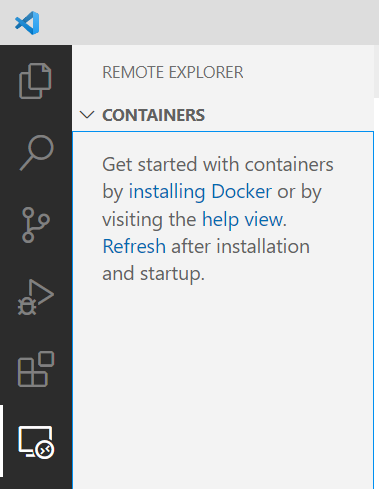
所有的东西都在使用podman -- pull、run、images等,但是远距离集装箱 on VSCode不认识podman。
在VS代码中运行Remote-Containers Developer: Show All Logs...之后:
[2022-08-21T12:55:15.916Z] Start: Run: podman version --format {{.Server.APIVersion}}
[2022-08-21T12:55:16.080Z] Stop (164 ms): Run: podman version --format {{.Server.APIVersion}}
[2022-08-21T12:55:16.080Z] Cannot connect to Podman. Please verify your connection to the Linux system using `podman system connection list`, or try `podman machine init` and `podman machine start` to manage a new Linux VM
Error: unable to connect to Podman. failed to create sshClient: dial unix \\.\pipe\openssh-ssh-agent: connect: No connection could be made because the target machine actively refused it.以及终端中的podman system connection list:
Name                         URI                                                          Identity                                      Default
podman-machine-default       ssh://user@localhost:62078/run/user/1000/podman/podman.sock  C:\Users\Edmundo\.ssh\podman-machine-default  true
podman-machine-default-root ssh://root@localhost:62078/run/podman/podman.sock C:\Users\Edmundo\.ssh\podman-machine-default false回答 3
Stack Overflow用户
发布于 2022-05-21 02:54:06
请确认您正在运行最新版本(预发布)
v0.236.1.
(在github上有一些已知的问题,在这个版本中修复了早期版本)
Stack Overflow用户
发布于 2022-05-23 01:14:06
在WSL shell中,即为了调试,请尝试
首先,尝试启动podman podlib REST (套接字,生存期5000秒)。-“永远”设置为零)
podman system service -t 5000 &然后将podman.sock符号链接到vscode所期望的位置:
sudo ln -s /mnt/wslg/runtime-dir/podman/podman.sock /var/run/docker.sock如果所有这些都不起作用,您介意张贴一个转储:
podman info提示:检查podman info YAML输出的host | remoteSocket | path &确保它与上面的路径/mnt/wslg/运行时-dir/podman/podman.sock匹配。
Stack Overflow用户
发布于 2022-10-02 08:14:07
GitHub上正在跟踪的bug。您还应该做的一个步骤是在VS代码开发容器扩展设置中启用Run in WSL。然后,它将在podman-machine-default wsl实例中运行podman命令。
https://stackoverflow.com/questions/72297060
复制相似问题
腾讯云开发者

Copyright © 2013 - 2026 Tencent Cloud. All Rights Reserved. 腾讯云 版权所有
深圳市腾讯计算机系统有限公司 ICP备案/许可证号:粤B2-20090059  粤公网安备44030502008569号
腾讯云计算(北京)有限责任公司 京ICP证150476号 | 京ICP备11018762号