
使用wb.save()保存数据更改
祝福,
我正在尝试将我当前的数据转换成一个工作表,这样我就能够正确地保存。
由于某种原因,在使用df.to_excel编辑df之后,尝试保存到xlsx时,它会覆盖到左上角行,而不是编辑我最初更改的单元格。
不过,ws.save()似乎工作得很好。
我用来写的东西:
from datetime import date
import pandas as pd
import argparse
import logging
import sys
import os


# Create logger
logging.basicConfig(level=logging.INFO,
                    format="%(asctime)s [%(levelname)s] %(message)s",
                    handlers=[
                        logging.FileHandler(filename="info.log"),
                        logging.StreamHandler(sys.stdout)
                    ])
logger = logging.getLogger()


def inventory():
    """This will allow interaction within Inventory.xlsx."""
    today = date.today()
    computer_date = today.strftime("%m-%d-%Y")
    file = "MMEX Inventory.xlsx"
    df = pd.ExcelFile(file).sheet_names

    # Filter sheets
    counter = 0
    sheets = []
    for sheet in df:
        if sheet == "EXTRA" or sheet == "Inventory Rules" or sheet == "Removed lines" or sheet == "EOL_Hynix_SODIMM" \
                or sheet == "EV" or sheet == "LPDDR4" or sheet == "LP4":
            pass
        else:
            counter += 1
            sheets.append(sheet)

    # Added arguments to take
    parser = argparse.ArgumentParser(description="Will allow interaction within Inventory")
    parser.add_argument("num", help="What memory are you looking for? min of 2 letters are "
                                    "sufficient.")
    parser.add_argument("-m", "--subtract", type=int, metavar='', help="Will add to mmex and subtract from cabinet")
    parser.add_argument("-c", "--add", type=int, metavar='', help="Will add to cabinet and subtract from mmex")
    args = parser.parse_args()

    # Loop through sheets
    counter = 0
    for i in sheets:
        if counter == len(sheets) + 1:
            break
        else:
            # Read xlsx and current sheet
            df = pd.read_excel(f"{file}", f"{sheets[counter]}")

            # Compare and keep matching columns
            a = df.columns
            b = ['IDC S/N', 'ECC', 'Cabinet Qty', 'MMEX', 'VDR']
            keep_columns = [x for x in a if x in b]

            # Maximum width on output
            pd.set_option('display.max_columns', None)
            pd.set_option('display.width', None)
            pd.set_option('display.max_colwidth', None)

            # Search within IDC S/N for argument
            df = df.loc[df['IDC S/N'].str.lower().str.contains(args.num.lower(), na=False), keep_columns]
            df.reset_index(drop=True, inplace=True)

            # Enable user to edit 'Cabinet Qty' or 'MMEX'
            if args.add:
                if df.empty:
                    pass
                else:
                    # Check whether calculation approves
                    check = df.loc[df["IDC S/N"].str.lower().str.contains(args.num.lower(),
                                                                          na=False), 'MMEX']
                    for num in check:
                        if num - args.add < 0:
                            print(f"\n\n{df}")
                            logger.info(f"\n\n\nYou cannot do that.\n"
                                        f"While available quantity on MMEX is {num}\n"
                                        f"You are trying to subtract it by {args.add}\n")
                            exit()
                        else:
                            pass

                    # Log user and changes
                    logger.info(f"\n\nBeing edited by - {os.getlogin()}")
                    logger.info(f"The following changes are being made in sheet - {sheets[counter]}\n{df}")

                    # Make changes to 'Cabinet Qty/MMEX'
                    df.loc[df['IDC S/N'].str.lower().str.contains(args.num.lower(),
                                                                  na=False), 'Cabinet Qty'] += args.add
                    df.loc[df['IDC S/N'].str.lower().str.contains(args.num.lower(),
                                                                  na=False), 'MMEX'] -= args.add

                    # Save changes
                    with pd.ExcelWriter(file,
                                        engine="openpyxl", mode="a", if_sheet_exists="overlay") as writer:
                        df.to_excel(writer, sheet_name=f"{sheets[counter]}")
                    logger.info(f"The following changes have been made \n{df}")

            elif args.subtract:
                if df.empty:
                    pass
                else:
                    # Check whether calculation approves
                    check = df.loc[df["IDC S/N"].str.lower().str.contains(args.num.lower(),
                                                                          na=False), 'Cabinet Qty']
                    for num in check:
                        if num - args.subtract < 0:
                            print(f"\n\n{df}")
                            logger.info(f"\n\n\nYou cannot do that.\n"
                                        f"While available quantity on 'Cabinet Qty' is {num}\n"
                                        f"You are trying to subtract it by {args.subtract}\n\n")
                            exit()
                        else:
                            pass
                    # Log user and changes
                    logger.info(f"\n\nBeing edited by - {os.getlogin()}")
                    logger.info(f"The following changes are being made in sheet - {sheets[counter]}\n{df}")

                    # Make Changes to 'Cabinet Qty/MMEX'
                    df.loc[df["IDC S/N"].str.lower().str.contains(args.num.lower(),
                                                                  na=False), 'Cabinet Qty'] -= args.subtract
                    df.loc[df['IDC S/N'].str.lower().str.contains(args.num.lower(),
                                                                  na=False), 'MMEX'] += args.subtract

                    # Save changes
                    with pd.ExcelWriter(file,
                                        engine="openpyxl", mode="a", if_sheet_exists="overlay") as writer:
                        df.to_excel(writer, sheet_name=f"{sheets[counter]}")
                    logger.info(f"The following changes have been made \n{df}")
            else:
                # Convert from float to int
                try:
                    df['MMEX'] = df['MMEX'].astype(int)
                    df['VDR'] = df['VDR'].astype(int)
                except KeyError:
                    pass
                finally:
                    pass

                # Will prevent empty dataframes when looping from sheets
                if df.empty:
                    counter += 1
                else:
                    print(f"\n{sheets[counter]}\n" f"{df}\n")
                    counter += 1


if __name__ == "__main__":
    inventory()
其产出:

它基本上覆盖到左上角,而不是追加当前的df。
而wb.save()则这样做:
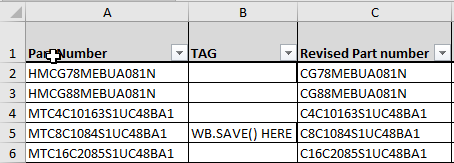
编辑:
总之,我需要转换这个df命令df = df.loc[df['IDC S/N'].str.lower().str.contains(args.num.lower(), na=False), keep_columns]。
在“IDC/N”中查找任何包含args.num.lower的输入和过滤器,只使用特定的列(keep_columns)
这需要转换成ws命令(openpyxl),如果有人知道如何做到这一点,请不要太高兴:)
回答 2
Stack Overflow用户
发布于 2022-05-18 17:05:12
OpenPyXL文档中有一个与使用熊猫相关的部分。
在您的例子中,您将需要openpyxl.utils.dataframe.dataframe_to_rows函数。
从文件中:
from openpyxl.utils.dataframe import dataframe_to_rows
wb = Workbook()
ws = wb.active

for r in dataframe_to_rows(df, index=True, header=True):
ws.append(r)Stack Overflow用户
发布于 2022-05-21 07:14:29
我用的是
# Will allow conversion to letters in later use
characters = 'abcdefghijklmnopqrstuvwxyz'

# Look for IDC S/N column
counter = 0
for col in df.columns:
    if col == 'IDC S/N':
        print(col)
        print(counter)
        break
    else:
        counter += 1

# Find 'IDC S/N' within xlsx
if ws[f"{characters[counter]}1"].value == "IDC S/N":
    print('IDC S/N Exists.')
else:
    print('IDC S/N Missing, Will stop')
    quit()

# Converted numbers to letters - 1 = A , 2 = B
header = characters[counter]

# Search for memory within 'IDC S/N'
counter = 0
print(header)
for cell in ws[header]:
    print(cell)
从这里开始,我可以编辑单元格,因为我有标题和索引。
如果有人有一个更有效的替代方案,请分享!
https://stackoverflow.com/questions/72293102
复制相似问题
腾讯云开发者

Copyright © 2013 - 2026 Tencent Cloud. All Rights Reserved. 腾讯云 版权所有
深圳市腾讯计算机系统有限公司 ICP备案/许可证号:粤B2-20090059  粤公网安备44030502008569号
腾讯云计算(北京)有限责任公司 京ICP证150476号 | 京ICP备11018762号