
我的Python selenium代码无法选择选择选项
我的Python selenium代码无法选择选择选项
提问于 2022-05-18 14:13:07
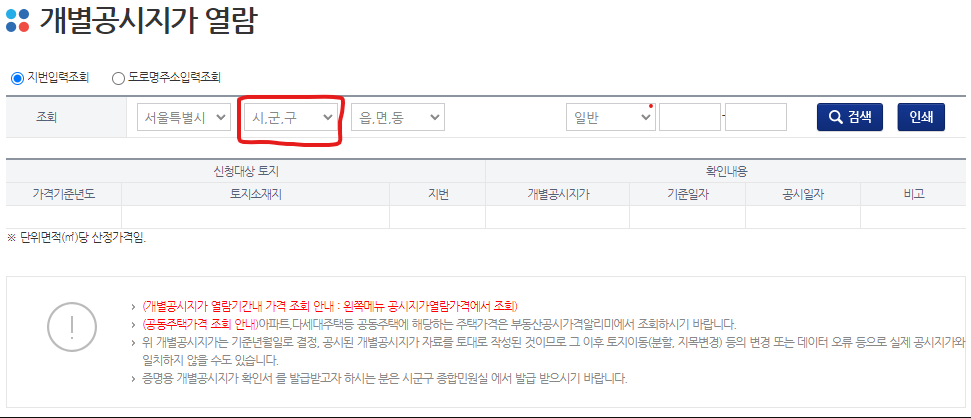
我不能使用下面的Python代码选择一个选择选项。我试过很多问题,例如select,execute_script.但它们仍然不起作用。

import time
from selenium import webdriver

browser = webdriver.Chrome()

seoul_url = 'http://kras.seoul.go.kr/land_info/info/landprice/landprice.do'
browser.get(seoul_url)

time.sleep(1)

browser.find_element_by_xpath('//*[@id="sggnm"]/option[11]').click()
回答 4
Stack Overflow用户
发布于 2022-05-18 22:54:30
新的
或者你可以使用ActionChains。在代码中,pos是要选择的选项的位置。
from selenium.webdriver.common.action_chains import ActionChains
from selenium.webdriver.common.keys import Keys
import time

actions = ActionChains(driver)

def select_option(id_, pos):
    driver.find_element(By.CSS_SELECTOR, id_).click()
    actions.send_keys(Keys.DOWN * pos).send_keys(Keys.ENTER).perform()

select_option('#sggnm', 10)
time.sleep(1)
select_option('#umdnm', 3)
年长的
使用此代码,您可以将当前选定的选项更改为所需的选项,而无需单击。
# webelement containing the currently selected option
option1 = driver.find_element(By.XPATH, '//*[@id="sggnm"]/option[1]')
# string with the text of the 11th option
option11 = driver.find_element(By.XPATH, '//*[@id="sggnm"]/option[11]').text
# replace the current option with the 11th option
driver.execute_script("var el = arguments[0]; arguments[1].innerText = el", option11, option1)Stack Overflow用户
发布于 2022-05-19 07:57:33
首先单击下拉列表,然后单击要选择的值,如下所示
Import
import org.openqa.selenium.JavascriptExecutor
import org.openqa.selenium.WebElement
选择愿望值
WebElement element = browser.find_element_by_xpath("//option[contains(text(),'동대문구')]"); // you can choose the value you want
JavascriptExecutor executor = (JavascriptExecutor)driver;
executor.executeScript("arguments[0].click();", element);Stack Overflow用户
发布于 2022-05-19 10:06:43
我猜您不能单击该元素,因为它是不可见的。
要使其可见,您必须按照@Akzy的建议,首先单击下拉菜单
driver = webdriver.Chrome()

url: str = "http://kras.seoul.go.kr/land_info/info/landprice/landprice.do"

driver.get(url)

dropdown_element = driver.find_element_by_id("sggnm")

# Open the dropdown menu first
dropdown_element.click()

option_element = driver.find_element_by_xpath('//*[@id="sggnm"]/option[11]')

# Now the options are visible we want to click the option in the list
option_element.click()
这是未经测试的(本页),但应该适用于通用网页。
还有其他方法可以这样做,比如将下键n次发送给下拉元素,获取nth选项元素。
页面原文内容由Stack Overflow提供。腾讯云小微IT领域专用引擎提供翻译支持
原文链接:
https://stackoverflow.com/questions/72290806
复制相关文章
相似问题
腾讯云开发者

Copyright © 2013 - 2026 Tencent Cloud. All Rights Reserved. 腾讯云 版权所有
深圳市腾讯计算机系统有限公司 ICP备案/许可证号:粤B2-20090059  粤公网安备44030502008569号
腾讯云计算(北京)有限责任公司 京ICP证150476号 | 京ICP备11018762号