
Swift吊舱还不能集成为静态库integrated核心内部库
我正在建立一个应用程序的颤栗。在执行"pod install“或"pod install --repo-update”或"pod update“时,我收到了此错误消息,而吊舱安装失败并停止。
错误信息:
好了!以下Swift吊舱还不能集成为静态库: Swift
FirebaseCoreInternal-library依赖于不定义模块的GoogleUtilities-library。要选择那些生成模块映射的目标(在构建静态库时从Swift导入它们是必要的),您可以在Podfile中全局设置use_modular_headers!,或者为特定的依赖项指定:modular_headers => true。
我的个人档案:
platform :ios, '11.0'

...

target 'Runner' do
  use_frameworks!
  use_modular_headers!

  flutter_install_all_ios_pods File.dirname(File.realpath(__FILE__))
end

...回答 13
Stack Overflow用户
发布于 2022-06-21 17:57:23
您可能不需要使用use_frameworks!或use_modular_headers!,因为它正在与use_flipper发生冲突
您可以在ios/Podfile中添加以下内容而不必使用它们:
  platform :ios, '12.4'
  ...
  ...

  pod 'Firebase', :modular_headers => true
  pod 'FirebaseCoreInternal', :modular_headers => true
  pod 'GoogleUtilities', :modular_headers => true
  #....add any library need headers
最好的
Stack Overflow用户
发布于 2022-07-13 15:55:14
对于带有react-native 0.69.1的最新版本的react-native 0.69.1,不需要启用use_frameworks,因为这会导致在实际设备中部署时出现错误
因此,您只需要添加firebase模块并将头设置为true。
     pod 'Firebase', :modular_headers => true
     pod 'FirebaseCore', :modular_headers => true
     pod 'GoogleUtilities', :modular_headers => true
     $RNFirebaseAsStaticFramework = true
并继续使用触发器
use_flipper!()我在真正的设备上测试了Android和IOS,它工作得很好!
下面是我的Podfile的样子
require_relative '../node_modules/react-native/scripts/react_native_pods'
    require_relative '../node_modules/@react-native-community/cli-platform-ios/native_modules'

    platform :ios, '12.4'
    install! 'cocoapods', :deterministic_uuids => false

    target 'myApp' do
      config = use_native_modules!
      flags = get_default_flags()

      pod 'Firebase', :modular_headers => true
      pod 'FirebaseCore', :modular_headers => true
      pod 'GoogleUtilities', :modular_headers => true
      $RNFirebaseAsStaticFramework = true


      use_react_native!(
        :path => config[:reactNativePath],
        # to enable hermes on iOS, change `false` to `true` and then install pods
        :hermes_enabled => flags[:hermes_enabled],
        :fabric_enabled => flags[:fabric_enabled],
        # An absolute path to your application root.
        :app_path => "#{Pod::Config.instance.installation_root}/.."
      )

      target 'myAppTests' do
        inherit! :complete
        # Pods for testing
      end

      # Enables Flipper.
      #
      # Note that if you have use_frameworks! enabled, Flipper will not work and
      # you should disable the next line.
      use_flipper!()

      post_install do |installer|
        react_native_post_install(installer)
        __apply_Xcode_12_5_M1_post_install_workaround(installer)
      end
    end
-
-
更新20/7月
如果您想使用丰富的内容通知,比如带有图像的通知。遵循这篇文章 by firebase将要求您也启用use_frameworks,因此我的解决方案是对以下软件包使用modular_headers => true
target 'richNotification' do
    pod 'FirebaseCoreInternal', :modular_headers => true
    pod 'Firebase/Messaging', :modular_headers => true
    pod 'GoogleUtilities', :modular_headers => true
end注意:确保richNotification目标位于podfile的底部。参见下面我的最后一个podfile是什么样子
require_relative '../node_modules/react-native/scripts/react_native_pods'
require_relative '../node_modules/@react-native-community/cli-platform-ios/native_modules'

platform :ios, '12.4'
install! 'cocoapods', :deterministic_uuids => false

target 'MyApp' do
  config = use_native_modules!
  flags = get_default_flags()

#     use_frameworks! :linkage => :static
  pod 'Firebase', :modular_headers => true
  pod 'FirebaseCore', :modular_headers => true
  pod 'GoogleUtilities', :modular_headers => true
  $RNFirebaseAsStaticFramework = true
  # Flags change depending on the env values.


  use_react_native!(
    :path => config[:reactNativePath],
    # to enable hermes on iOS, change `false` to `true` and then install pods
    :hermes_enabled => flags[:hermes_enabled],
    :fabric_enabled => flags[:fabric_enabled],
    # An absolute path to your application root.
    :app_path => "#{Pod::Config.instance.installation_root}/.."
  )

  target 'MyAppTests' do
    inherit! :complete
    # Pods for testing
  end

  # Enables Flipper.
  #
  # Note that if you have use_frameworks! enabled, Flipper will not work and
  # you should disable the next line.
  use_flipper!()

  post_install do |installer|
    react_native_post_install(installer)
    __apply_Xcode_12_5_M1_post_install_workaround(installer)
  end
end

target 'richNotification' do
    pod 'FirebaseCoreInternal', :modular_headers => true
    pod 'Firebase/Messaging', :modular_headers => true
    pod 'GoogleUtilities', :modular_headers => true
end
我在Android和IOS上都测试过它,它工作得很好!
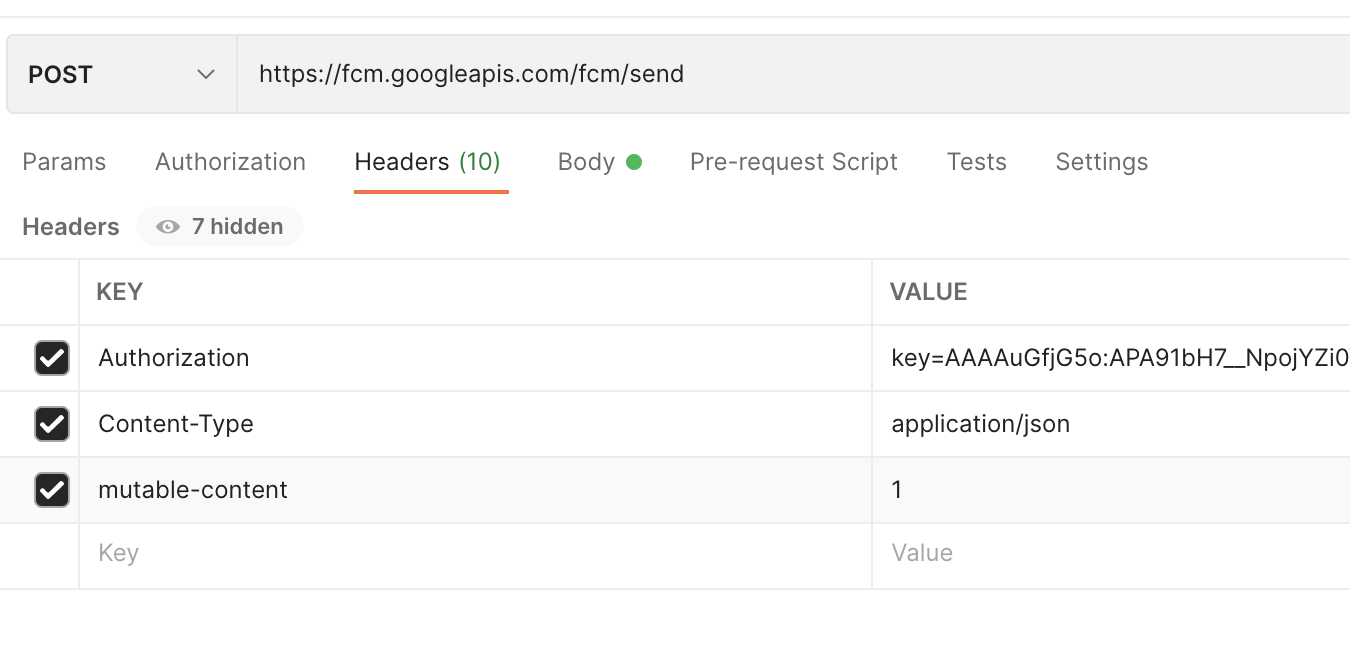
用于测试的将以下JSON数据作为“POST”发送到https://fcm.googleapis.com/fcm/send,并确保将标题"mutable-content": "1",放入到屏幕截图中
{
        "to": " Put here your mobile fcm token ",
        "notification": {
            "title": "You have received a new request",
            "body": "Radiohead - Street Spirit (Fade Out)",
            "content_available" : "true",
            "priority" : "high",
            "sound":"defualt",
            "image": "https://i.ytimg.com/vi/LCJblaUkkfc/hq720.jpg"
        },
        "android": {
          "priority": "high",
          "notification": {
            "imageUrl": "https://www.youtube.com/watch?v=o3mP3mJDL2k"
          }
        },
        "apns": {
          "payload": {
            "aps": {
              "mutable-content": "1",
              "content-available": "true",
            },
            "imageUrl": "https://i.ytimg.com/vi/panR4xwt0wM/hqdefault.jpg",
            "fcm_options": {
              "imageUrl": "https://i.ytimg.com/vi/panR4xwt0wM/hqdefault.jpg"
            }
          },
          "headers": {
            "mutable-content": "1",
            "apns-push-type": "background",
            "apns-priority": "5",
            "apns-topic": "com.paidtabs"
          }
        },
        "webpush": {
          "headers": {
            "image": "https://koenig-media.raywenderlich.com/uploads/2021/01/good_news_petsicon.png"
          }
        },
        "data":{
          "passingDataToApp" : "Mario",
          "body" : "great match!",
          "Room" : "PortugalVSDenmark"
        }
      }
标题看起来像
Stack Overflow用户
发布于 2022-07-23 16:59:05
删除use_frameworks是因为与use_flipper冲突,并且添加所有这些库对我有用
  pod 'Firebase', :modular_headers => true
  pod 'FirebaseCore', :modular_headers => true
  pod 'FirebaseCoreInternal', :modular_headers => true
  pod 'FirebaseStorageInternal', :modular_headers => true
  pod 'FirebaseCoreExtension', :modular_headers => true
  pod 'FirebaseAppCheckInterop', :modular_headers => true
  pod 'FirebaseAuthInterop', :modular_headers => true
  pod 'FirebaseMessagingInterop', :modular_headers => true
  pod 'GTMSessionFetcher', :modular_headers => true
  pod 'FirebaseAppCheckInterop', :modular_headers => true
  pod 'FirebaseAuthInterop', :modular_headers => true
  pod 'GoogleUtilities', :modular_headers => true
Head! FirebaseFunctions-h.swift和FirebaseStorage-h.swift需要use_frameworks,所以您可能对这些文件有错误。也许您可能更喜欢使用axios或类似的lib来调用端点api和/或aws s3来保存文件。
https://stackoverflow.com/questions/72289521
复制相似问题
腾讯云开发者

Copyright © 2013 - 2026 Tencent Cloud. All Rights Reserved. 腾讯云 版权所有
深圳市腾讯计算机系统有限公司 ICP备案/许可证号:粤B2-20090059  粤公网安备44030502008569号
腾讯云计算(北京)有限责任公司 京ICP证150476号 | 京ICP备11018762号